4 | ANYLOAD NPS Series Pallet Jack Scale Operator’s Guide (V1906) – T15E v2 series indicator
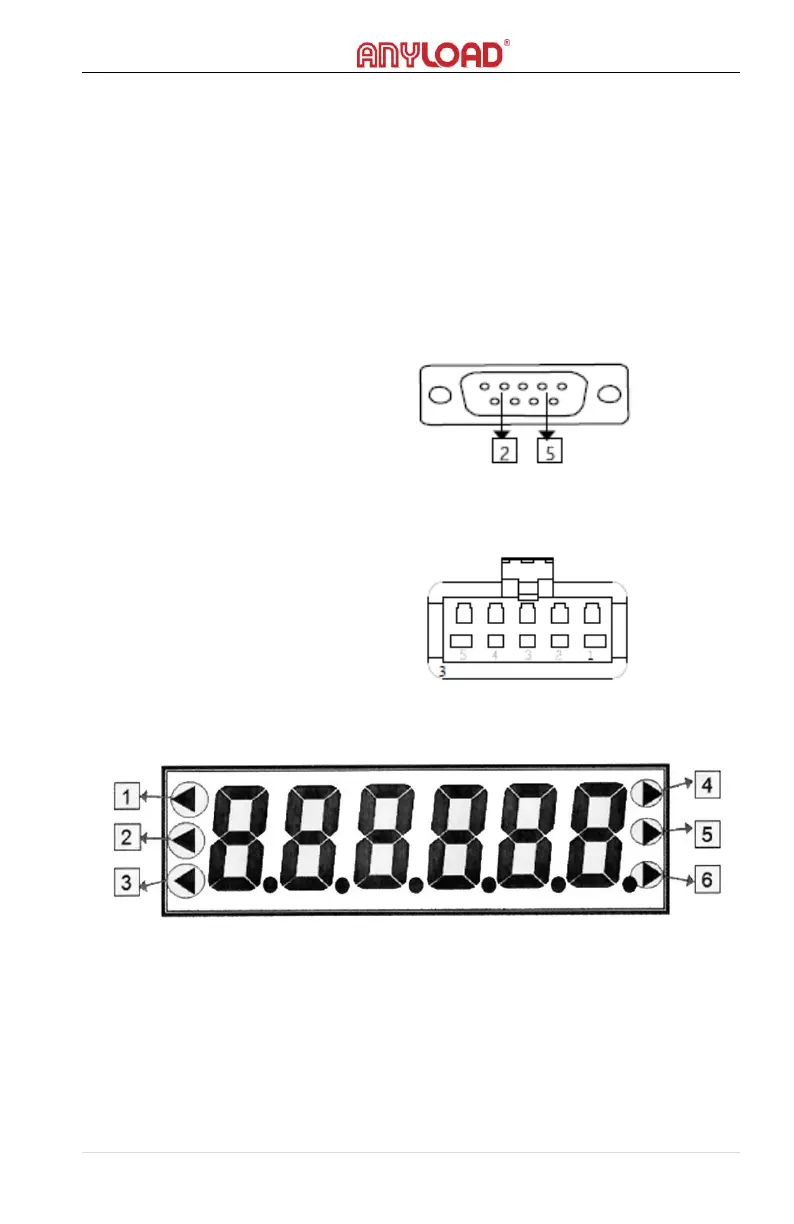
2- pin = Data output (TXD)
5- pin = Ground (GND)
Printer pin 1 connects with +5V
Printer pin 2 connects with GND
Printer pin 4 connects with TXD
Printer pin 5 connects with GND
4.3 RS232 Connection
RS232 connection with printer or computer applies only to T15E-R, T15C-R,
T15E-A, T15C-A indicator models:
1. Serial communication interface use RS232 plug with 9 cores.
2. All data are in ASCII codes. Every set is composed of 10 bits: the
1
st
is the starting bit, the 10
th
is the stop bit.
3. Baud rates: 2400/4800/9600/19200
4. Communication Type: Command Mode
4.4 Printer Connection
4.5 Display
1. Zero status indication. Will light on when the scale is at the centre of
its zero band.
2. Indication when battery charge is low
3. Tare status indication. Will light on when the weight has been tared.
4. Will light on when the scale is in Counting Mode
5. Will light on when the scale is set to lb unit of measurement
6. Will light on when the scale is set to kg unit of measurement



 To Next Page