8 | ANYLOAD NPS Series Pallet Jack Scale Operator’s Guide (V1906) – T15E v2 series indicator
5. Calibration
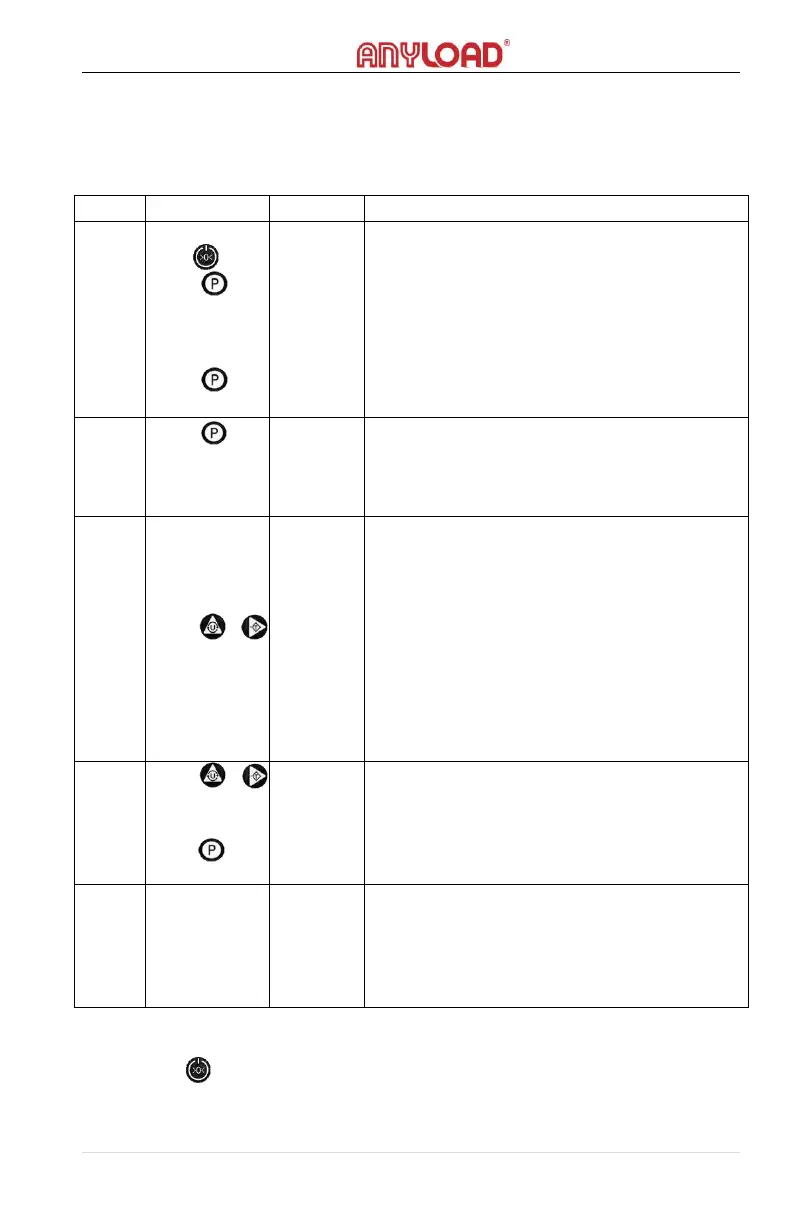
Turn off the indicator. Turn on the indicator by pressing and holding
the power key. When the unit starts to initialize and shows the
software version, press the (Print key) to enter the calibration mode.
Press and
hold
Press
Press
[-t15E-]
[V2.04]
[524563]
-Indicator starts to initialize
-When the software version shows up, press
the Print key to enter calibration
-When A/D value is displaying it indicates
the scale is in calibration mode
-Press the Print key start the calibration
process
-Will start the zero calibration and zero
correction. Make sure there is no load on
the scale and is at stable state then press
the Print key to start.
[-------]
[2000]
[-LoAd-]
-Indicating the zero calibration is in
progress.
-After a few seconds, it will show the
capacity of the scale and will display LOAD.
-When “LOAD” is displaying, press either
Unit key or Tare key to enter the value of
weights to be used for calibration. It is
recommended to use at least 80% of max
capacity of scale to have a better calibration
result.
-If using a 2000.0kg as calibration weight.
Press Unit key and Tare key to change the
weight value.
-Load the 2000kg weight to the scale then
press Print key to start span calibration
-Indicating the span calibration is in
progress
-Displaying the weight value of the load.
This also indicates that the calibration is
successfully done.
Note:
1. If the zero position is constant and not needed to be calibrated, press
the to skip the zero correction when [CAL 00] is displaying on the
screen. When “LOAD” is displaying, press Unit or Tare key to enter the
value of the calibration weight, then proceed on the span calibration.



 To Next Page