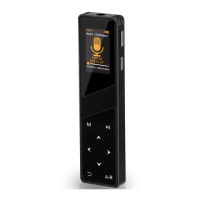
Aomago VOICE RECORDER
E: support@aomago.com W: http://aomago.com
A-B: Back / A-B repeat (when it is playing)
M: Playback Setting (when it is playing)
PLAY: Play / Pause / Turn on / off
+: VOL UP / Selection
-: VOL DOWN / Selection
: Next / Fast Forward (hold it down) / Selection
: Previous / Rewind (hold it down) / Selection
: OK / Confirm
REC/SAVE: recording / save recording
STOP / : Delete file (when forgot password, this button could be helpful)
Could record at MP3/WAV format
800mAh rechargeable battery long working hour
Chapter 2
The Basics Operation of A19 Voice Recorder
1. Check the voice recorder
NOTICE:
Keep the power ON/OFF at ON
position
So you could press and hold PLAY
button to boot on / shut the recorder
We highly suggest you use the PLAY
button to turn on / off the recorder
Selections and Confirm OK
buttons


 To Next Page