Aomago VOICE RECORDER
E: support@aomago.com W: http://aomago.com
“
“
When select Delete , and press OK, it will delete the recording you just selected, if select delete
all, it will erase all recordings on the device
Caution: when delete file, it cannot be restored, be careful with this. Backup file before deleting.
8. How to download recordings to computer
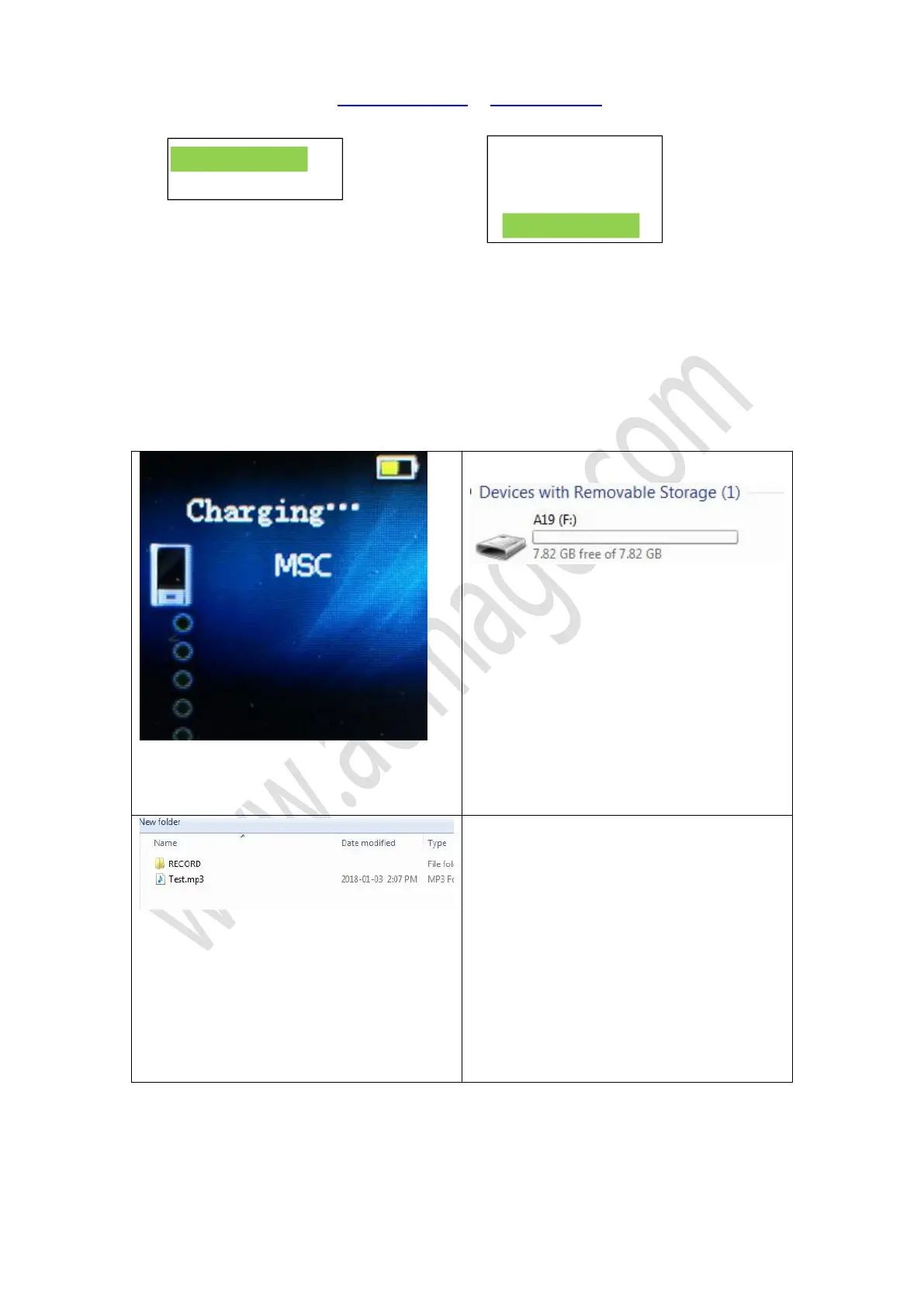
1) Use USB cable connect recorder to
computer, recorder screen will display
connection icon and charging info.
2) Find removable drive
“
A19
”
on computer
3) All recordings were inside the folder
“
RECORD
”
NOTE: when failed connection, you could try
with your Cell Phone USB cable have a test. Or
contact us for a new USB cable, some else USB
cable may not work, not all USB cable could
transfer data.
Don
’
t press any button, when connect to
computer
Switch off recorder before connecting to
computer
Use the Micro USB cable, connect to your computer. And you will find the removable drive
named A19
“2018-07-2..”
Delete?
Yes
No


 To Next Page