8
Installation
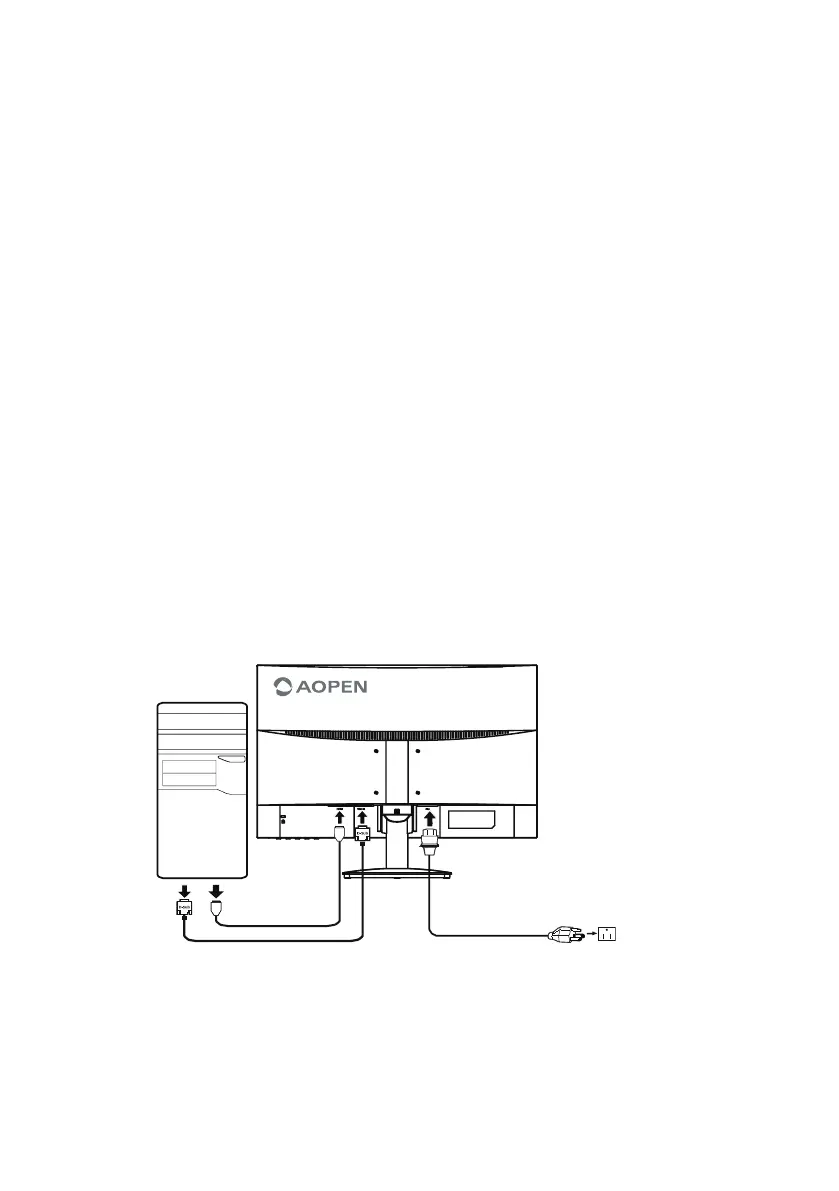
To install the monitor on your host system, please follow the steps below:
Steps
1. Connect the video cable
a. Make sure both the monitor and computer are switched off.
b. Connect the VGA video cable to the computer.
c. Connect the HDMI (Only HDMI Model)
(1) Make sure both the monitor and computer are switched off.
(2) Connect one end of the 19-pin HDMI to the back of the monitor and the other end to the
computer's port.
2. Connect the power cord
Connect the power cord to the monitor, then to a properly grounded AC outlet.
3. Turn on the monitor and computer
Turn on the monitor first, then the computer. This sequence is very important.
4. If the monitor does not function properly, please refer to the troubleshooting section to diagnose
the problem.


 To Next Page