51
M
M
X
X
4
4
G
G
V
V
R
R
n
n
l
l
i
i
n
n
e
e
M
M
a
a
n
n
u
u
a
a
l
l
O
O
S
S
/
/
P
P
D
D
I
I
F
F
(
(
S
S
o
o
n
n
y
y
/
/
P
P
h
h
i
i
l
l
i
i
p
p
s
s
D
D
i
i
g
g
i
i
t
t
a
a
l
l
I
I
n
n
t
t
e
e
r
r
f
f
a
a
c
c
e
e
)
)
C
C
o
o
n
n
n
n
e
e
c
c
t
t
o
o
r
r
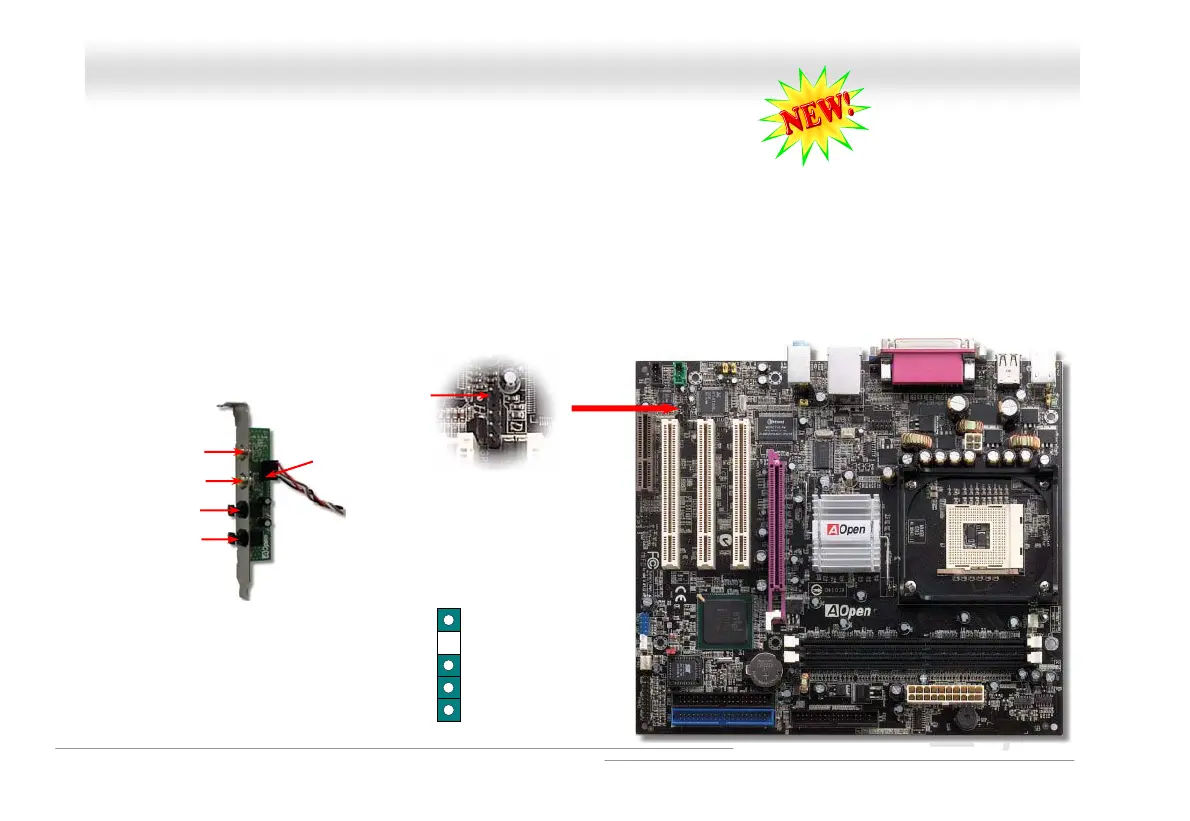
S/PDIF (Sony/Philips Digital Interface) is a newest audio transfer file format, which provides impressive audio quality through
optical fiber and allows you to enjoy digital audio instead of analog audio. Through a specific audio cable, you can connect the
S/PDIF connector to other end of the S/PDIF audio module, which bears S/PDIF digital output. Normally there are two S/PDIF
outputs as shown, one for RCA connector, the most common one used for consumer audio products, and the other for optical
connector with better audio quality. Same as outputs, you can also connect RCA or optical audio products to input connectors on
the module and have the voice or music come out from your computer. However, you must have a S/PDIF supported
speaker/amplifier/decoder with S/PDIF digital input/output to connect to the S/PDIF digital input/output to make the most out of this
function.
Pin 1
S/PDIF IN
S/PDIF IN
S/PDIF
S/PDIF Module
(User Upgrade Optional)
S/PDIF
Connector
+5V
1
NC
S/PDIFOUT
GND



 To Next Page