EasyManua.ls Logo

AOR AR2000 - Receiver Controls and Interface; Aerial Connector and Volume;Power Control; Squelch, Attenuator, and Tuning Controls

AOR AR2000
15 pages
Print Icon
To Next Page IconTo Next Page
To Previous Page IconTo Previous Page
Loading...
AR2000
Operating
manual
Page
3
ea
le
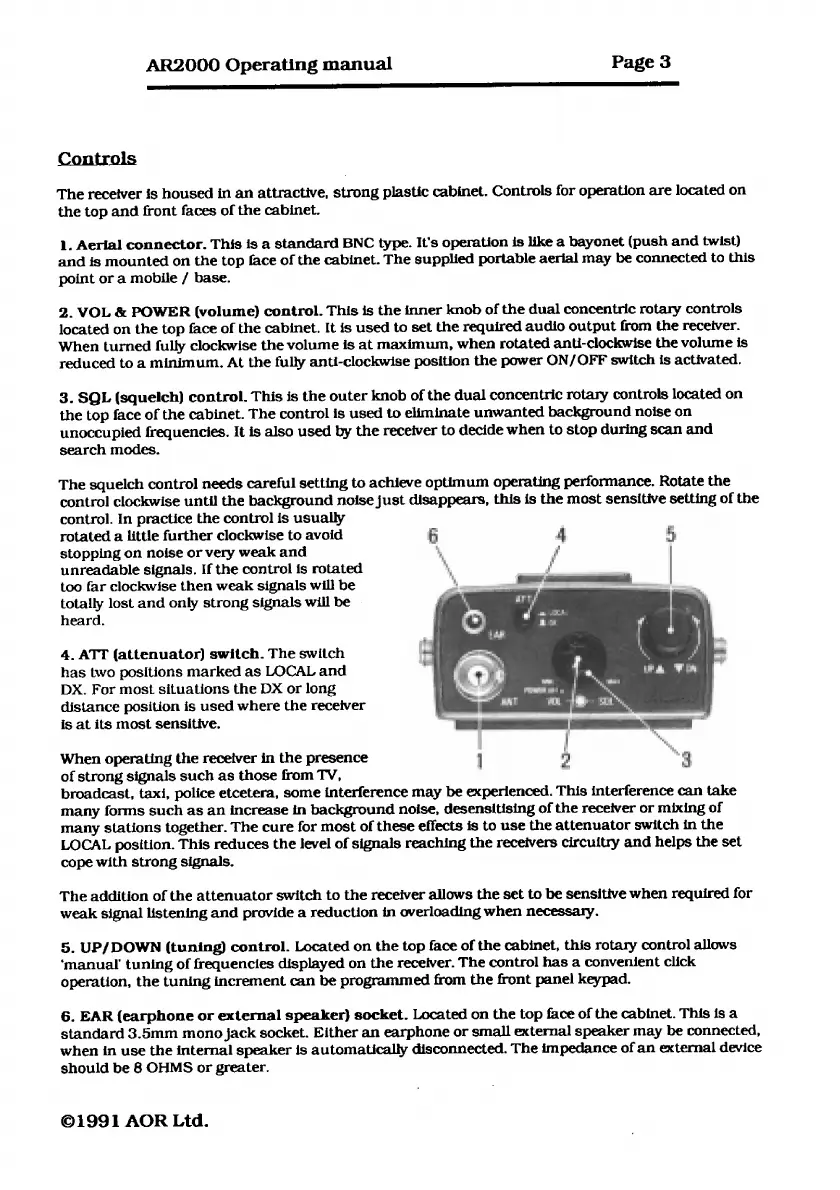
Controls
The
receiver
is
housed
in
an
attractive,
strong
plastic
cabinet.
Controls
for
operation
are
located
on
the
top
and
front
faces
of
the
cabinet.
1.
Aerial
connector.
This
is
a
standard
BNC
type.
It’s
operation
is
like
a
bayonet
(push
and
twist)
and
is
mounted
on
the
top
face
of
the
cabinet.
The
supplied
portable
aerial
may
be
connected
to
this
point
or
a
mobile
/
base.
2.
VOL
&
POWER
(volume)
control.
This
is
the
inner
knob
of
the
dual
concentric
rotary
controls
located
on
the
top
face
of
the
cabinet.
It
is
used
to
set
the
required
audio
output
from
the
receiver.
When
turned
fully
clockwise
the
volume
is
at
maximum,
when
rotated
anti-clockwise
the
volume
is
reduced
to
a
minimum.
At
the
fully
anti-clockwise
position
the
power
ON/OFF
switch
is
activated.
3.
SQL
(squelch)
control.
This
is
the
outer
knob
of
the
dual
concentric
rotary
controls
located
on
the
top
face
of
the
cabinet.
The
control
is
used
to
eliminate
unwanted
background
noise
on
unoccupied
frequencies.
It
is
also
used
by
the
receiver
to
decide
when
to
stop
during
scan
and
search
modes.
The
squelch
control
needs
careful
setting
to
achieve
optimum
operating
performance.
Rotate
the
control
clockwise
until
the
background
noise
just
disappears,
this
is
the
most
sensitive
setting
of
the
control.
In
practice
the
control
is
usually
rotated
a
little
further
clockwise
to
avoid
6
df
a]
stopping
on
noise
or
very
weak
and
,
Fi
|
unreadable
signals.
If
the
control
is
rotated
i
too
far
clockwise
then
weak
signals
will
be
totally
lost
and
only
strong
signals
will
be
heard.
4.
ATT
(attenuator)
switch.
The
switch
has
two
positions
marked
as
LOCAL
and
DX.
For
most
situations
the
DX
or
long
distance
position
is
used
where
the
receiver
is
at
its
most
sensitive.
When
operating
the
receiver
in
the
presence
of
strong
signals
such
as
those
from
TV,
broadcast,
taxi,
police
etcetera,
some
interference
may
be
experienced.
This
interference
can
take
many
forms
such
as
an
increase
in
background
noise,
desensitising
of
the
receiver
or
mixing
of
many
stations
together.
The
cure
for
most
of
these
effects
is
to
use
the
attenuator
switch
in
the
LOCAL
position.
This
reduces
the
level
of
signals
reaching
the
receivers
circuitry
and
helps
the
set
cope with
strong
signals.
The
addition
of
the
attenuator
switch
to
the
receiver
allows
the
set
to
be
sensitive
when
required
for
weak
signal
listening
and
provide
a
reduction
in
overloading
when
necessary.
5.
UP/DOWN
(tuning)
control.
Located
on
the
top
face
of
the
cabinet,
this
rotary
control
allows
‘manual
tuning
of
frequencies
displayed
on
the
receiver.
The
control
has
a
convenient
click
operation,
the
tuning
increment
can
be
programmed
from
the
front
panel
keypad.
6.
EAR
(earphone
or
external
speaker)
socket.
Located
on
the
top
face
of
the
cabinet.
This
is
a
standard
3.5mm
mono
jack
socket.
Either
an
earphone
or
small
external
speaker
may
be
connected,
when
in
use
the
internal
speaker
is
automatically
disconnected.
The
impedance
of
an
external
device
should
be
8
OHMS
or
greater.
©1991
AOR
Lid.

Related product manuals