EasyManua.ls Logo

AOR AR2000 - Audio Output and Display Controls; Keyboard Layout and Function Keys

AOR AR2000
15 pages
Print Icon
To Next Page IconTo Next Page
To Previous Page IconTo Previous Page
Loading...
AR2000
Operating
manual
Page
4
7.
CHG
(charging)
socket.
Located
on
the
right
hand
side
of
the
cabinet.
The
socket
is
of
the
dual
concentric
type
and
accepts
a
1.3mm
plug.
The
supplied
AC
charger
or
DC
lead
are
connected
to
this
point
when
charging
the
receiver's
batteries
or
operating
from
an
extermal
supply.
Any
suitable
DC
supply
of
11
to
15
volts
may
also
be
connected
to
this
socket,
please
note
the
connection
is
CENTRE
POSITIVE.
8.
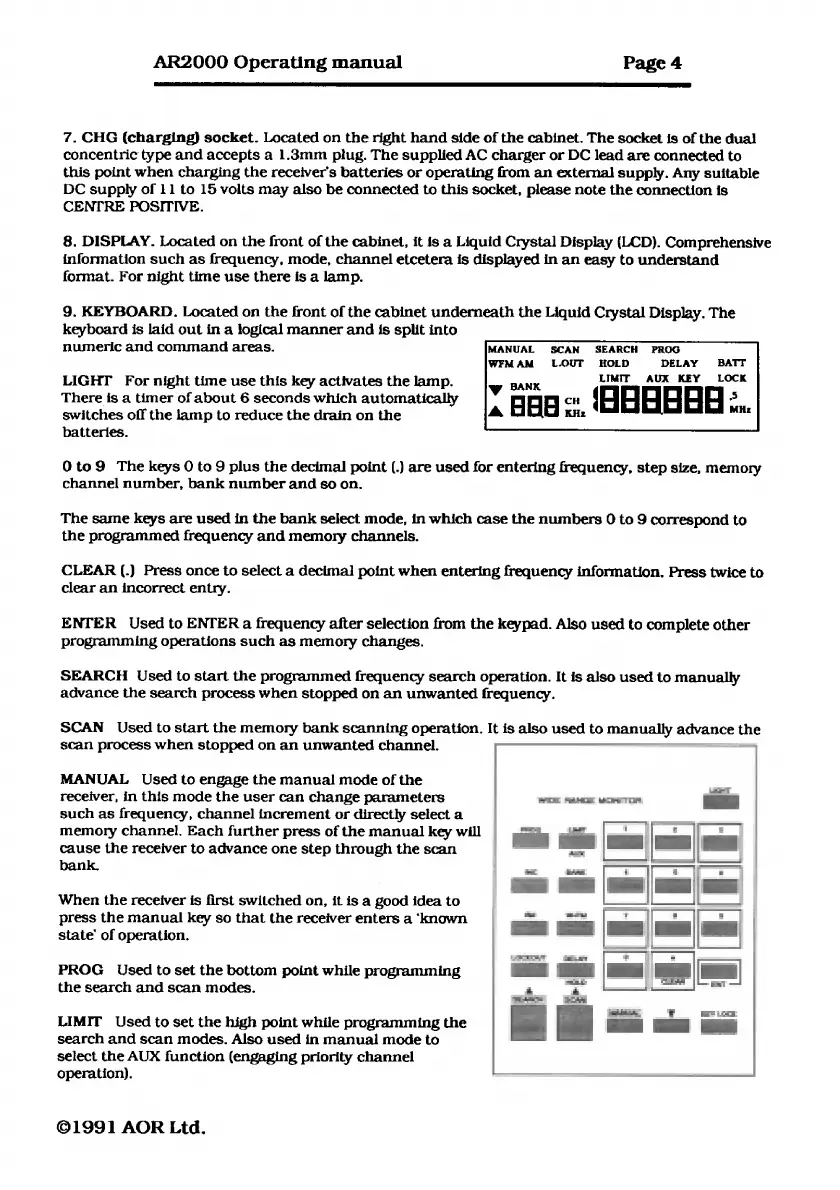
DISPLAY.
Located
on
the
front
of
the
cabinet,
it
is
a
Liquid
Crystal
Display
(UCD).
Comprehensive
information
such
as
frequency,
mode,
channel
etcetera
is
displayed
in
an
easy
to
understand
format.
For
night
time
use
there
is
a
lamp.
9.
KEYBOARD.
Located
on
the
front
of
the
cabinet
underneath
the
Liquid
Crystal
Display.
The
keyboard
is
laid
out
in
a
logical
manner
and
is
split
into
numeric
and
command
areas.
MANUAL
SCAN
SEARCH
PROG
WFMAM
L.OUT
HOLD
DELAY
BATT
LIGHT
For
night
time
use
this
key
activates
the
lamp.
LIMIT
AUX
KEY
LOCK
There
is
a
timer
of
about
6
seconds
which
automatically
CH
‘GEBEBEE
a
KHz
:
switches
off
the
lamp
to
reduce
the
drain
on
the
batteries.
Oto9
The
keys
0
to
9
plus
the
decimal
point
(.)
are
used
for
entering
frequency,
step
size,
memory
channel
number,
bank
number
and
so
on.
The
same
keys
are
used
in
the
bank
select
mode,
in
which
case
the
numbers
0
to
9
correspond
to
the
programmed
frequency
and
memory
channels.
CLEAR
(.)
Press
once
to
select
a
decimal
point
when
entering
frequency
information.
Press
twice
to
clear
an
incorrect
entry.
ENTER
Used
to
ENTER
a
frequency
after
selection
from
the
keypad.
Also
used
to
complete
other
programming
operations
such
as
memory
changes.
SEARCH
Used
to
start
the
programmed
frequency
search
operation.
It
is
also
used
to
manually
advance
the
search
process
when
stopped
on
an
unwanted
frequency.
SCAN
Used
to
start
the
memory
bank
scanning
operation.
It
is
abo
nUSeS:
to
manually
advance
the
scan
process
when
stopped
on
an
unwanted
channel.
lr
=
-
MANUAL
Used
to
engage
the
manual
mode
of
the
o
|
receiver,
in
this
mode
the
user
can
change
parameters
|
such
as
frequency,
channel
increment
or
directly
select
a
memory
channel.
Each
further
press
of
the
manual
key
will
cause
the
receiver
to
advance
one
step
through
the
scan
bank.
When
the
receiver
is
first
switched
on,
it
is
a
good
idea
to
press
the
manual
key
so
that
the
receiver
enters
a
‘known
state’
of
operation.
PROG
Used
to
set
the
bottom
point
while
programming
the
search
and
scan
modes.
LIMIT
Used
to
set
the
high
point
while
programming
the
search
and
scan
modes.
Also
used
in
manual
mode
to
select
the
AUX
function
(engaging
priority
channel
operation).
©1991
AOR
Ltd.

Related product manuals