Rear panel
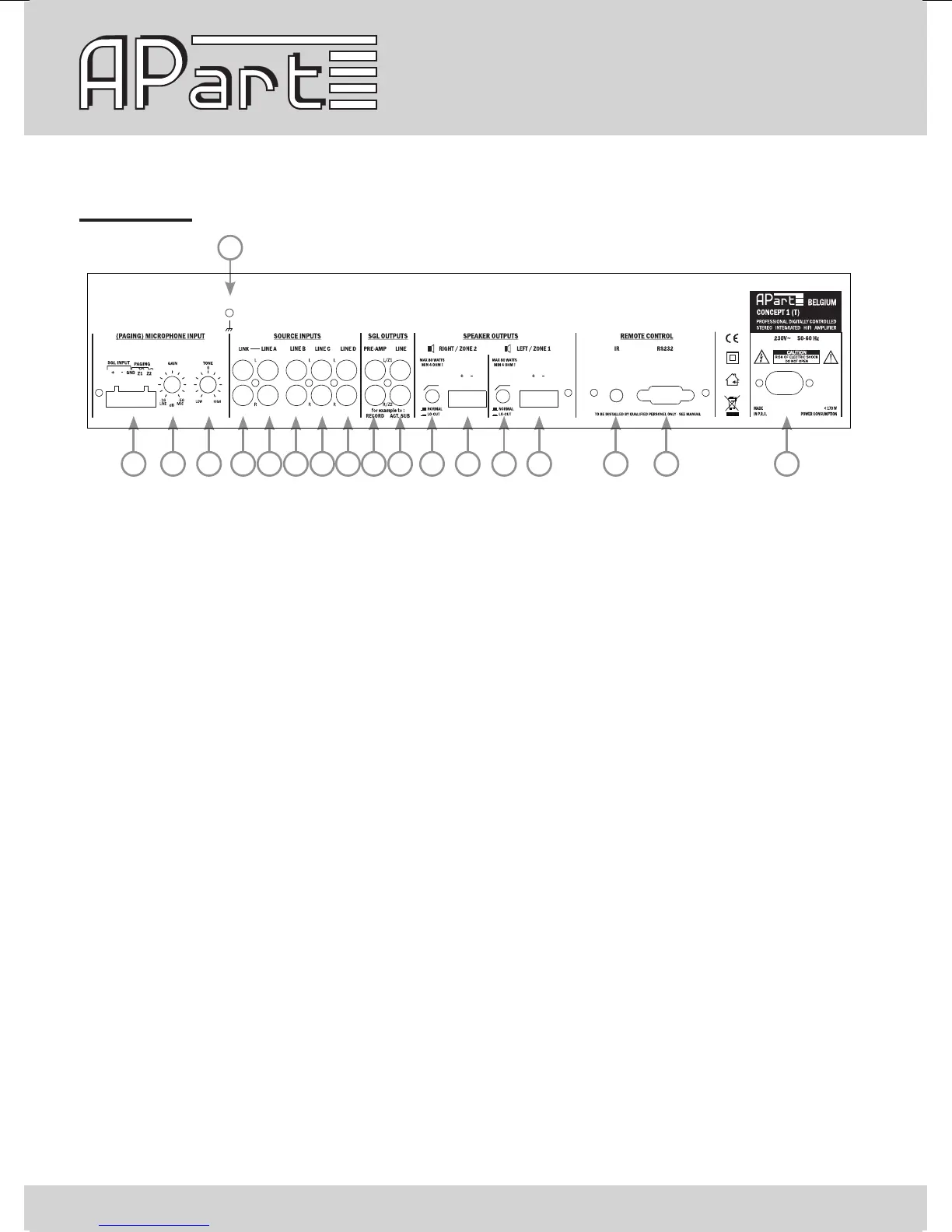
1 2 3 5 6 7 8 9 10 11 12 13 14 15 16 17 18
4
1) Microphone input: connect your (paging) microphone on this euroblock connector, connect the signal
on +, -, the screen on GND. Connect the eventual paging contacts between GND and Z1 (for zone 1) and
between GND and/or Z2 (for zone 2). The input gain can be adjusted with knob 2 between line and mic
level to avoid distortion.
2) Mic input gain control: mic input gain adjust
3) Mic input tone control: adjust the tone of the mic input between dark and bright
4) Ground connection: connect your safety ground lead or screens of your shielded input cables on this
screw if necessary.
5) Link output: the signal here is a copy of the line A input signal
6) Line A: stereo line RCA connector
7) Line B: stereo line RCA connector
8) Line C: stereo line RCA connector
9) Line D: stereo line RCA connector, a mini jack version of the line D input is available on the front panel.
Only use one of the two input’s at the same time.
10) Pre-amp out: these RCA connectors offer a level line out signal, before the master volume. It can be
used for recording or induction loop systems
11) Line out: these RCA connectors carry the line level signal after passing the volume control and limiter
circuit. This is an ideal way to connect to active subwoofers or extra power ampliers


 To Next Page