EasyManua.ls Logo

APC GALAXY 5000 - External Battery Cabinet Control Connections

APC GALAXY 5000
68 pages
Print Icon
To Next Page IconTo Next Page
To Previous Page IconTo Previous Page
Loading...
34001813EN/AE - Page 40
2. Installation
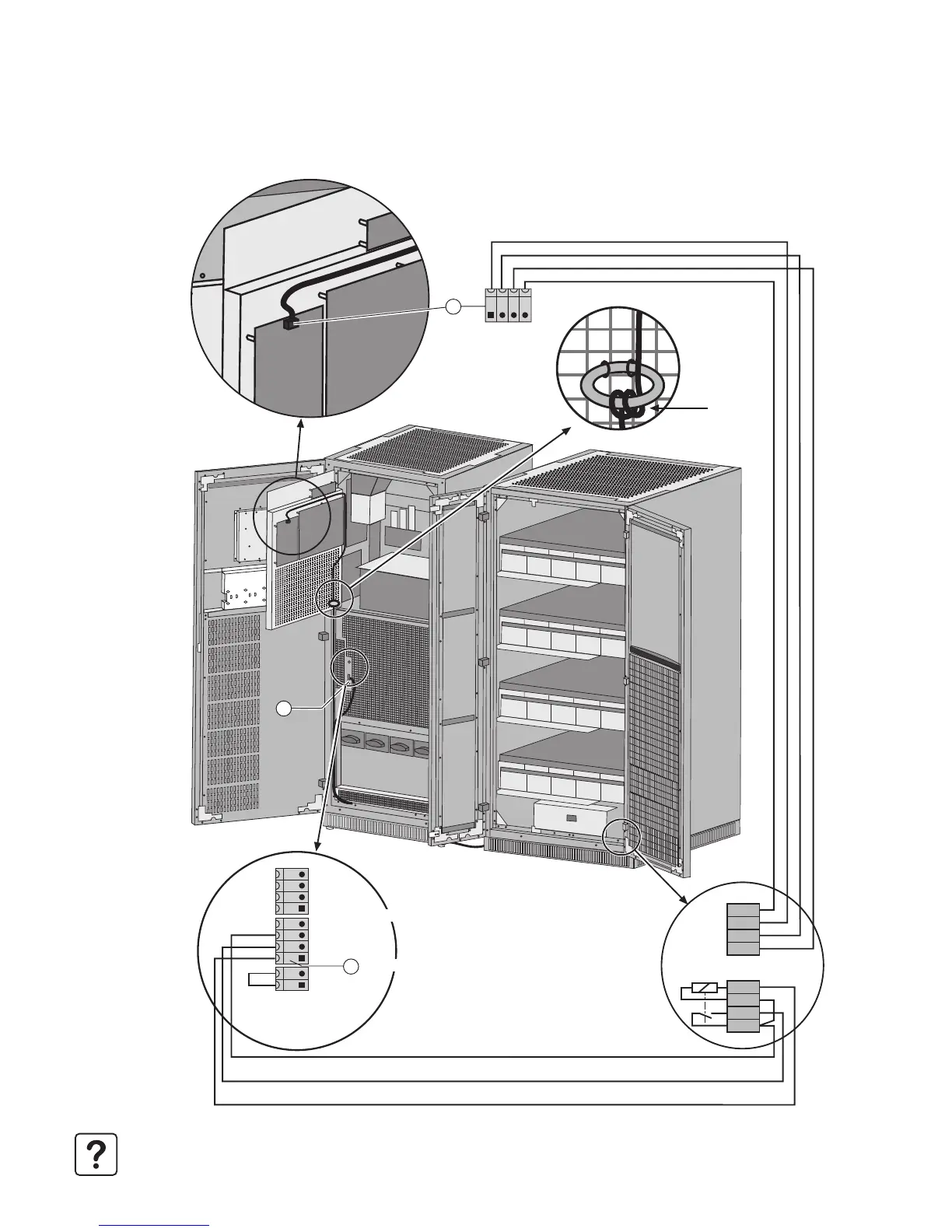
2.18 Control connections for an external battery cabinet
1 - Connect wires 1-2-3-4 on connector XR1 (QF1 position and coil) in the external battery cabinet to connector XMB07 (6)
(SELV) and wires 7-8-9-10 (temperature sensor) to connector XMD3 (22) (SELV).
Note. The wires for the screw-type terminal block are not supplied (max. size 2.5 mm
2
and total length less than 100 m).
8
7
6
5
4
3
2
1
XMD3
XMD3
QF1
-12V
+12V
BC+
BC-
XR1
22
XMB 08 XMB 07 XMB 06
6
5
12V
+
12V
BC
+
BC
Circuit breaker 2
Common
Open-close contact
QF1 command
Circuit breaker 1
Pass through
three times

Related product manuals