20
5) Check for leaks!
6) Drain the first tank of water (through faucet) to flush out the new membrane! The 2
nd
tank of
water is ready for use.
How to Replace Stage-5 Carbon Filter:
Replace this last filter at the same time you replace the stage-4 membrane.
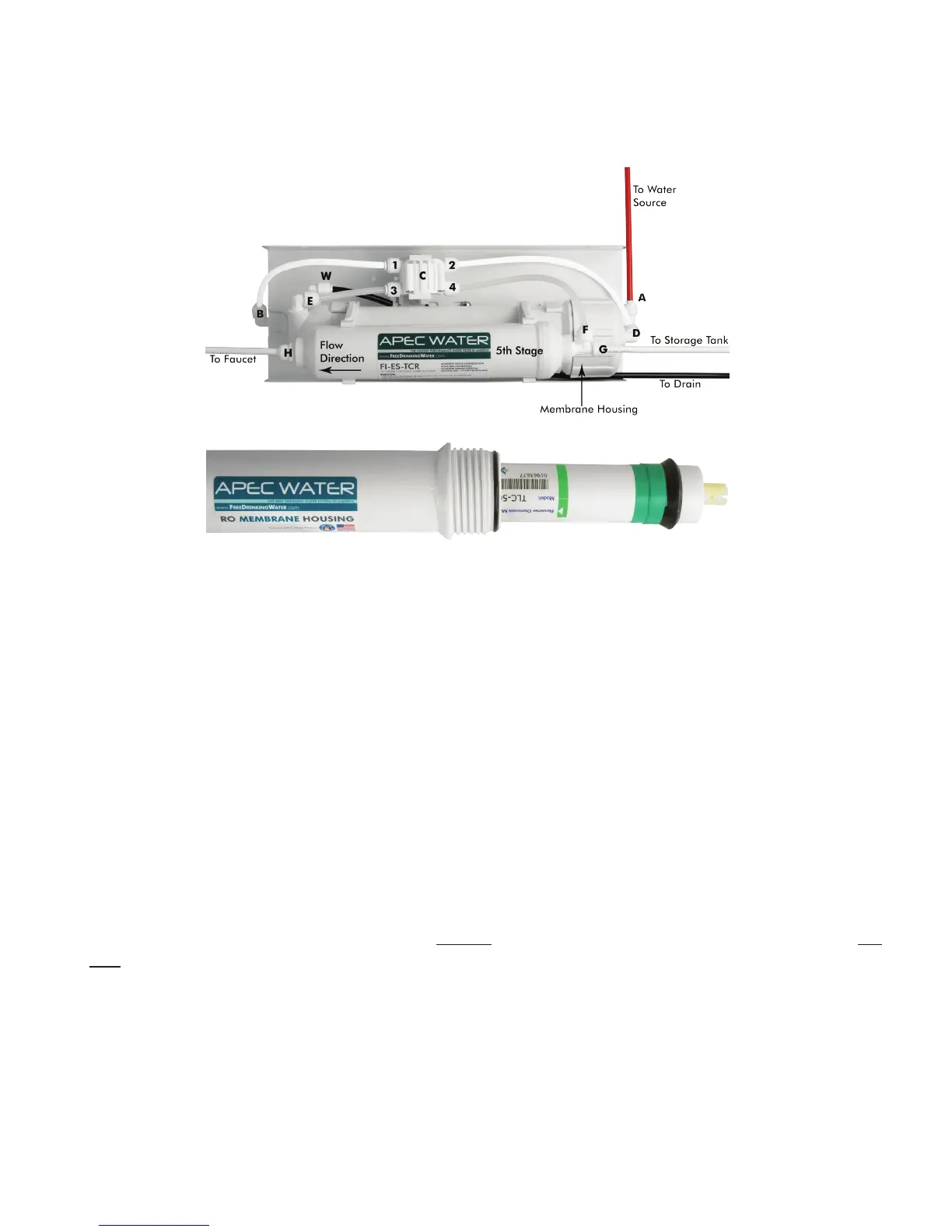
1) Remove the OLD filter: See Fig. 14A. Disconnect the output tubing from point H and tubings at point
G & F. Use a wrench to unscrew the fitting from the filter’s Left hand port, then unscrew the T-fitting from
filter’s Right hand port. You will put these 2 fittings on the new filter. Discard the used filter. The new
5th stage filter will come with 2 plastic end caps. Please use a flat head screwdriver to remove the caps
before proceeding.
2) Sanitize: Use some mild bleach solution to rinse the 2 plastic fittings, the 3 tubing ends, and the 2 ports
of the new filter. This is to prevent contamination.
3) Connect the 2 fittings and tubing to the new filter as before. Make sure the “FLOW ” on the filter is
pointing to the pure water output direction. NOTE: Only this filter change needs bleach sanitizing. Do
Not apply chlorine/ bleach in any way to Membrane for it will damage the membrane!
4) Check for leaks!
* * * End Filter Change Section * * *
Fig. 14A
Fig. 14B


 To Next Page