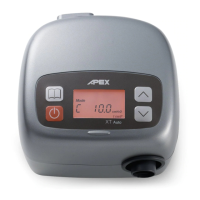
XT Auto/ English 9
(5) Maximum Pressure (only APAP mode)
Press
"MENU"
button to select
[Max. XX.XcmH
2
O]
menu, you can view the current pressure
setting displayed in cmH
2
O unit. Maximum pressure is adjustable only by the provider, a
respiratory therapist or physician.
NOTE: The maximum pressure is to only be prescribed by a physician.
(6) Minimum Pressure (only APAP mode)
Press
"MENU"
button to select
[Min. XX.XcmH
2
O]
menu, you can view the current pressure
setting displayed in cmH
2
O unit. Minimum pressure is adjustable only by the provider, a
respiratory therapist or physician.
NOTE: The minimum pressure is to only be prescribed by a physician.
(7) PVA (Pressure Variation Algorithm)
Press
"MENU"
button to select
[c on/off]
menu, you can view if the PVA function is enabled by
the provider, a respiratory therapist or physician. The PVA function delivers pressure relief upon
exhalation to improve comfort. If the PVA function is enabled, press
"UP"
or
"DOWN"
button to
adjust the comfort level. There are 3 adjustable levels of pressure relief that you feel while
exhalation. Level 1 provides small pressure variation; and level 3 provides higher pressure
variation.
(8) Low Pressure Auto Off (only CPAP mode)
Press
"MENU"
button to select
[LOW P on/off]
menu, you can view if the Low Pressure Auto Off
setting is enabled and the device will be automatically turned off while detecting a large leak for
3 minutes. This setting is adjustable only by the provider, a respiratory therapist or physician.
(9) Compliance Meter
Press
"MENU"
button to select
[CM XXXX.X hr]
menu, the compliance meter records the total
therapy hours for the device. The compliance meter should be re-set only by the provider, a
respiratory therapist or by a physician.
(10) Alarm
Press
"MENU"
button to select
[Alarm on/off]
menu, press
"UP"
or
"DOWN"
button to set the alarm
on or off. When alarm is turned on, the audible alarm will activate with warning messages
showed on the LCD display. Set alarm off for mute the audible alarm.
(11) Clock Alarm
Press
"MENU"
button to select
[Clock Alarm on/off]
menu, press
"UP"
or
"DOWN"
button to set the
clock alarm on or off. When clock alarm is set on, the display will show the time on the left side.
Press
"UP"
or
"DOWN"
button to set the time to wake you up. Once the clock alarm is activated,
press the start/standby button to mute the audible alarm.
(12) Clock
Press
"MENU"
button to select
[Clock XX:XX]
menu, press
"UP"
or
"DOWN"
button to set the
current time.








 To Next Page