XT Auto/ English 14
7.3 Air Filter Maintenance
For an optimum operation of the device, the air filter can be cleaned by the user at least once every
two weeks or more often if this device is operated in a dusty environment. It is recommended that
the filter be replaced with a new one after 6 months of use; however, depending on the air quality,
the replacement time may vary.
CAUTION:
Dirt
air filter ma
cause hi
h o
eratin
tem
eratures that affect device
performance. Ensure the air filter is cleaned and fitted at all times.
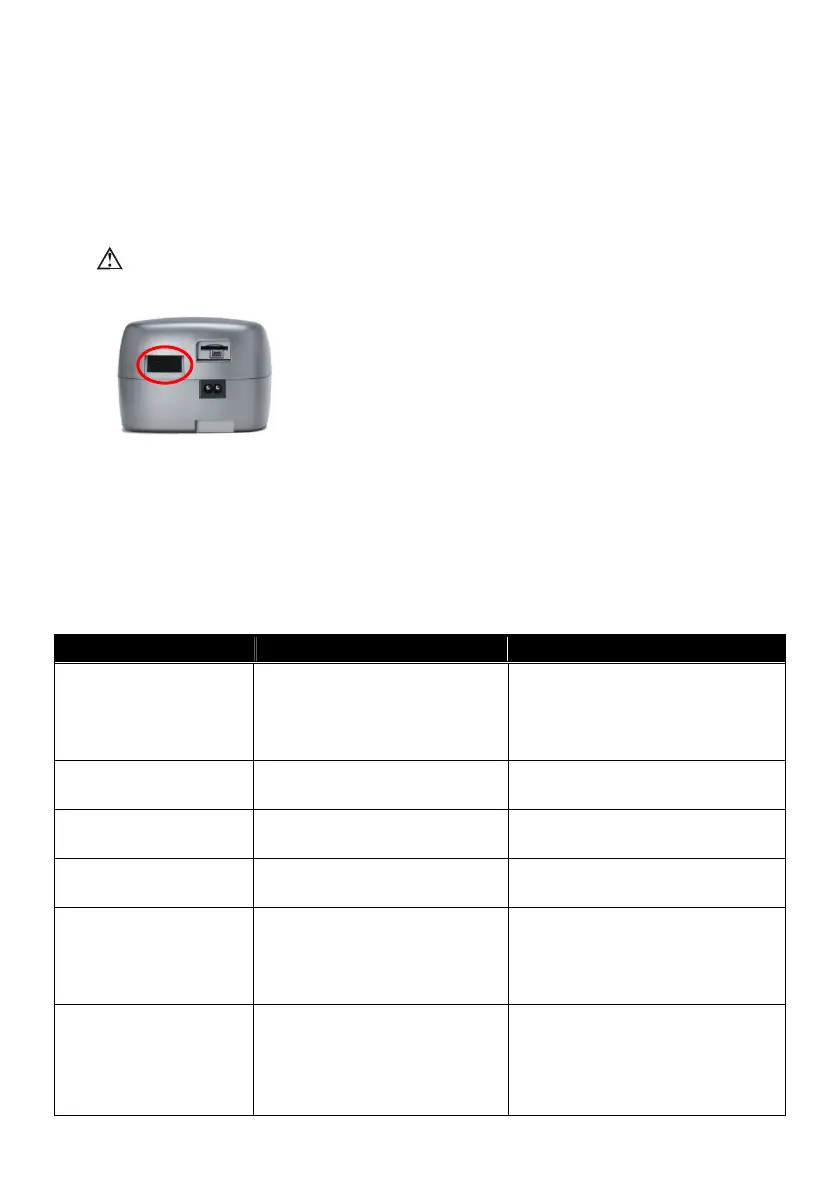
1. Remove the dirt
filter from the enclosure on the rear of the
device.
2. Wash the filter in warm water with a mild deter
ent, and rinse
with water. Allow the filter to air dr
com
letel
before
reinstalling. Do not use a filter that is not completely dry. If the
filter is torn, replace it.
3. Reinstall the filter.
NOTE: Please follow national requirements to dispose the unit properly.
8. Troubleshooting
The table below lists troubleshooting solutions for the problems that may happen. If the problem persists,
contact your equipment provider service agent.
Problem Possible Causes Solutions
No display 1. The power cord is not
connected to the power socket.
2. LCD failure or controlled PCB
failure.
1. Ensure the power cord is
connected.
2. Contact your equipment provider
for repair.
Display code incorrect LCD failure or controlled PCB failure. Contact your equipment provider for
repair.
Illuminant under LCD is not
on
LED failure Contact your equipment provider for
repair.
Buttons disable Button failure Contact your equipment provider for
repair.
Air delivered is slow 1. During ramp time.
2. Filter is too dirty.
3. Flow generator failure.
1. Check the ramp time setting
2. Change or clean the filter regularly.
3. Contact your equipment provider
for repair.
Data can not be copied to
the SD card
1. SD card is full.
2. SD card is not inserted correctly.
3. Data on the SD card is corrupted.
1. Ensure the SD card has enough
capacity.
2. Ensure the SD card is inserted into
the slot.
3. Format the card.








 To Next Page