XT Fit /English 10
power socket on the back of device.
4.4 Flowchart of Menu settings
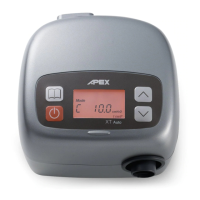
Enter the user's menu mode by pressing the “
MENU
” butt on.
In each setting, when the preferred value has been selected, press
"MENU"
for confirmation and press
"MENU"
again to enter next selection.
NOTE: For physicians, please refer to a separated “Physician’s Additional Instruction”
page.
Once the setting is confirmed, press
“MENU”
button. Otherwise, the device will automatically go
back to standby without saving the modification if no action is taken in 20 seconds.
Alt.
(Altitude Compensation)
< 0, 5, 10, 15, ……………., 45> min
< 4, 4.5, 5, 5.5, ……………., 20> cmH2O
< 1, 2, 3, 4, 5, 6, 7, 8> if P set at 4-18 cmH2O
< 1, 2, 3, 4, 5> if P set at 18.5-20 cmH2O
Ramp P
(Ramp Starting Pressure)
< 4, 4.5, 5, 5.5, ……………., 19> cmH2O
CM 4 hr
(Session Counter)


 To Next Page
 Loading...