APOGEE ELECTRONICS
12
ROSETTA 800 – User’s Guide
Configuration Examples - continued
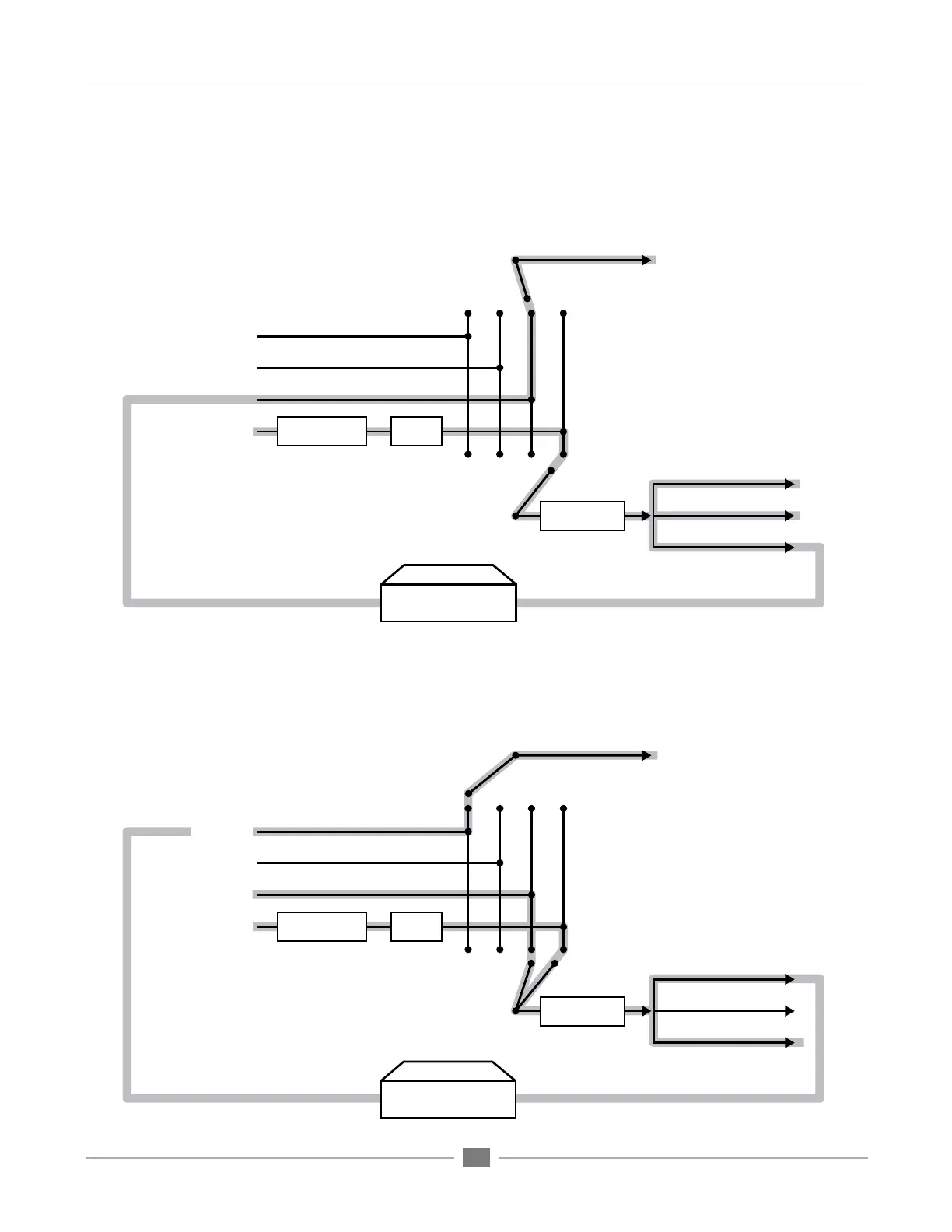
AES DEVICE
To ADAT Out
To OPTION Out
To AES Out
To Analog OutputsSource to Analog Outs button
Source to Digital Outs button
ADAT In
OPTION In
AES In
ANALOG In
SOFT LIMIT
UV22HR
A/D
ADAT DEVICE
To ADAT Out
To OPTION Out
To AES Out
To Analog OutputsSource to Analog Outs button
Source to Digital Outs button
ADAT In
OPTION In
AES In
ANALOG In
SOFT LIMIT
UV22HR
A/D
FLOW DIAGRAM CONFIGURATION #3 (advanced settings) :
FLOW DIAGRAM CONFIGURATION #1:


 To Next Page