
EasyManua.ls Logo

Apollo Seiko OMEGA - User Manual

Apollo Seiko OMEGA
60 pages
Print Icon
To Next Page IconTo Next Page
Loading...
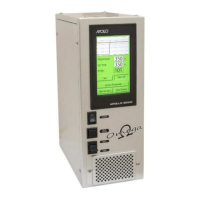
Soldering Controller
OMEGA
Instruction Manual -2
Thank you for purchasing the OMEGA.
Read these instructions thoroughly for proper use of this machine.
Make sure to read "Safety Notes" before you use machine.
This information protects you from possible dangers during use.
Apollo Seiko Ltd.
Ver.202202

Questions and Answers

  • W
    William MillerAug 13, 2025
    Why is my Apollo Seiko Controller iron tip not heating properly?
    • J
      julie91Aug 13, 2025
      Several factors can prevent the iron tip from heating correctly. The heater itself might be broken and in need of replacement. The heater connector could be disconnected, or the heater cable might be broken, requiring a new cable. A worn-out iron tip will also cause this issue, so replace it with a new one. Incorrect parameter settings can also be the cause, so check the system parameters and input the correct values. In some cases, the control PCB may be damaged. Contact Apollo Seiko or our agency for repair in such cases.
  • H
    hannah36Aug 16, 2025
    What to do if solder is not properly fed in my Apollo Seiko OMEGA?
    • B
      Betty ThompsonAug 16, 2025
      There are several reasons why solder might not feed properly. First, check if the release lever is in the upper position and lower it. The feeding cutting blade might be idling, in which case you should adjust its position. Also, verify that the speed setting is not set to β€˜0’ by checking the system parameters. If the motor is damaged or the control PCB is damaged, contact Apollo Seiko or our agency for repair.
  • W
    Wesley KellyAug 19, 2025
    How to fix an Apollo Seiko Controller when OMEGA is not receiving power?
    • C
      cliffordortegaAug 19, 2025
      If the OMEGA is not receiving power, start by checking the power cord connection to ensure it is properly connected. If the power cord is fine, the fuse might be blown; replace it with a 3 Amp fuse. If neither of these solutions works, the Control PCB might be damaged. Contact Apollo Seiko or our agency for repair.
  • R
    Ryan LevyAug 23, 2025
    What to do if the temperature controller cannot be adjusted on my Apollo Seiko?
    • K
      Kelly SpearsAug 23, 2025
      If you cannot adjust the temperature controller, the heater might be broken and needs replacement. Another possibility is a broken heater cable, which would also need replacing. Check the cable connection to ensure it's properly connected. If these steps don't resolve the issue, the temperature controller itself may be damaged, and you should contact Apollo Seiko or our agency for repair.
  • C
    Caroline MacdonaldAug 27, 2025
    What causes temperature abnormality that does not disappear on Apollo Seiko OMEGA?
    • L
      Lynn WrightAug 27, 2025
      If a temperature abnormality persists, it could be due to a damaged temperature controller, in which case you should contact Apollo Seiko or our agency for repair. Alternatively, the upper/lower temperature alarm value might not be set correctly. Check the system parameters and enter the correct value.
  • N
    Nancy KramerAug 31, 2025
    What to do if the iron unit does not move up or down on my Apollo Seiko OMEGA Controller?
    • C
      Carol NielsenAug 31, 2025
      If the iron unit isn't moving up or down, the first thing to check is the air supply to the unit. If air is being supplied, the Control PCB may be damaged, and you should contact Apollo Seiko or our agency for repair.
  • A
    aguilaramandaSep 4, 2025
    Why does my Apollo Seiko OMEGA not work when inputting I/O?
    • C
      christineandersonSep 4, 2025
      If OMEGA does not work from inputting I/O, the type of system parameter setting might be wrong. Set the type to β€œSTA”, except when combining with an APOLLO SEIKO robot.
  • B
    Brandon HarrisSep 7, 2025
    Why is the touch panel on my Apollo Seiko Controller turned on even when the power is off?
    • A
      Amber WatersSep 7, 2025
      If the touch panel remains on even after the power is turned off, it's likely because the 24V power source is being supplied to pins 30, 32, 38, and 40 of the I/O. When using an I/O external power source, set DS1 to ON and connect 24V of the external power source to pin 34 of I/O, and 0V of the external power source to pin 38 or 40.

Summary

Safety Notes

13. Soldering Operation

13.1 Point Soldering Operation

Explains the point soldering process using I/O port signals.

13.2 Slide Soldering Operation

Describes the slide soldering process using I/O port signals.

13.3 Special Soldering Point Soldering Operation

Details the special point soldering operation using I/O port.

13.4 Special Soldering Slide Soldering Operation

Explains the special slide soldering operation using I/O port.

13.5 Special Soldering Point Soldering Operation (without Iron Up Motion)

Describes special point soldering without iron up motion via I/O port.

13.6 Special Soldering Easy Slide Soldering Operation

Details the easy slide soldering operation using I/O port.

15. Troubleshooting

15.1 Main Problem, Failure Reason and Recommended Solution

Provides common problems, their causes, and solutions.

18. ZSB Feeder Adjustment and Alignment (Option)

Apollo Seiko OMEGA Specifications

General IconGeneral
BrandApollo Seiko
ModelOMEGA
CategoryController
LanguageEnglish