APPENDIX
NP-3262 POS Terminal 53
APPENDIX
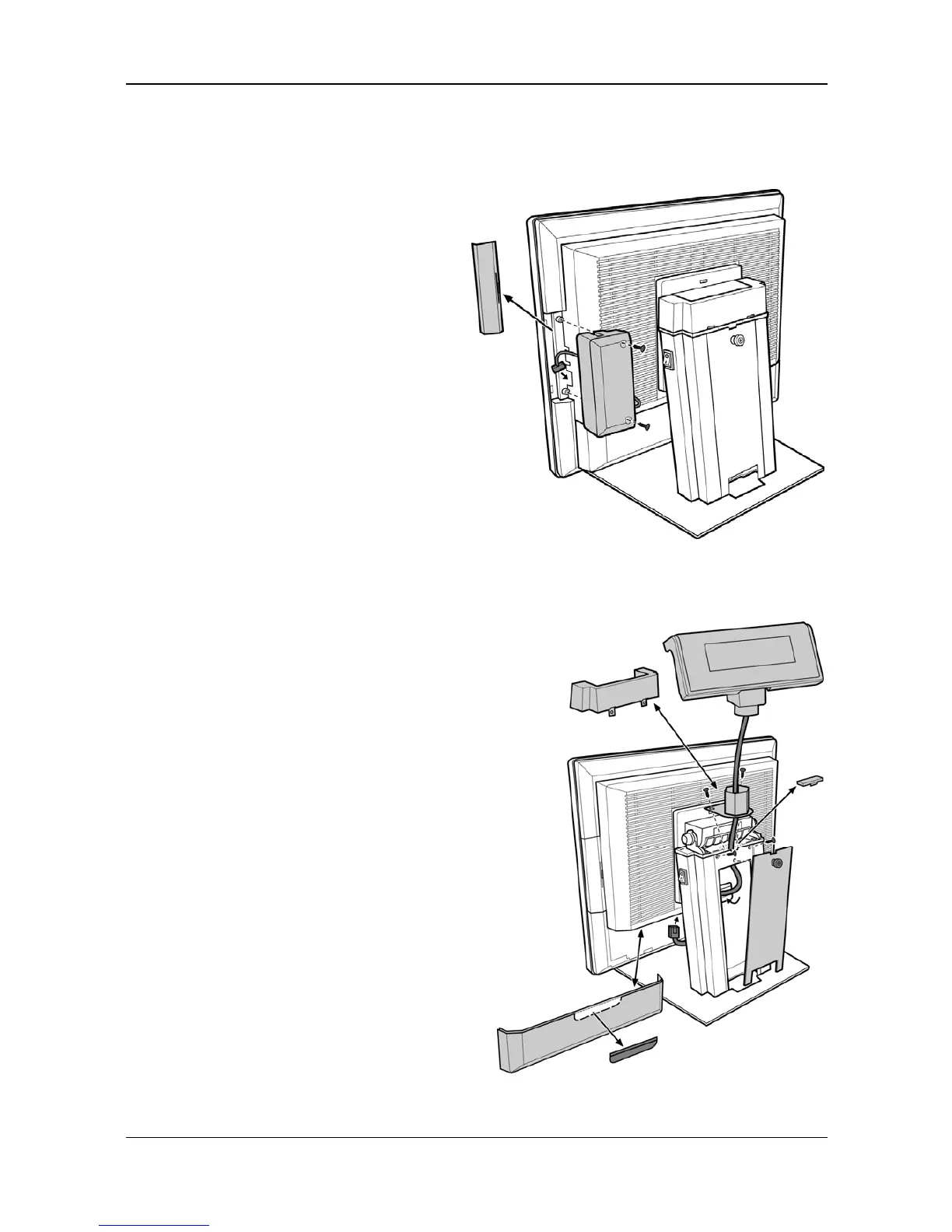
Magnetic Stripe Reader (MSR) Installation
An optional MSR can be installed in
both right/left side of NP-3262.
By default, the MSR is installed on the
right side.
Step 1 Remove the cover from the
MSR extension slot.
Step 2 Connect the MSR cable
correctly.
Step 3 Fix the MSR module in position
with 2 screws.
Integrated VFD/LCD Customer Display Installation
Step 1 Loosen the thumb screw to
remove the stand cover.
Loosen 2 screws to remove the
hinge cover.
Step 2 Fit the customer display with
bracket in position with 2 screws.
Step 3 Reinstall the hinge cover with 2
screws.
Step 4 Connect the cable to the COM2
at the bottom side of the monitor.
Step 5 Refasten the stand cover with 1
thumb screw.
NOTE:
Please refer to CH. 2 Hardware
Installation for complete instructions.



 To Previous Page