Home
APsystems
Conference System
ECU-B
Page 19 (Creating Customer Profile)
APsystems ECU-B - Creating Customer Profile
22 pages
Manual
Save Page as PDF
To Next Page
To Next Page
To Previous Page
To Previous Page
Loading...
APsyst
ems
E
CU-B
Instal
lation/User
Manual
19
4.
ECU-B
User
Interfa
ce
4.7
.2
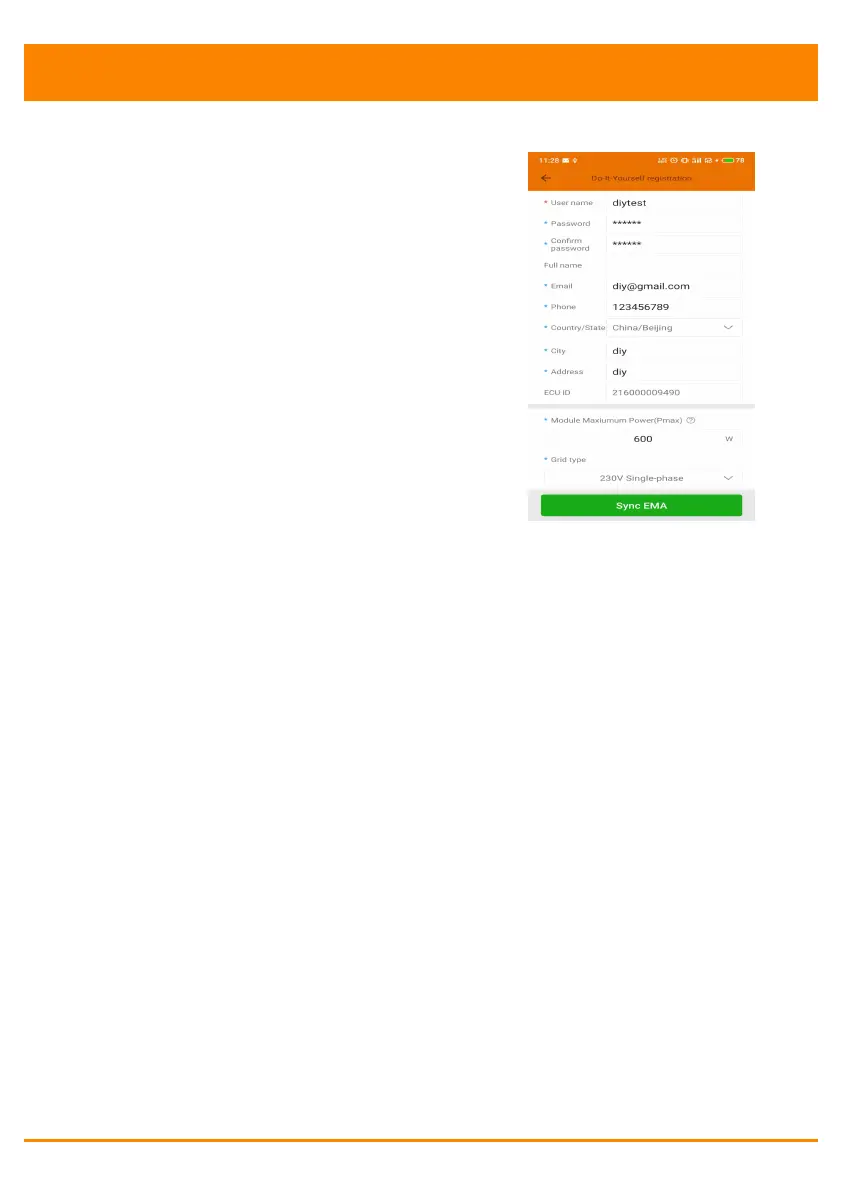
Create
Customer
Connect
your
phone
to
internet
instea
d
of
to
the
ECU.
Then
enter
the
informat
ion
and
click
“Sy
nc
EMA
”.
User
na
me,
pass
wor
d,
city
an
d
countr
y
/
stat
e
are
necessary
.
18
20
Table of Contents
Main Page
Default Chapter
2
Table of Contents
2
1 Introduction
3
2 Interface Explanation
4
Interface Layout
4
Reset
4
Power Connection Port
5
Antenna
5
USB Port
5
Led1
5
Led2
5
3 Hardware Installation
6
Preparation
6
Selecting an Installation Location for the ECU-B
6
Installation
6
Cable Connection
7
Internet Connection
8
4 ECU-B User Interface
9
Connecting to the ECU-B Via the Local Wireless
9
Add UID
10
Delete UID
10
Homepage
10
Data
11
Real Time Data
11
Power
12
Power Generation Statistics
12
Settings
13
Manage Ids
13
Grid Profile
13
Inverter Signal Level
13
Time Management
14
Manage the Network Connection
15
Manage the WLAN Connection
15
Wlan Password
16
Automatic System Check
16
Language
17
Help
17
EMA Registration Function
18
Scan Ecu's ID
18
Create Customer
19
5 Technical Data
20
6 Contact Information
22
Other manuals for APsystems ECU-B
Quick Installation Guide
2 pages
Related product manuals
APsystems ECU-C
45 pages
APsystems ECU-C Zigbee
46 pages



 To Next Page