APsystems ECU-B Installation/User Manual
3. Hardware Installation
3.1 Preparation
Make sure you have the following components ready before
beginning to install the ECU-B:
A dedicated standard AC electrical outlet (located as close to the
array as is possible).
A broadband Internet connection available for your use.
A broadband router with either a CAT5 Ethernet, or a wireless
router.
A phone with APP (see page 11).
3.2 Selecting an Installation Location for the ECU-B
Choose a location that is as close to the array as possible
The ECU-B is NOT rated for outdoor use, so if installing outdoors,
ensure it is put in a waterproof box, and the antenna is placed
outside for communication quality.
3.3 Installation
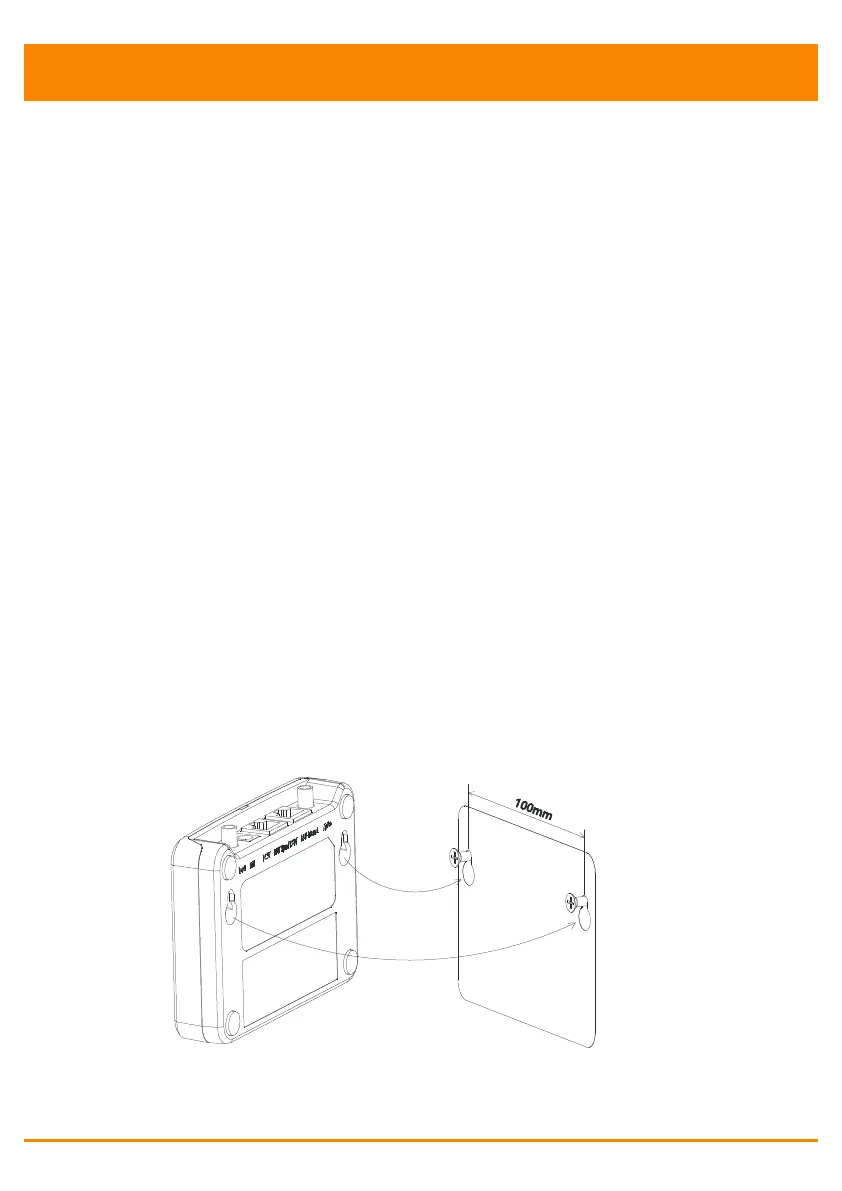
1) Using a Wall Mount
When mounting the ECU-B to a wall, make sure to select a cool, dry
indoor location.
Depending on the wall surface you are mounting the ECU-B to, use
either two drywall screws or wall anchors, installed 100 mm apart
(The drywall screws and wall anchors are not included in the ECU-B
kit).
Align and slide the ECU-B onto the mounting screws.
Figure 4



 To Next Page