Tianjin APT Science and Technology Co., Ltd.
1001, Building 5 HuaDing, No.1 HuaKe 3 Road,
Binhai hi-tech Industrial Development Zone, Tianjin, China
6 TEL: 86 22 26345859
FAX: 86 22 8371 9955
Email: apt@aptdevelop.com
darkness,׀׀׀׀׀ is brightness
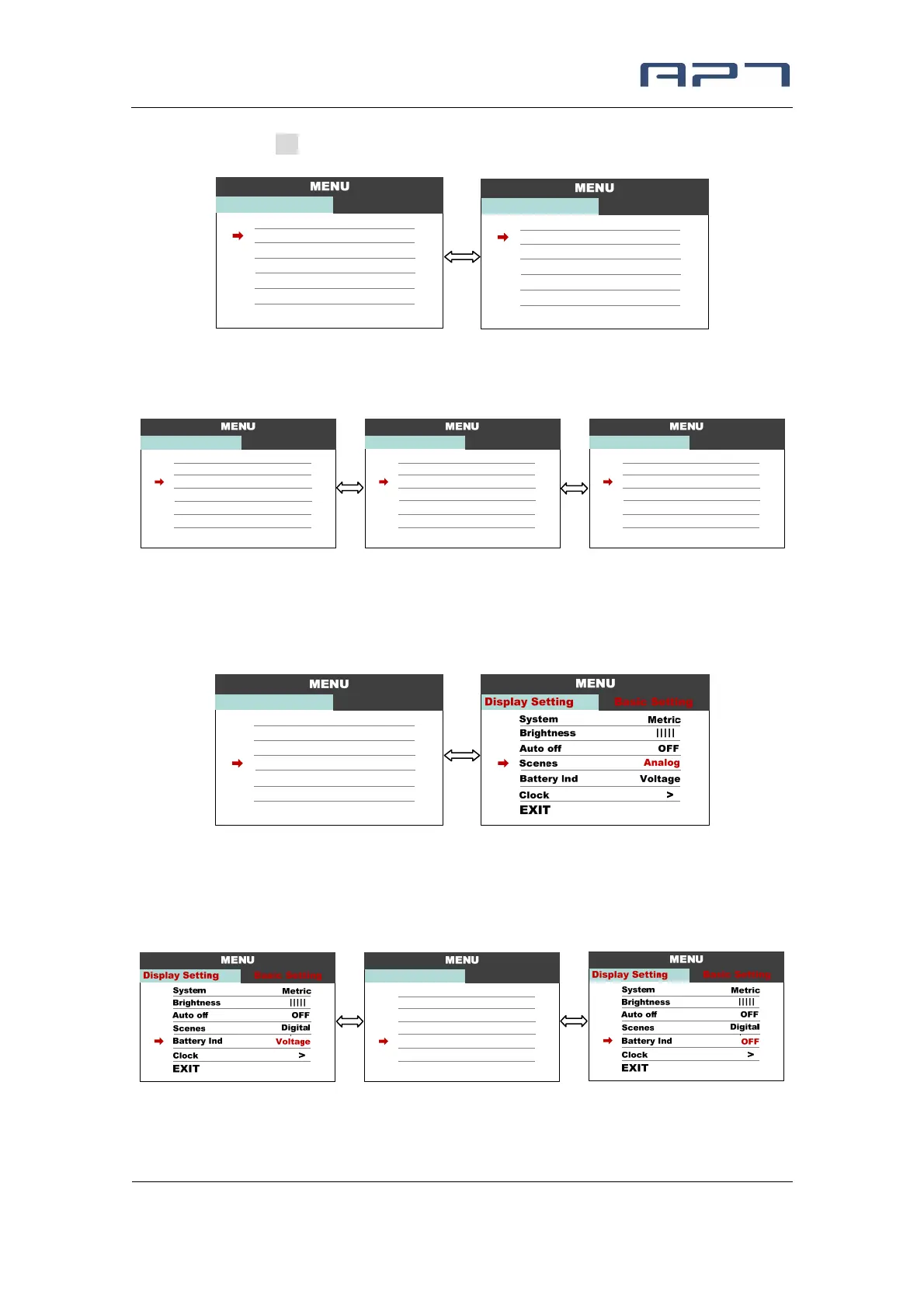
8.3 Auto off : Press UP/DOWN button to change the auto power off time, from 1 to 9,
the number represent time (minutes) to shutdown, default value is 5 minutes.
8.4 Scenses : Press UP/DOWN button to change the scenes, Digital / Analog.
*Display only support Digital scenes for now, Analog scenes will be supported for
future.
8.5 Battery Ind : Press UP/DOWN button to change the battery indicator, Voltage /
Percentage / OFF.
*Accurate percentage needs communication with battery.
1
6
:
2
3
P
M
|||||
System
Display Setting
EXIT
Basic Setting
Metric
Brightness
Auto off
OFF
Scenes
Digital
Battery Ind
Percent
Clock
>
1
6
:
2
3
P
M
|||||
System
Display Setting
EXIT
Basic Setting
Metric
Brightness
Auto off OFF
Scenes
Digital
Battery Ind
Voltage
Clock
>
1
6
:
2
3
P
M
|||||
System
Display Setting
EXIT
Basic Setting
Metric
Brightness
Auto off OFF
Scenes
Digital
Battery Ind
Voltage
Clock
>
1
6
:
2
3
P
M
|||||
System
Display Setting
EXIT
Basic Setting
Metric
Brightness
Auto off 9min
Scenes
Digital
Battery Ind
Voltage
Clock
>
1
6
:
2
3
P
M
|||||
System
Display Setting
EXIT
Basic Setting
Metric
Brightness
Auto off 1min
Scenes
Digital
Battery Ind
Voltage
Clock
>
1
6
:
2
3
P
M
|||||
System
Display Setting
EXIT
Basic Setting
Metric
Brightness
Auto off OFF
Scenes
Digital
Battery Ind
Voltage
Clock
>
1
6
:
2
3
P
M
|
System
Display Setting
EXIT
Basic Setting
Metric
Brightness
Auto off OFF
Scenes
Digital
Battery Ind
Voltage
Clock
>


 To Next Page