-7-
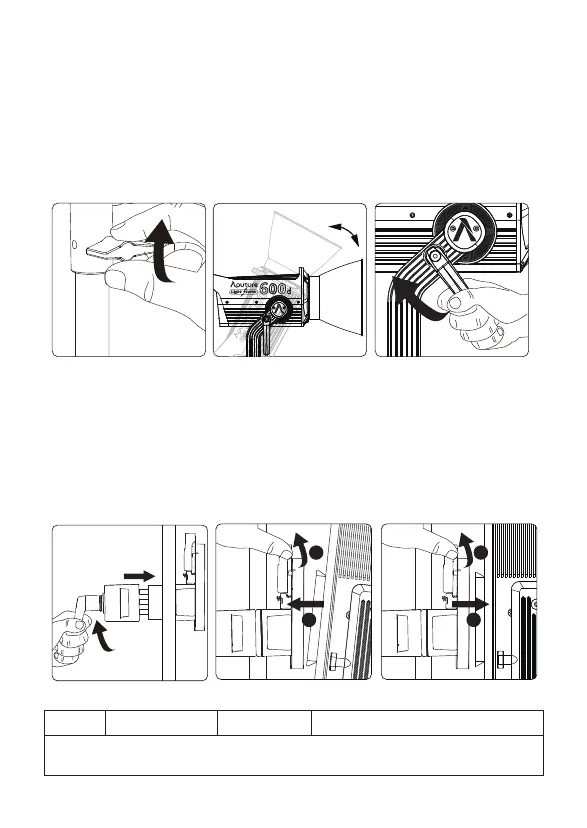
3. Setting up the Lamp Head
Sizes (L*W*H)
4. Lightning Clamp Operation Instructions
Weight
* The Lightning Clamp can clamp onto square or round pipe with a diameter between
2-5cm or 0.79-1.97in.
670g / 1.48lbs 10.35x8.74x12.5cm / 4.07x3.44x4.92in
Specifications
1
2
1
2
1) Clamp the Lightning Clamp onto a light stand.
2) To attach the control box, rotate the release lever to unlock the quick-release
baseplate, then mount the control box onto the Lightning Clamp (the release
lever will automatically spring back).
3) To remove the control box, grasp it firmly, then unlock the quick-release plate by
turning the release lever, and detach the control box.
If using a 5/8in / 16mm stand (Baby Pin), then mount the Lamp Head onto the stand,
and proceed to fix it in place using the T-Handle/Mounting Screw on the Baby Pin
Receiver/Mounting Column.
If using a 1.125in / 28mm stand (Junior Pin), then mount the Lamp Head into the
Junior Pin receiver, and fix it in place using the T-Handle on the stand.
Loosen or tighten the handbrake locking mechanism on the yoke to adjust the
fixture's angle of tilt.












 To Next Page