150Mbps Wireless Lite-N USB Adapter – APPUSB150 User’s Guide English
and its operations.
3.1.2 Profile Management
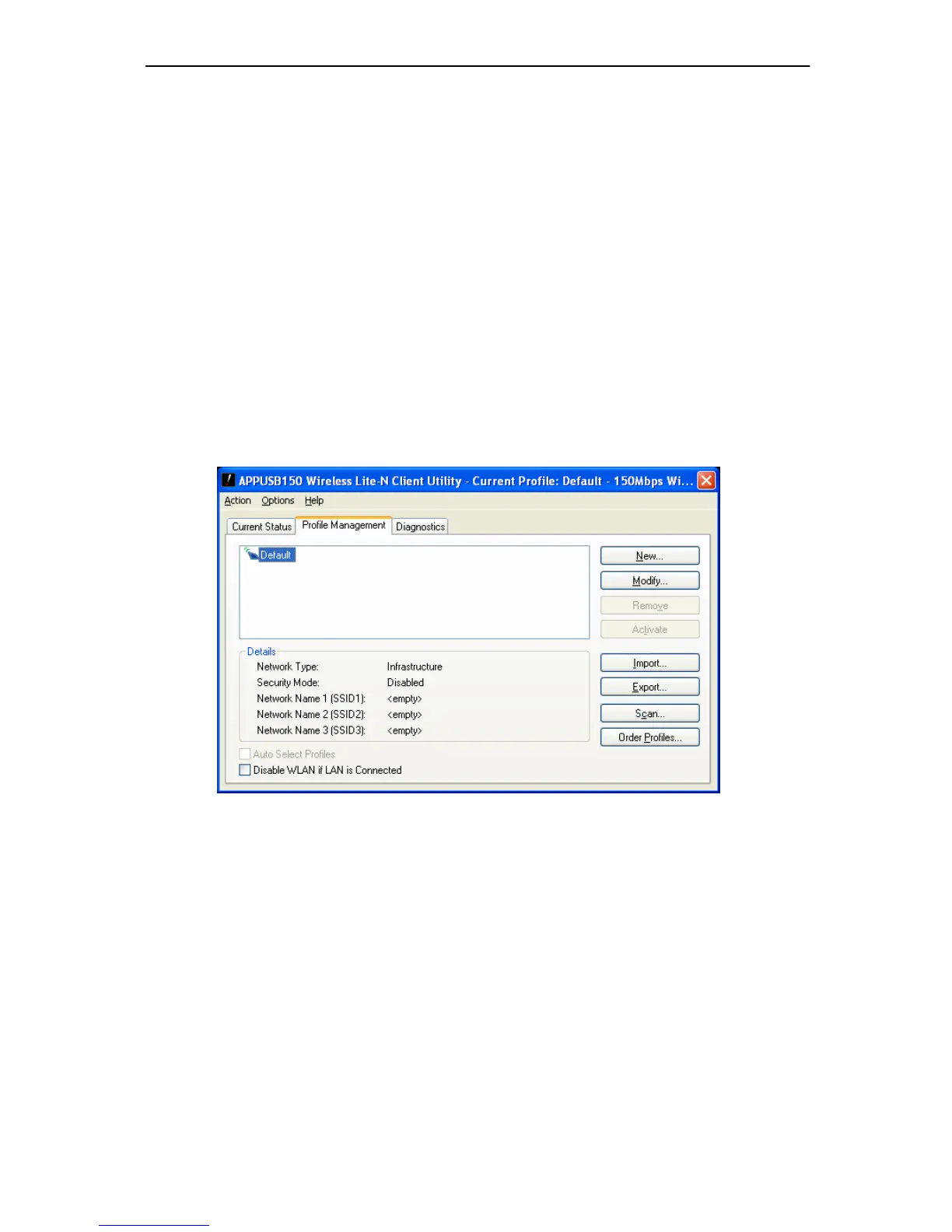
Click the Pr ofile Manag ement t ab of the AWCU and the next screen will appear (shown i n
Figure 3-2). The Profile Management screen provides tools to:
Add a new profile
Modify a profile
Remove a profile
Activate a Profile
Import a Profile
Export a Profile
Scan Available Networks
Order profiles
Figure 3-2
3.1.2.1. Add or Modify a Configuration Profile
To add a new configuration profile, click New on the Profile Management tab. To mo dify a
configuration profile, select the configuration profile from the Profile list and click Modify. Then
you will see the Management dialog box (shown in Figure 3-3).
1. Edit the General tab
Profile Name - Please enter the Profile name which identifies the configuration profile. This
name must be unique. No
te that the profile names are not case-sensitive.
Client Name - Please enter the Profile name which identifies the client machine.
Network Names (SSIDs) - Please enter the IEEE 802.11 wireless network name. This



 To Next Page