AQUASTREAM ULTIMATE
Important:
Important:Important:
Important: If you hear rattling noises from the pump, they are most likely caused
by air inside the pump. You can accelerate the deaeration process by carefully tilt-
ing the pump or by activating the deaeration mode of the pump.
After completing the filling process, turn off the PSU and remove the ATX start
plug. Attach all previously disconnected hardware components of the PC to the
power supply unit again.
Please note: Some high-power PSUs will not be able to power the aquastream UL-
TIMATE without further electrical load due to power regulation problems. In this
case, use a second (complete) PC or a separately sold PSU for single components
for the filling process. Alternatively, connect further load like hard disk drives and
optical drives to the PSU.
7.2.
7.2.7.2.
7.2. Operation via keys and display
Operation via keys and displayOperation via keys and display
Operation via keys and display
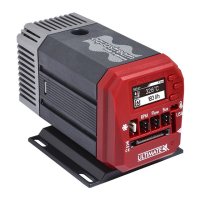
The aquastream ULTIMATE is equipped with an OLED display and three keys and
can be fully configured using these.
The upper and lower key will select information pages during display mode and
select and alter menu entries. The middle key will open the device menu while in
display mode and confirm selected menu entries or values while in the menu.
During configuration via keys and display, the aquasuite software should be closed
on a connected PC! Otherwise, the aquasuite will overwrite and thereby cancel
any settings made on the device itself.
7.3.
7.3.7.3.
7.3. Configuration using USB connection
Configuration using USB connectionConfiguration using USB connection
Configuration using USB connection
The aquastream ULTIMATE can be connected to a PC via USB interface and can
then be configured using the aquasuite software. Comprehensive visualization and
logging options are also available in the aquasuite software. However, an USB
connection is not required for operation.
8.
8.8.
8. aquasuite software
aquasuite softwareaquasuite software
aquasuite software
The Windows software aquasuite is an extensive software suite and can be used
for configuration and monitoring. The software is not required for operation
though. All configuration parameters can be saved into the device's memory.
Please note: Depending on the type of product you are using, some features may
not be available for your device.
8.1.
8.1.8.1.
8.1. Installation of the aquasuite software
Installation of the aquasuite softwareInstallation of the aquasuite software
Installation of the aquasuite software
For configuration and monitoring of our products with USB interface, the aqua-
suite software is available for download from our website www.aqua-computer.de.
You will find the setup program in the support section of the website under Down-
loads/Software.
© 2016-2018 Aqua Computer GmbH & Co. KG - 9 -
Gelliehäuser Str. 1, 37130 Gleichen


 To Next Page