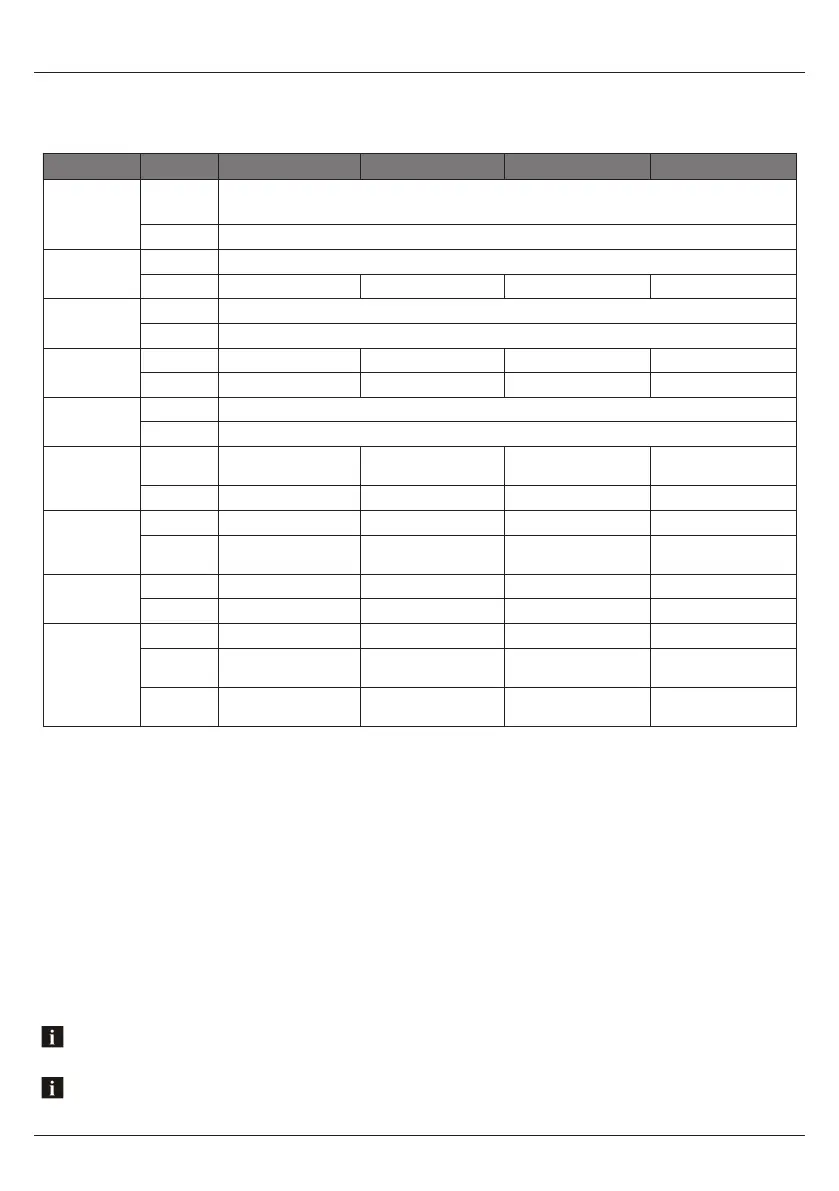
2.2 Control Functions
If your music player is connected via the Auxiliary input you will not be able to control track or receive track
information.
Button Action AM/FM USB AUX BLUETOOTH
Power/Mute
Short Press
Power ON
Mute ON/OFF
Long Press Power OFF
Dimmer
Short Press Dimmer High/Low
Long Press No function Repeat Playback No function No function
Mode
Short Press Change source
Long Press Bluetooth off/link
Band /
File Search
Short Press Change Band File search No function No function
Long Press Auto Store Random Playback No function No function
Display
Short Press Info/Clock
Long Press Clock setting
Preset /
Play/Pause
Short Press
Show CH1. Rotate to
select CH1-CH6
Play/Pause No function Play/Pause
Long Press Manual Save Station No function No function No function
Next /
Fast Forward
Short Press Seek Up Next File No function Next File
Long Press Turn Up Fast Forward
Press and Hold for 5 sec
to reset unit
No function
Previous /
Fast Rewind
Short Press Seek Down Previous File No function Previous File
Long Press Turn Down Fast Rewind Show Version No function
Rotary Selector
Rotate Volume Up/Down Volume Up/Down Volume Up/Down Volume Up/Down
Short Press
BAS / TRE / BAL / FAD
/ EQ / LOUD
BAS / TRE / BAL / FAD /
EQ / LOUD
BAS / TRE / BAL / FAD /
EQ / LOUD
BAS / TRE / BAL / FAD /
EQ / LOUD
Long Press
BEEP / CLOCK / P-VOL
/ AREA / LOCAL / ST
BEEP / CLOCK / P-VOL /
AREA / LOCAL / ST
BEEP / CLOCK / P-VOL /
AREA / LOCAL / ST
BEEP / CLOCK / P-VOL /
AREA / LOCAL / ST
Navigating past the last Settings Menu item (Restore) will automatically exit the Settings Menu and enter the Audio
Menu. Press and hold Audio/Menu button to enter the Settings Menu again.
Controlling the Stereo GP1 WATERPROOF STEREO
7www.aquaticav.com



 To Next Page