EasyManua.ls Logo

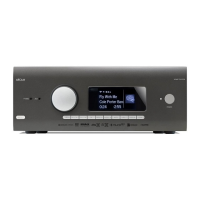
Arcam HDA AV41 - User Manual

Arcam HDA AV41
47 pages
Print Icon
To Next Page IconTo Next Page
Loading...
HANDBOOK
EN
AVR SURROUND AMPLIFIERS
AV41/AVR31/AVR21/AVR11

Questions and Answers

  • D
    Dylan PattersonAug 17, 2025
    What to do if my Arcam Amplifier remote control is not working?
    • D
      Dr. Walter AustinAug 17, 2025
      If your Arcam Amplifier isn't responding to the remote, ensure the remote has fresh batteries. Also, make sure the front panel window of the unit is visible and that you're pointing the remote directly at it.
  • B
    Brian MooreAug 20, 2025
    Why is there no sound coming from my Arcam Amplifier?
    • H
      haaskathleenAug 20, 2025
      If no sound is produced from your Arcam Amplifier, ensure that the correct input has been selected and the 'audio source' is set correctly in the 'input config' menu. Also, verify that the source equipment is on, operating normally, and in 'play' mode if applicable. Finally, check that the volume is at a reasonable level and the receiver is not in mute mode.
  • R
    Rachel RodriguezAug 23, 2025
    What to do if my Arcam Amplifier doesn't produce a picture?
    • M
      Marcus StuartAug 23, 2025
      If your Arcam Amplifier isn't producing a picture, first, ensure your viewing device is turned on and set to display your receiver. Test by pressing the button on the receiver or remote, looking for the main menu on your display. Confirm the correct video input is selected on the receiver and that the video source is on, working correctly, and in 'play' mode if needed.
  • S
    scottjonesAug 26, 2025
    How to fix sound only coming from some speakers on my Arcam Amplifier?
    • R
      Reginald YoungAug 26, 2025
      If sound only comes from some speakers on your Arcam Amplifier, make sure you have selected and are playing an appropriate surround source. Verify the BD/DVD disc is encoded in the correct format, and the correct format is selected in the disc start menu of the BD player (if applicable). Ensure the BD/DVD player outputs 'bitstream' audio on the digital output. Confirm the display window shows the disc is a multichannel recording. Check all speakers are correctly and securely connected to the terminals. Ensure you haven't selected 'stereo' as the decoding mode and that your speaker balance is correct. Finally, configure the receiver to include all speakers in your system.
  • J
    jamesheatherAug 28, 2025
    How to fix poor or distorted sound on my Arcam Amplifier?
    • J
      Jennifer HansonAug 28, 2025
      To fix poor or distorted sound on your Arcam Amplifier, ensure you haven't excessively increased the input sensitivity (reduced the maximum input signal voltage) in the input config menu if using an analogue input. Also, verify that you've selected the correct speaker size to suit your system in the setup menu.
  • M
    Mary GrahamAug 30, 2025
    Why can't I select Dolby or DTS decoding modes on my Arcam Amplifier?
    • M
      Mrs. Mary MendozaAug 30, 2025
      The receiver can only apply Dolby and DTS decoding to sources encoded in the same format. Check that a digital source is selected and connected. Ensure the source is playing appropriately encoded material. Verify the BD/DVD disc is encoded in the correct format and that the correct format has been selected in the disc start menu of the BD player (if applicable). Confirm the BD/DVD player is set to output 'bitstream' audio on the digital output.
  • S
    Samantha CastroSep 2, 2025
    How to fix bright edges or ghosts on the picture of my Arcam Amplifier?
    • M
      Melissa DelgadoSep 2, 2025
      To resolve bright edges or ‘ghosts’ on the picture with your Arcam Amplifier, ensure the ‘sharpness’ control on your display device is switched off or set to near minimum. For HDMI connections, try using a shorter cable or a different brand.
  • P
    Patrick RichmondSep 5, 2025
    What to do if my Arcam AV Amplifier selects Dolby Surround when playing a Dolby BD/DVD?
    • M
      Mike Baird DDSSep 5, 2025
      If your Arcam AV Amplifier selects Dolby Surround when playing a Dolby BD/DVD, it may be because you have a digital connection from your BD/DVD player. Some Dolby BD/DVD discs contain material at the beginning or end of the main movie that is not in full 5.1 format, but in two-channel.
  • C
    Crystal CookSep 8, 2025
    Why is there hum on the analogue input of my Arcam Amplifier?
    • M
      Margaret ThomasSep 8, 2025
      If there's a hum on the analogue input of your Arcam Amplifier: - Ensure all cables are making a good connection; if necessary, withdraw and fully re-plug the cable (after turning the power off). - Check the connections inside the source cable connector are not broken or badly soldered. - If the hum originates only when a particular source component is connected, ensure that an aerial cable or dish connection to this source is ground isolated. Contact your installation contractor.
  • E
    Emily KellySep 12, 2025
    Why is the front panel display blank on my Arcam Amplifier?
    • T
      Tara HenrySep 12, 2025
      If the front panel display on your Arcam Amplifier is blank, ensure that the display hasn’t been turned off. Press the button on the front panel or remote control to turn it back on.

Arcam HDA AV41 Specifications

General IconGeneral
TypeAV Processor
HDMI Inputs7
HDMI Outputs3
HDMI 2.1Yes
eARCYes
Audio Formats SupportedDolby Atmos, DTS:X, IMAX Enhanced
Room CalibrationDirac Live
Network ConnectivityEthernet, Wi-Fi
IMAX EnhancedYes
Roon ReadyYes
BluetoothYes
Streaming ServicesApple AirPlay 2, Chromecast, Spotify Connect
DACESS Sabre ES9026PRO
Frequency Response20Hz - 20kHz
InputsHDMI, Optical, Coaxial, RCA
OutputsHDMI, XLR, RCA

Related product manuals