18
EN
EOlife X device failure
If there is a device failure, EOlife X will be unusable: the screen switches off (or no longer comes on) and the red LED in
the top right corner of the screen comes on.
See “XI. Troubleshooting”.
f) Automatic shutdown
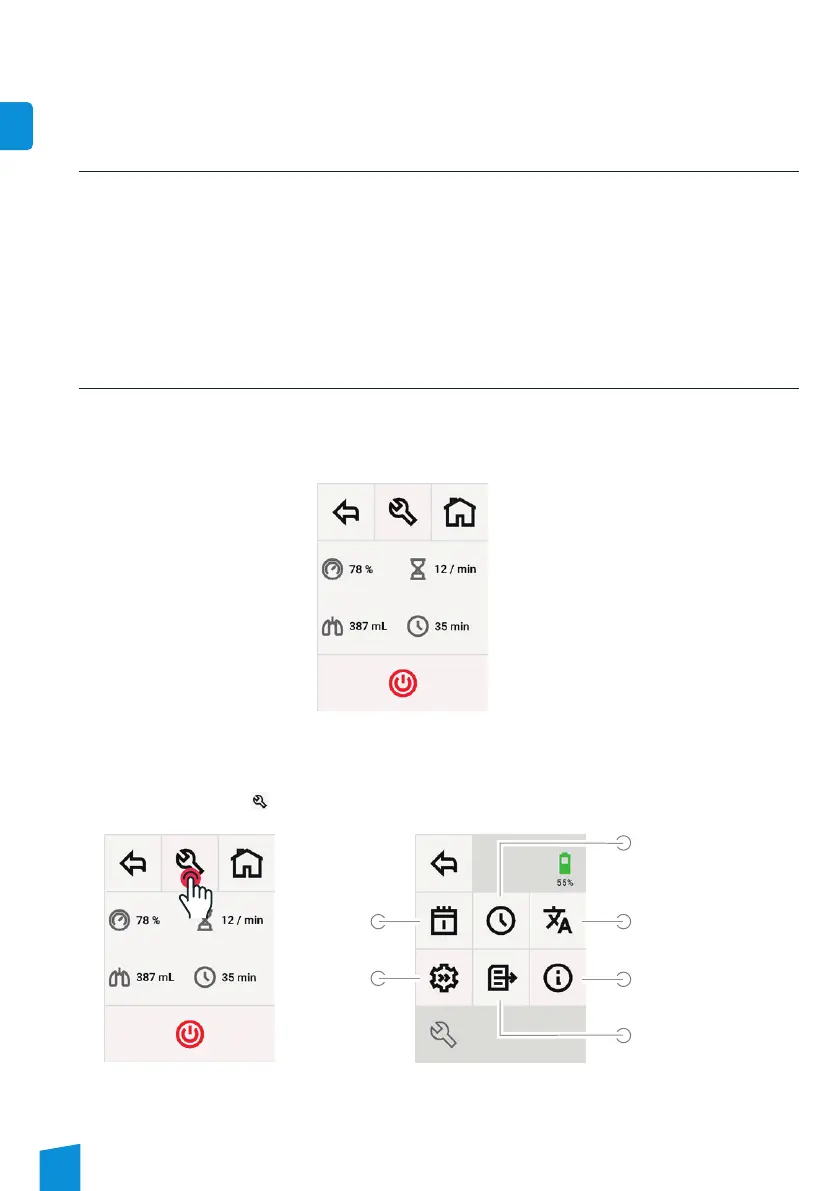
a) Set-up screen display
1. Start up EOlife X by pressing the physical ON/OFF button.
2. Press normally on the physical ON/OFF button to show the summary screen.
2. EOlife X device set-up screen
Summary screen
Summary screen
3. Next, select the [wrench
] to display the EOlife X set-up screen.
Set-up screen
To set
the time
Data transfer
To set
the date
Device
settings
Language
selection
Access to main
information
If there is no user action (a press of the physical ON/OFF button, a touch of the screen when the device is running
or the detection of the inspiration phase when a ventilation sequence is running.) for 1 hour, the device turns itself
off completely.
To turn the device on again, simply press the physical ON/OFF button.


 To Next Page