19
EN
b) Device settings
c) Data transfer
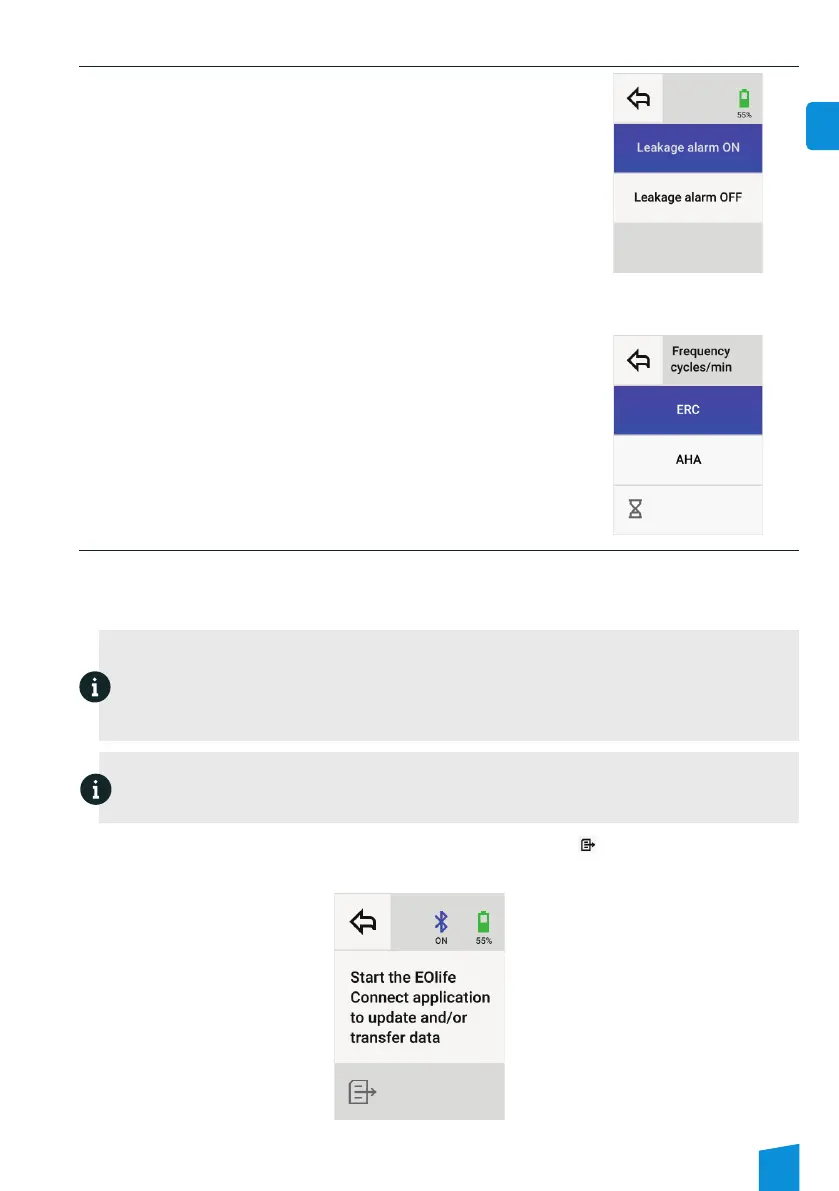
o Leakage alarm settings
When the manikin’s airways are not completely sealed and the air insufflated
via the mouth is not fully expired, you have to deactivate the leakage alarm in
the device settings because EOlife X will not correctly works. By deactivating
the leakage alarm, EOlife X will simulate an expiration and will be able
to analyse the ventilation cycles or calculate the ventilation parameters
correctly.
o Frequency settings
For a child patient, AHA and ERC guidelines do not have the same
recommandations about the ventilation frequency. EOlife X offers the
possibility to choose between following AHA or ERC guidelines.
• AHA guideline for children between 1 year and 11 years : 25 cycles per minutes
• ERC guideline for children between 1 year and 6 years : 20 cycles per minutes
• ERC guideline for children between 7 years and 11 years : 15 cycles per minutes
EOlife X records the ventilation parameters in each ventilation cycle. It can record for an estimated period of 10 hours.
This data can then be transferred via Bluetooth to a compatible device using the EOlife Connect© app to extract and
analyse the data. To avoid losing the data recorded, it is advisable to transfer the data recorded by EOlife X after each
use.
Note
Transferring data requires the use of a device compatible with EOlife Connect©, not included with the
equipment sold with EOlife X. This device can be either a tablet or a smartphone running on one of these
operating systems: Android or IOS.
The EOlife Connect© app must be downloaded from the App Store or Google Play Store and installed on your
device to be able to use the EOlife X data transfer feature.
Please contact an approved distributor or the manufacturer for more information.
Download the data recorded by EOlife® from the set-up screen by selecting [the icon]. The EOlife® Bluetooth
connection is automatically turned on and a message appears.
Note
When data is being transferred from the device, the EOlife X screen is frozen and the red LED at the top left of
the screen may come on. Once the transfer is complete, the LED will turn off and the device will be operational
again.
Bluetooth activation screen


 To Next Page