42
4242
42
6. Low Oil Pressure - Will be displayed
during self-test at start-up. It will not
be displayed during normal opera-
tion as oil pressure is not monitored
on these models.
7. Odometer/Trip Meter - Odometer
registers the total distance the vehi-
cle has traveled. The trip meter is
resetable and can be used to measure
trip or trip legs. The odometer can-
not be reset.
NOTE: To shift between the
odometer (ODO) or trip meter
(TRIP), press the Mode Button (3) to
select the distance mode; then
press the Set/Reset Button (4) to
select the desired display. Hold the
Set/Reset Button down to reset the
trip meter.
8. Gear Position Indicator - Indicates
which gear position is selected.
• R (reverse)/N (neutral)/L (low range)/
H (high range)
NOTE: An E will be displayed if
there is an error caused by a no-
shift position signal.
9. High Beam Indicator - The High
Beam icon will appear only when
the headlights are on high beam.
10. Drive Select Indicator - Displays
4WD when selected by the drive
select switch. The display is blank
when in 2WD.
11. Speedometer - Indicates the approxi-
mate vehicle speed in miles per hour
(MPH) or kilometers per hour (km/
h).
NOTE: To change mph/km/h dis-
play, press and release Mode But-
ton (3) until the icon (MPH/km/h)
appears; then press the Set Button
(4) to change the display.
Condition Warning Display (425) - Uses
odometer/trip meter display of the LCD
to warn of a system error condition
requiring attention.
A. Volt - The LCD will go blank
except the word VOLT will
flash on the LCD whenever a
low voltage (< 9 DC volts) or a
high voltage (> 16 DC volts) is
detected. When voltage returns
to normal, the gauge must be
reset by turning the ignition key
to the OFF position and then to
the ON position.
B. EFI - The LCD will go blank
except a diagnostic trouble code
(DTC) will flash on the LCD
and a wrench icon will be dis-
played whenever an electronic
fuel injection malfunction is
detected. After 30 seconds, the
LCD will return to normal;
however, the DTC and wrench
icon will continue to be dis-
played until the malfunction is
corrected.
NOTE: Take the ATV to an autho-
rized Arctic Cat ATV dealer to have
the EFI error corrected and to have
the ECU reset as soon as possible.
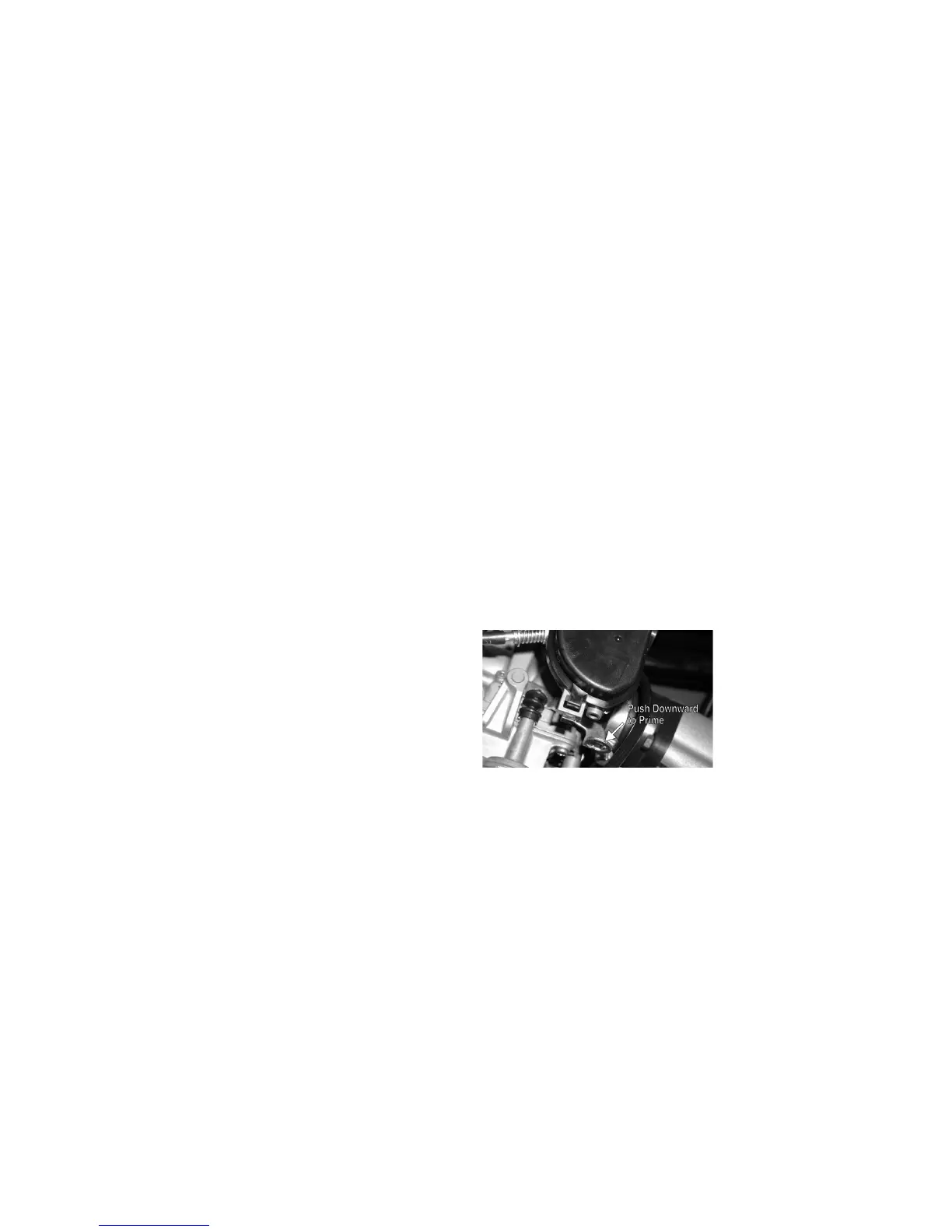
Primer - Cold Start (350)
CF123A
The primer is located on the carburetor.
Depress and release the lever several
times prior to attempting to start a cold
engine.
Gas/Vent Hoses
Replace the gas hose every two years.
Damage from aging may not always be
visible.
On the 350, do not bend or obstruct the
routing of the carburetor vent hose. Make
certain that the vent hose is securely con-
nected to the carburetor and hose holder
and the opposite end is always open.



 To Next Page