24
V 12/15
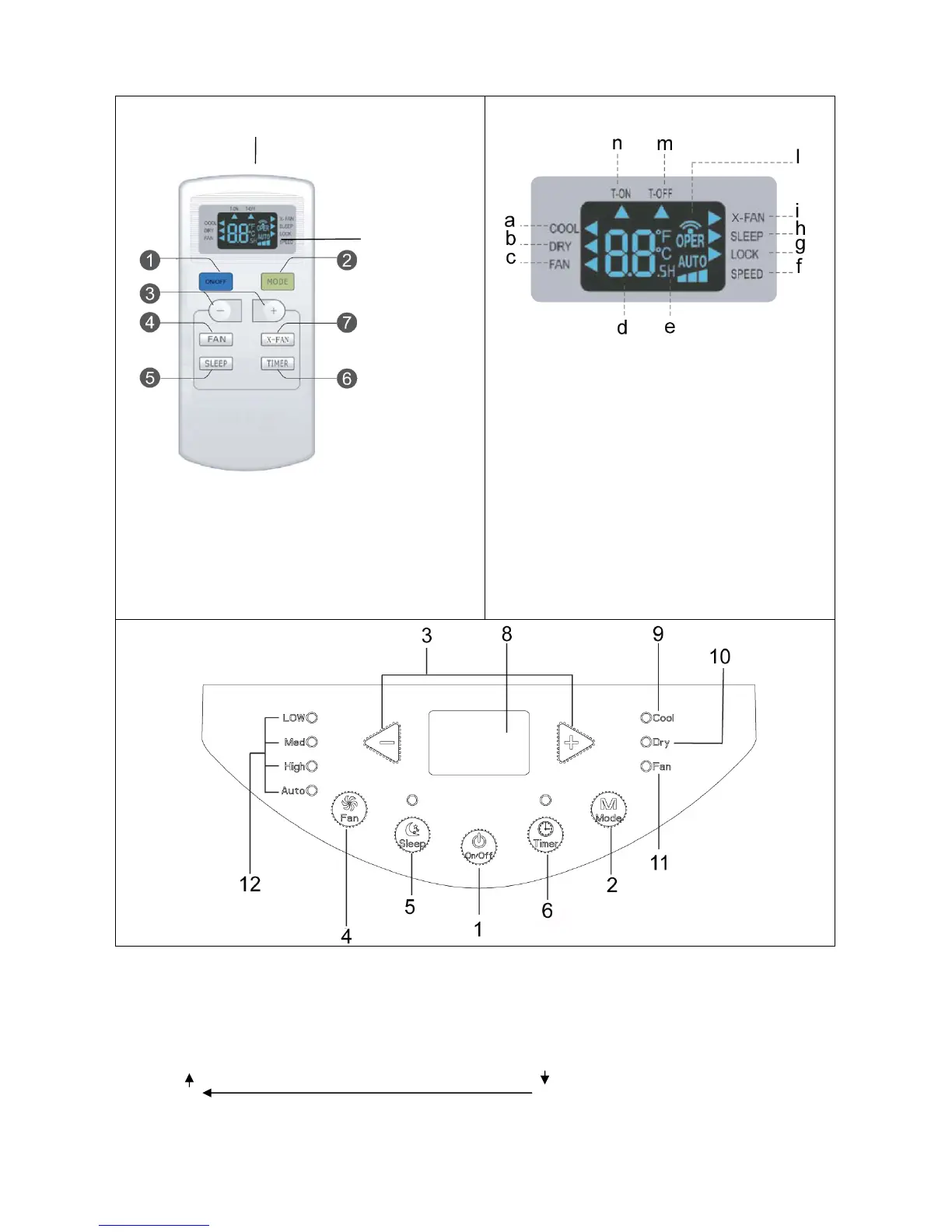
1. ON/OFF BUTTON
2. MODE BUTTON
3. TEMPERATURE AND TIMER ADJUSTMENT
BUTTONS
4. FAN BUTTON - VENTILATION SPEED
5. SLEEP BUTTON
6. TIMER BUTTON
7. X-FAN BUTTON
a. Cooling
b. Dehumidification
c. Ventilation
d. Temperature setting
e. Timer setting
f. Speed setting
g. Lock
h. Sleep mode setting
i. X-FAN mode setting
l. Signal transmission
m. T-OFF off timer
n. T-ON on timer
(1)ON/OFFBUTTON
Press this button to switch the unit on or off.
When switched on, the appliance will start functioning based on its last settings (save function).
(2)MODE SELECTION BUTTON (MODE)
Press this button to select the various operating modes, according to the following sequence:
Cooling (Cool) → Dehumidification (Dry) → Ventilation (Fan Only)
In the COOL mode the display lights up. In the DRY and FAN
modes the display does not light up.
Signal
receiver
Operating display


 To Next Page