ARICO Technology Co., Ltd. -3-
1-3 Faceplate
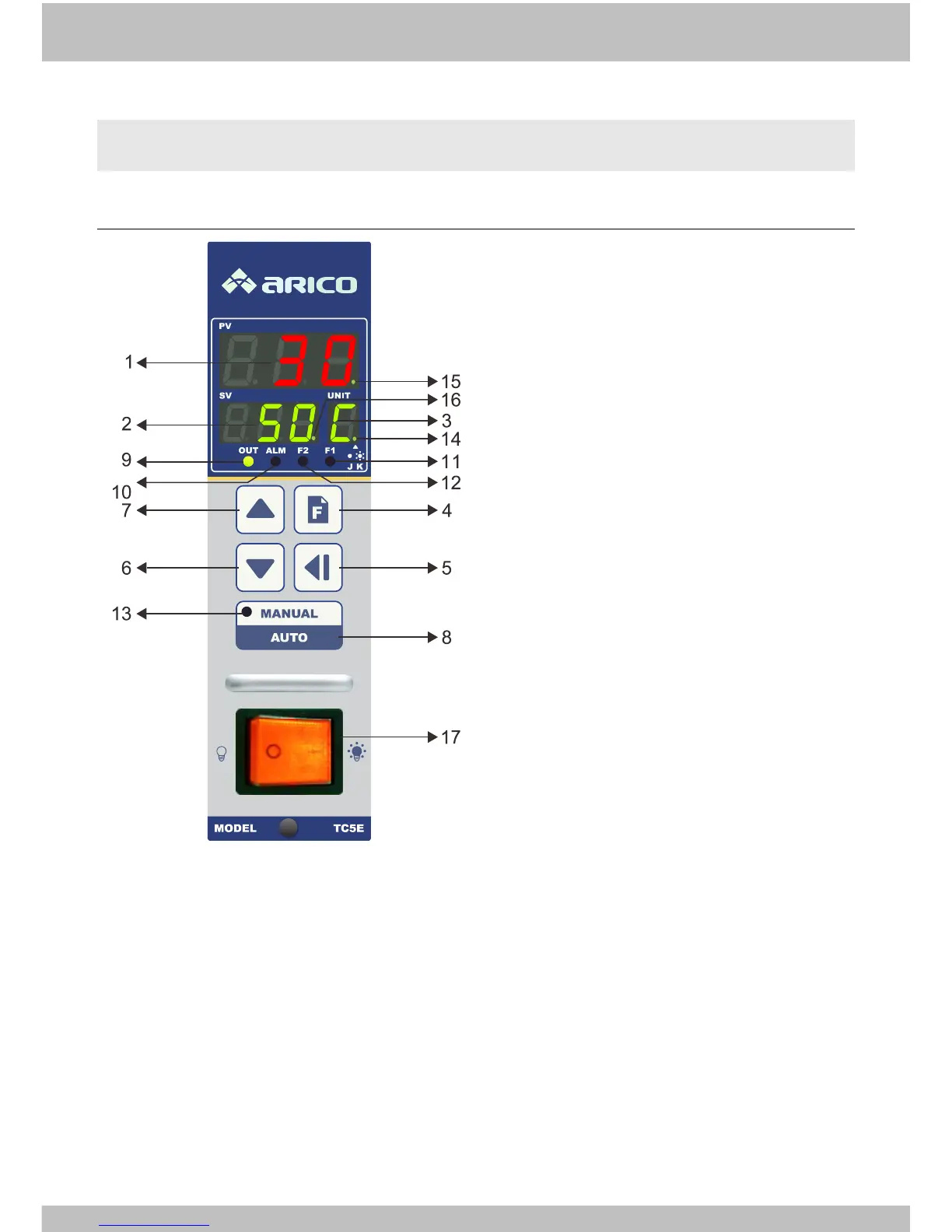
1-3-1 Faceplate description
(1)PV:
○
1
Normal mode: Present value
○
2
Parameter mode: Parameter
name
(2)SV:
○
1
Normal mode: Setting value
○
2
Parameter mode: Parameter
value
○
3
Manual output mode: Manual
output %
(3)UNIT: Temperature or parameter unit
(4)Function key: Parameter level and
parameter select key
(5)Set key: Set enab l e and d igi t al s hift k ey
(6)Decrement key: Setting number
decrease
(7)Increment key: Setting number
increase
(8)Auto/Manual mode key
(9)Output indicator: Light up when
instrument output
(10)Alarm indicator: Light up when
alarm happen
(11)Fuse 1 indicator: Light up when fuse
1 break
(12)Fuse 2 indicator: Light up when fuse
2 break
(13)Manual mode indicator: Light up
when instrument is in manual mode
(14)Sensor input indicator: Light up
when K type was selected
(15)PID tuning indicator: In PID tuning
progress indicator flash
(16)SV2 indicator: Execute SV2
temperature control indicator flash
(17)Power switch


 To Next Page