17
EN
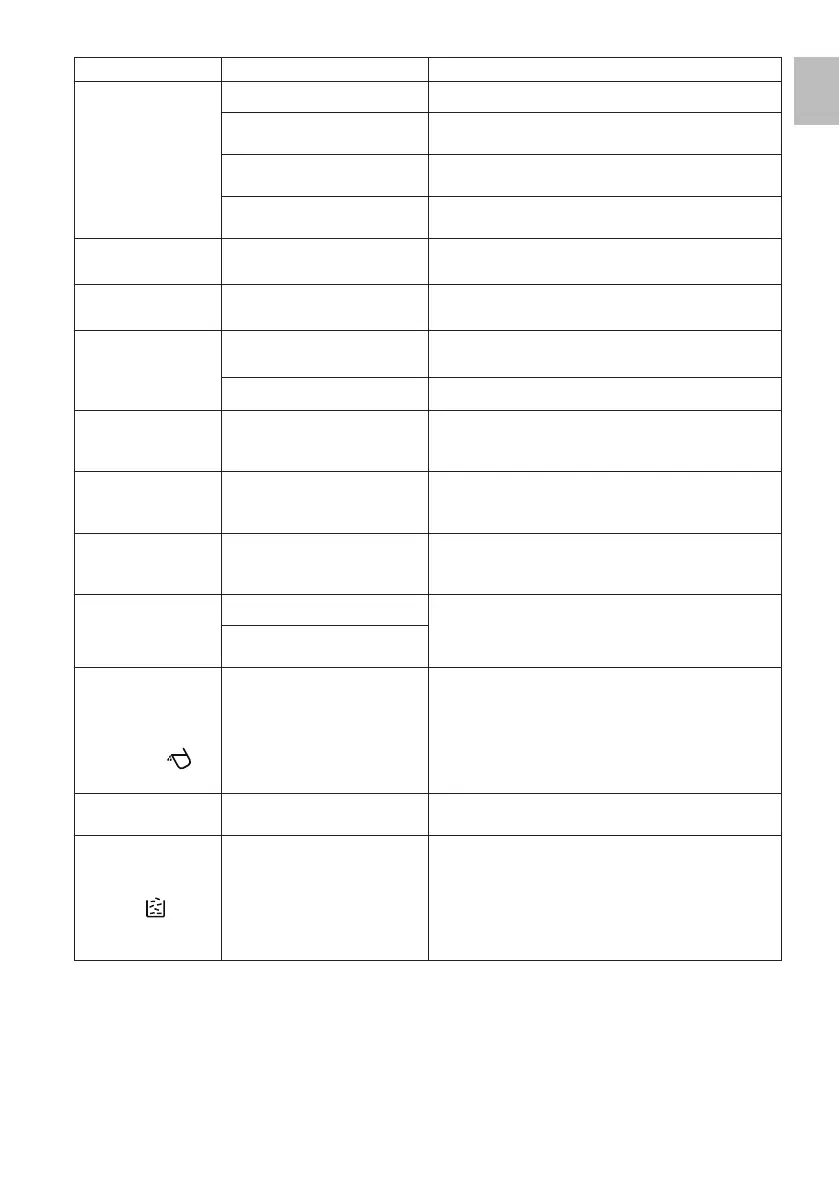
PROBLEMS CAUSES SOLUTIONS
Coffee brewing does
not start or is too slow.
Coffee grinding is too fine. Try using a coarser grinding level.
The water tank (B) is not installed
properly.
Insert the water tank properly by pressing it fully.
There is little water and the pump
suction does not work.
Check the water level in the tank is correct. If needed, fill
the tank with fresh water up to the MAX level.
Empty water tank. Fill the water tank with fresh still water up to the MAX level
(Fig. 6).
The first cup of coffee
does not taste good.
Insufficient amount of ground
coffee into the brewer duct.
Throw away the coffee previously brewed. Prepare more
coffee.
Coffee cream is
missing.
The coffee beans used are not
fresh.
Always use fresh and high-quality coffee beans.
Display buttons do not
respond.
Buttons pressed incorrectly. Press the button in different points around the icon.
The display is dirty. Clean the display using a non-abrasive cloth.
During steam delivery,
the appliance makes
noise.
The noise is due to the water
pump which is working at higher
pressures during steam delivery.
No action needed. Proper operation.
During coffee brewing,
the appliance makes
an unusual noise.
There is little water and the pump
suction does not work.
Check the water level in the tank is correct. If needed, fill
the tank with fresh water up to the MAX level.
Heating of the
appliance is taking too
long.
Excessive amount of limescale. Perform descaling (see paragraph “Descaling”).
Milk is not frothed
enough.
Steam is not enough. Use the provided needle to remove any scale deposits
from the spout of the steam/hot water wand.
The outlet hole of the steam/hot
water wand (M) is clogged.
The water tank is not
installed or the amount
of water in the tank
is not enough but the
indicator light (
)
does not turn on.
The water tank base and seat
are wet.
Dry any water residue at the base and in the water tank
seat.
The drip tray (I) is full
of water.
Coffee grinding is too fine. Try using a coarser grinding level.
The indicator light
indicating the lack of
coffee beans in the
container (
) turns
on but there are still
coffee beans inside.
The coffee outlet hole located
inside the brewer seat is clogged.
Use the provided cleaning brush (F) to remove any coffee
residues from the outlet hole located inside the brewer
seat (Fig. 32).


 To Next Page