ARITERM SWEDEN AB Installation, Operation & Maintenance - 2009.02.18- 15/32
DISPLAY MESSAGES AND POSSIBLE ADJUSTMENTS
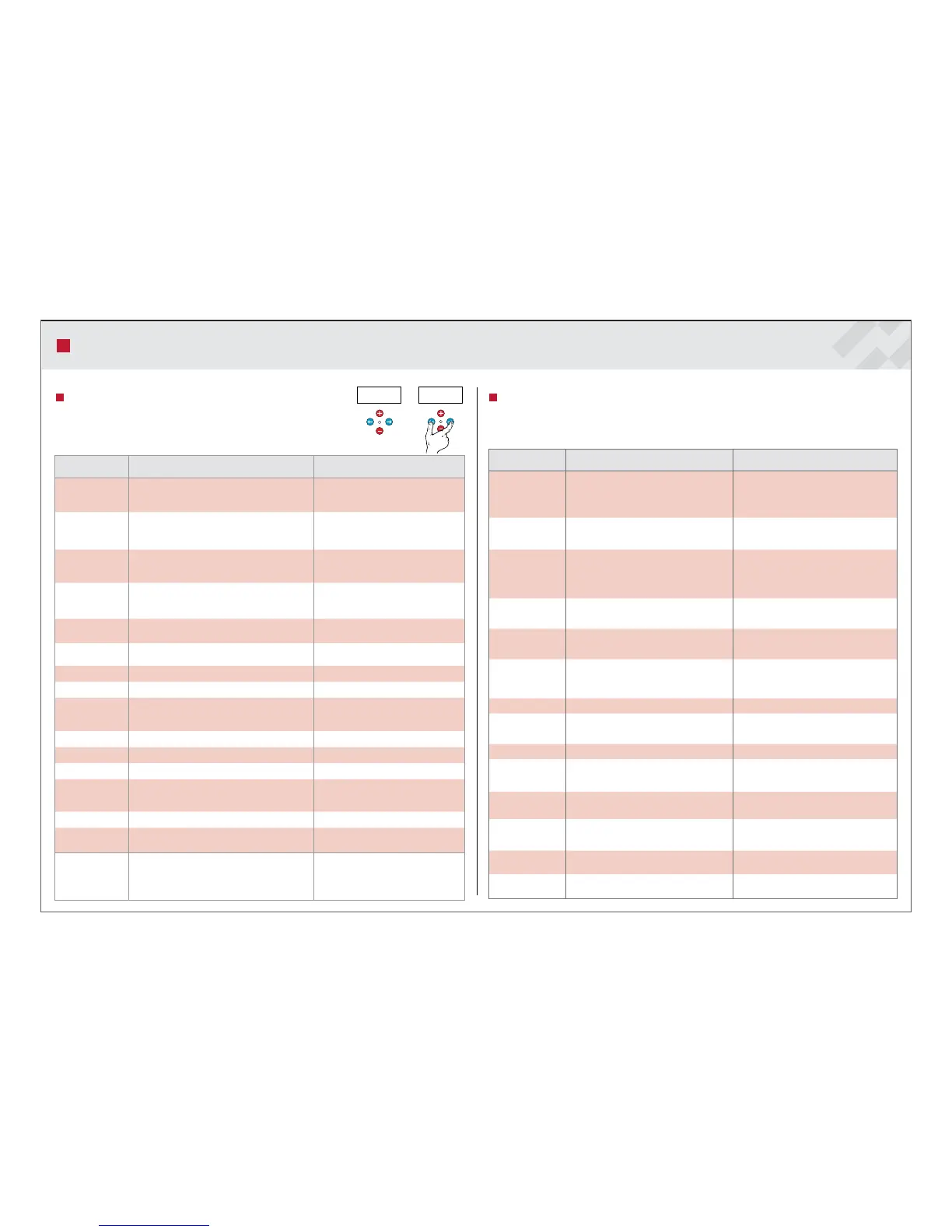
Description of menu 2 – Service
Service: To select this menu press both arrow buttons simulta-
neously for. approx. 5 seconds, then press the arrow button forward
to the next screen.
Text on the
display
Description Setting possibilities
El Step
Displays in brackets the activation of one of the elec-
tric resistors (enabled only in Biomatic+ models).
To activate one of the electric resistors
enter number (3) here by means of the
Plus button.
Start backup heat
15°C
Displays temperature difference from the target tem-
perature, at which the electric resistor is switched on
(enabled only in Biomatic+ models).
Adjustable between 10 and 40°C.
Level monitor
Measured light intensity in percentage.
The set limit value for the light in brackets in per-
centage.
Adjustable between 10 and 90%.
Optical monitor
level
Measured light intensity in percentage.
The set limit value for the light in brackets in per-
centage.
Adjustable between 1 and 98%.
Testing press plus
key
Press the Plus button and then the arrow button to
the right, if you want to view the test values.
Auger external 0/1 manual test.
Enabled by pressing the Plus button, disa-
bled by pressing the Minus button.
Fan 0 to 100% Enabled by pressing the Plus button.
Auger burner 0/1 manual test. Enabled by pressing the Plus button.
Ignition 0/1 manual test.
Enabled by pressing the Plus button.
Note: the test is performed only when the
fan is running.
Alarm 0/1 manual test of the alarm diode. Enabled by pressing the Plus button.
El Step 0/1 manual test (enabled only in Biomatic+ models). Enabled by pressing the Plus button.
Power regulation 0 See the next menu.
English Selection of the display language.
Finnish, Swedish, English, German or Ita-
lian can be selected by pressing the Plus/
Minus buttons.
Address 0 Not used.
Default set vXXXX
Displays the version number of the processor and
enables resetting the factory settings.
The factory settings can reset by pressing
the Plus button.
Diff tank
Hysteresis can be adjusted when using hot water
supplier. If diff tank setting is 'no', holding time
setting can also be 'no', and the burner will
always make cold start. (see also holding time)
No, 1-60˚C
Activated by pressing the plus/minus
keys
Description of menu 3 – Power
Power: In order to activate this menu, select number 5 in the “Service” - “Power” menu by pres-
sing the Plus button. Wait, until the number stops flashing and continue by pressing the arrow but-
ton to the right.
Text on the
display
Description Setting possibilities
Power 0
The menu is activated by entering code 5.
Wait, until the number stops flashing and
continue by pressing the arrow button to the
right.
Burner type *)
12-50 kW *) Note: Don’t change the factory
setting, button -> resets the original settings.
12, 15, 20, 30 and 50 kW
Power high auger Setting of fuel feed to high power (%).
50 to 100%, adjusted by means of the Plus/
Minus buttons.
Note! The maximum value is 90% for 20 kW.
Power high fan Setting of speed of the fan to high power (%).
1 to 100%, adjusted by means of the Plus/
Minus buttons.
Power low auger Setting of fuel feed to medium power (%).
1 to 100%, adjusted by means of the Plus/
Minus buttons.
Power low fan
Setting of speed of the fan to medium power
(%).
1 to 100%, adjusted by means of the Plus/
Minus buttons
Power min auger Setting of fuel feed to low power (%). 20 to 50%, not in use at level 0.
Power min fan Setting of speed of the fan to low power (%).
1 to 100%, adjusted by means of the Plus/
Minus buttons.
Cleaning fan Frequency of cleaning blows 0 to 4 blows/h.
Holding time
Time between maintenance periods for the
glow of embers
20 to 120 minutes, in increments of five mi-
nutes, adjusted by means of the Plus/Minus
buttons.
Auger external time
Setting of operating time for the external au-
ger.
1 to 250 seconds.
Auger external
manual
Setting of operating time for the external auger
in manual operation, see page 13.
3 to 60 minutes, adjusted by means of the Plus /
Minus buttons.
Hot starts Displays the number of hot starts.
Is reset by pressing the Plus/Minus buttons si-
multaneously for 3 seconds.
Cold starts Displays the number of cold starts.
Is reset by pressing the Plus/Minus buttons si-
multaneously for 3 seconds.



 To Next Page