18
Using the Dynamic Positioning
System ((DPS) Clip Sling)
Ensure the spreader bar is securely attached to the
lifter before commencing with the lifting
procedure. ('Lock and Load' combi system jib
only).
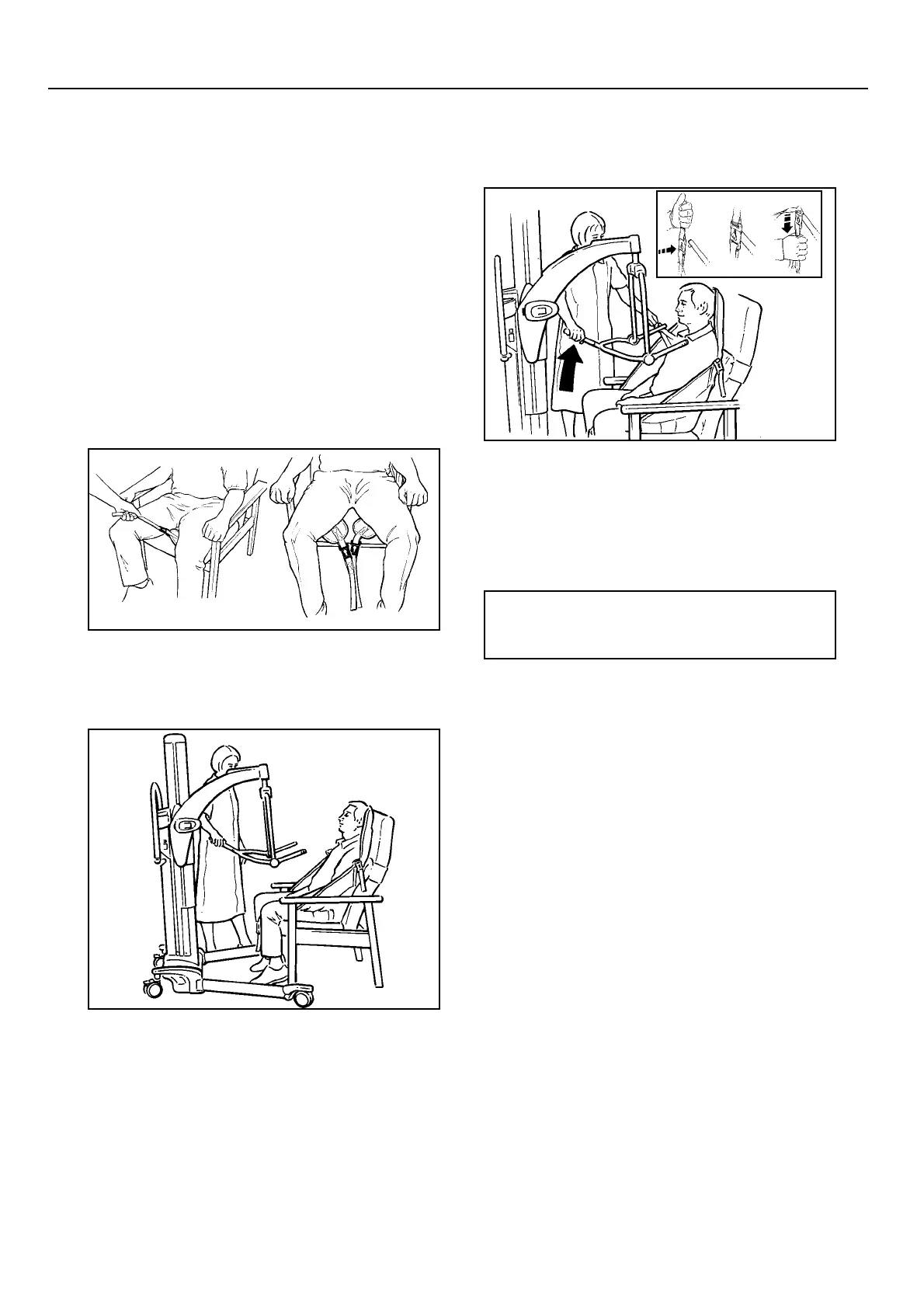
Place the sling around the patient so that the base of
his/her spine is covered, and the head support area
is behind the head. Place each leg piece under the
thigh so that it emerges on the inside of the thigh.
(See fig. 1). You may wish to use the Maxislide to
help in this situation. For reference, see Maxislide
CD-Rom, Technique 24.
Ensure the positioning handle on the spreader bar is
facing away from the patient, and that the wide part
of the spreader bar is at, or just below shoulder
level. (See fig. 2).
Ensure that the Lifter is close enough to be able to
attach the shoulder clips of the sling to the spreader
bar. To accomplish this you may have to put the
patient's feet on, or over the chassis.
Once the Lifter is in position, first attach the leg
clips to the spreader bar; this will stop the patient
slipping down. Then attach the shoulder strap
attachment clips to the pegs on the spreader bar.
(See fig. 3)
If necessary, lower the spreader bar using the
handset control, being careful not to lower it onto
the patient, although if this should happen
inadvertently, there is a built in cut-out device
which will prevent any further downwards
movement. Do not continue to press the handset-
lowering button.
Raise the patient by operating the handset control,
move the lifter away from the chair then carefully
lift the positioning handle until the patient is
reclined in the sling - the head support will now
come into use. This is the most comfortable
position for transportation, as it reduces pressure on
the thighs. The angle of recline can be adjusted for
increased comfort, if the patient is restless, using
the positioning handle.
Before transportation, turn the patient to face the
attendant at approximately normal chair height.
This gives confidence and dignity and also
improves the Lifter mobility.
Fig. 1
P1146a,b
Fig. 2
P1392c
Fig. 3
P1392d, P1002a,b,c
•Note: If the handset button is
released during lifting or lowering,
powered motion will stop immediately.
Lifting from a chair



 To Next Page