11
3 OPERATING INSTRUCTIONS
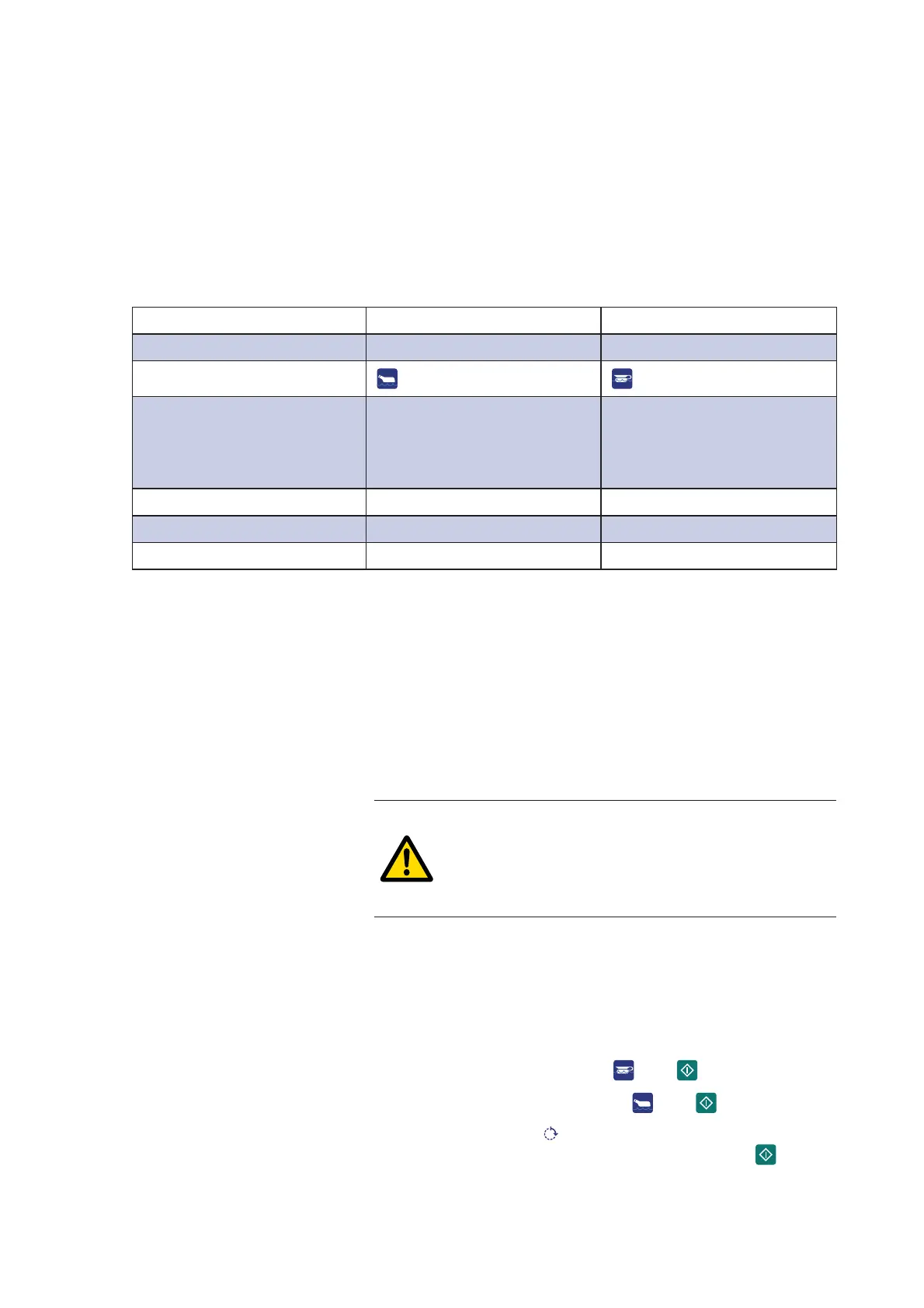
3.1 Program overview
The machine's standard programs are described here. There may
be other programs for the program buttons. A service technician
can change the button functions.
Program Economy Normal
Goods Lightly soiled Normally soiled
Key
Process Cleaning
Disinfection
Ventilation (Option)
End of program
Cleaning
Disinfection
Ventilation (Option)
End of program
Time* 6–10 min 7–11 min
Energy 0.16 kWh 0.16 kWh
Water** 11 l + - 10% 18 l +- 10%
* The process times may vary according to which cooling/
ventilation method is used. They may also vary depending
on water temperature and pressure.
** Including cooling.
3.2 Run a program
3.2.1 Start a program
WARNING!
If the machine has not been used for more than
72 hours, it is necessary to run a program with
an empty chamber before using the machine to
clean goods.
1. Open the door.
2. Place the goods to be cleaned in the holder.
3. Close the door.
4. Select program:
• Normal program: Press
, then .
• Economy program: Press , then .
5. The yellow light at
ÀDVKHVIRUVL[VHFRQGV'XULQJWKLV
period the program can be cancelled by pressing .


 To Next Page