9
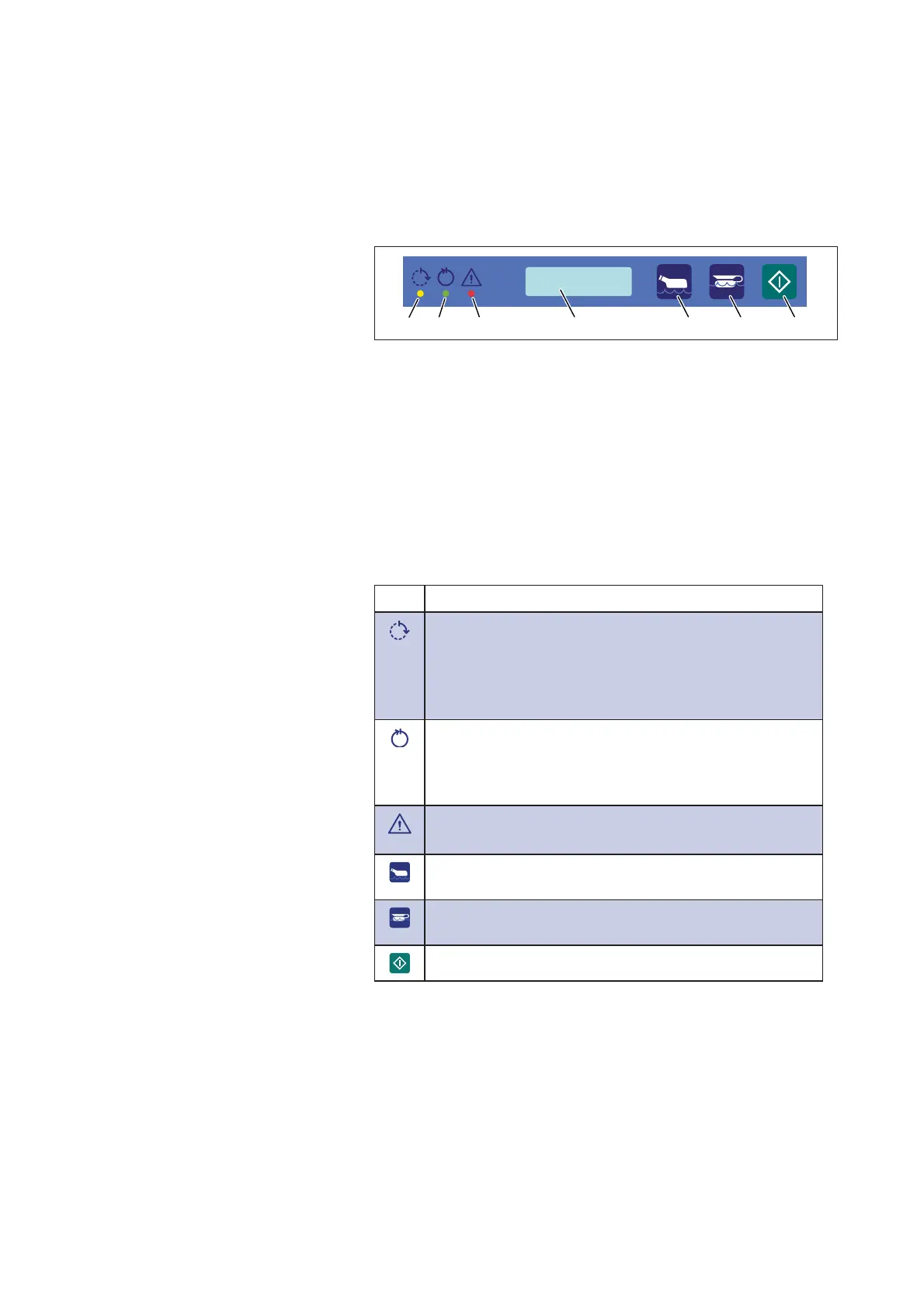
2.3 Control panel
2.3.1 Components
12 3 4 5 6 7
Figure 2. Control panel
1. Yellow: Process
running
5. Economy program
6. Normal program
2. Green: Process
complete
7. Starting a program
3. Red: Error indication
4. Display
2.3.2 Functions
Function
<HOORZÀDVKLQJLQGLFDWRUOLJKW7KHSURFHVVFDQEH
aborted.
Yellow indicator light: The machine is running a program.
The display shows the current status*, for example
the cleaning phase and temperature.
Green indicator light: The program is complete.
The green light goes out when the door is opened and
for a short time a program summary* is shown in the
display, for example maximum temperature.
Red indicator light: Error indication.
The display shows an error message.
Button for choosing economy program for lightly soiled
goods.
Button for choosing normal program for normally soiled
goods.
Button for starting a program.
* The information displayed depends on the display options.


 To Next Page