11
System Failure Lower Override:- (See fig 5) This
can be used in the event of main control failure. In
the unlikely event that the control handset or dual
switch panel fails to operate the lifter, with a patient
still supported by the sling or stretcher, provision
for lowering has been made, using the “System
Failure Lower Override switch”, situated on the
right hand side of the controls console, a green and
white identification label is positioned near the
switch, for quick and easy recognition. If pressure
is released from the switch during use, lowering
will stop.
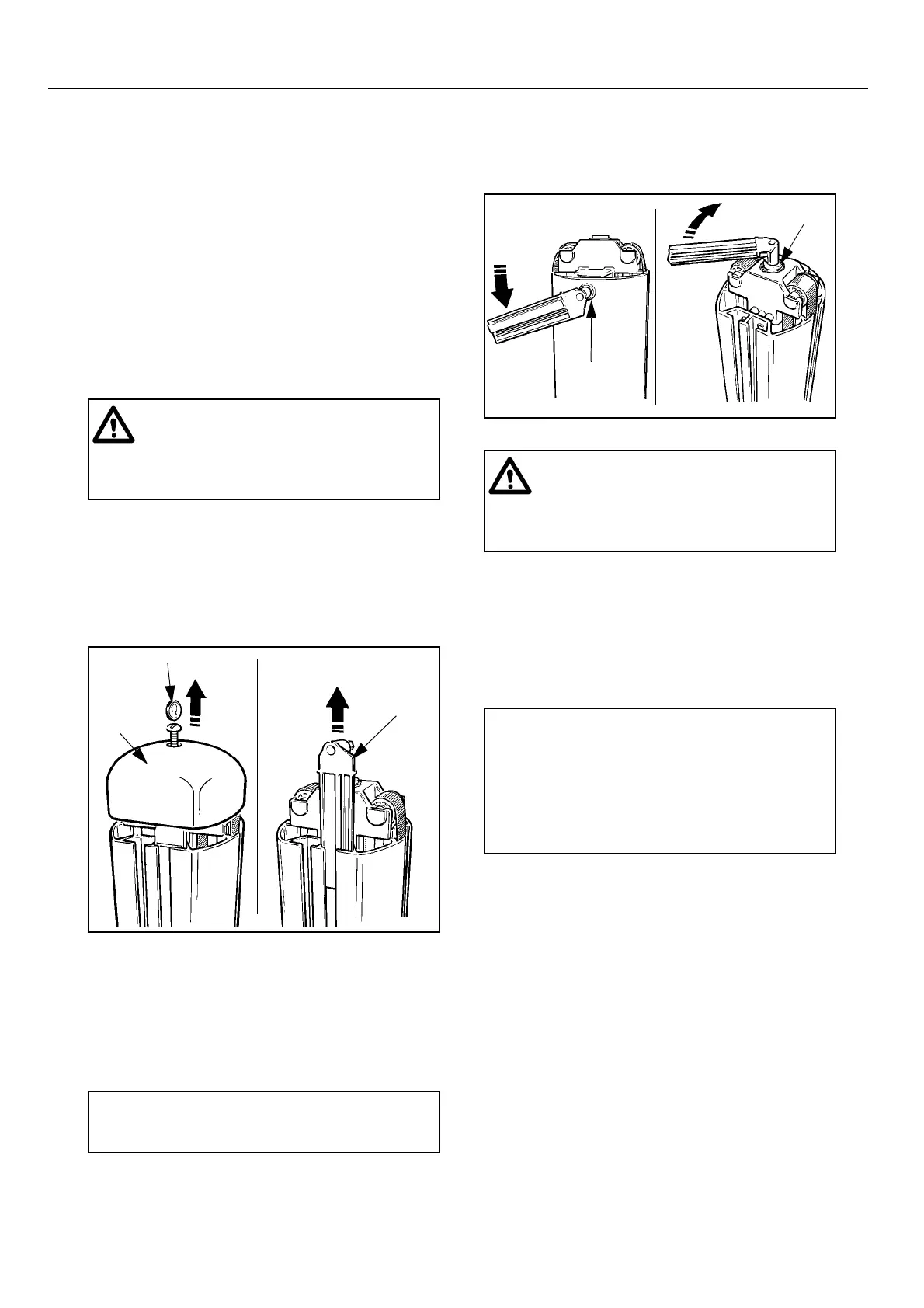
System Failure Wind Down Facility:- (see Figs.
6 & 7) If the electrical power fails completely due
to battery power loss or other electrical
malfunction, the jib can be lowered, by firstly
removing the battery pack, then using a coin or
screwdriver slacken and remove the screw that
retains the mast top cover. Slightly lift the rear side
of the top cover approximately 5 mm (3/16 in),
slide the cover forwards then lift it off the mast.
Identify and remove the hexagon wrench located
inside the mast. Using the wrench slacken the shaft
lockscrew located at the top front of the mast (see
fig. 7c), turn it 3 full turns anti-clockwise. Identify
the hexagonal hole in the shaft centre inside the
mast (see fig. 7d) and using the wrench turn the
shaft clockwise to lower the patient.
Hold the hexagon wrench securely into the shaft
and do not release hand contact with the wrench to
ensure control is maintained during the lowering
procedure.
Once the patient has been lowered and removed
from the lifter ensure the components are re-
assembled by reversing the above procedure.
If the system failure lower override switch or wind
down facility has to be operated the lifter must then
be withdrawn from use immediately and the ARJO
Service Department or their appointed distributor
contacted.
System Cut-Out Switch:- (See fig 5) If the lifter
functions fail to operate when pressing the buttons
on the control handset or dual switch panel.
Check that the “green” reset button is pressed in
and check that the battery pack is in a good state of
charge, if the lifter still fails to operate, check the
system cut out switch, situated on the right hand
side of the controls console above the lower
override switch. If the cut-out has operated, the
switch will protrude from its mount, press the
switch in to reset.
Warning: The Lower Override switch
will only operate while the green reset
button is in. Only use this switch in an
emergency, do not use it for normal
function lowering.
Fig. 6
P1398a,b
A
B
Top
Cover
Wrench
Screwdriver/Coin
•Note: One full clockwise rotation of
the shaft lowers the mast jib by 10mm (3/
8 in).
Fig. 7
P1398c,d
C
D
Shaft
lockscrew
Shaft
Warning: If the mast is in a high position
and the wind down facility has to be
utilized always ensure that suitable and
safe measures are taken to gain access to
the top cover.
•Note: To enable the shaft lockscrew
to be tightened three full turns the shaft
may have to be rotated slightly to make
alignment possible, this is aided by
identifying the alignment mark on the top
of the shaft and then rotating the shaft
until the mark aligns with the axis of the
lockscrew.
Product Description/Function


 To Next Page