18
• Start a program with the machine empty and check that:
yellow light flashes for 6 seconds.
yellow light on
comes on.
- the temperature rises continuously until the cooling
phase begins.
SDXVHIRUKHDWLQJXSGRHVQRWH[FHHGDERXWPLQ
WKHWHPSHUDWXUHUHDFKHV&
the green lamp at
lights up and the display shows U7
(hot goods).
ZKHQWKHGRRULVIXOO\RSHQFKHFNPD[WHPSHUDWXUH
Typhoon
2 4
5
6
3
1
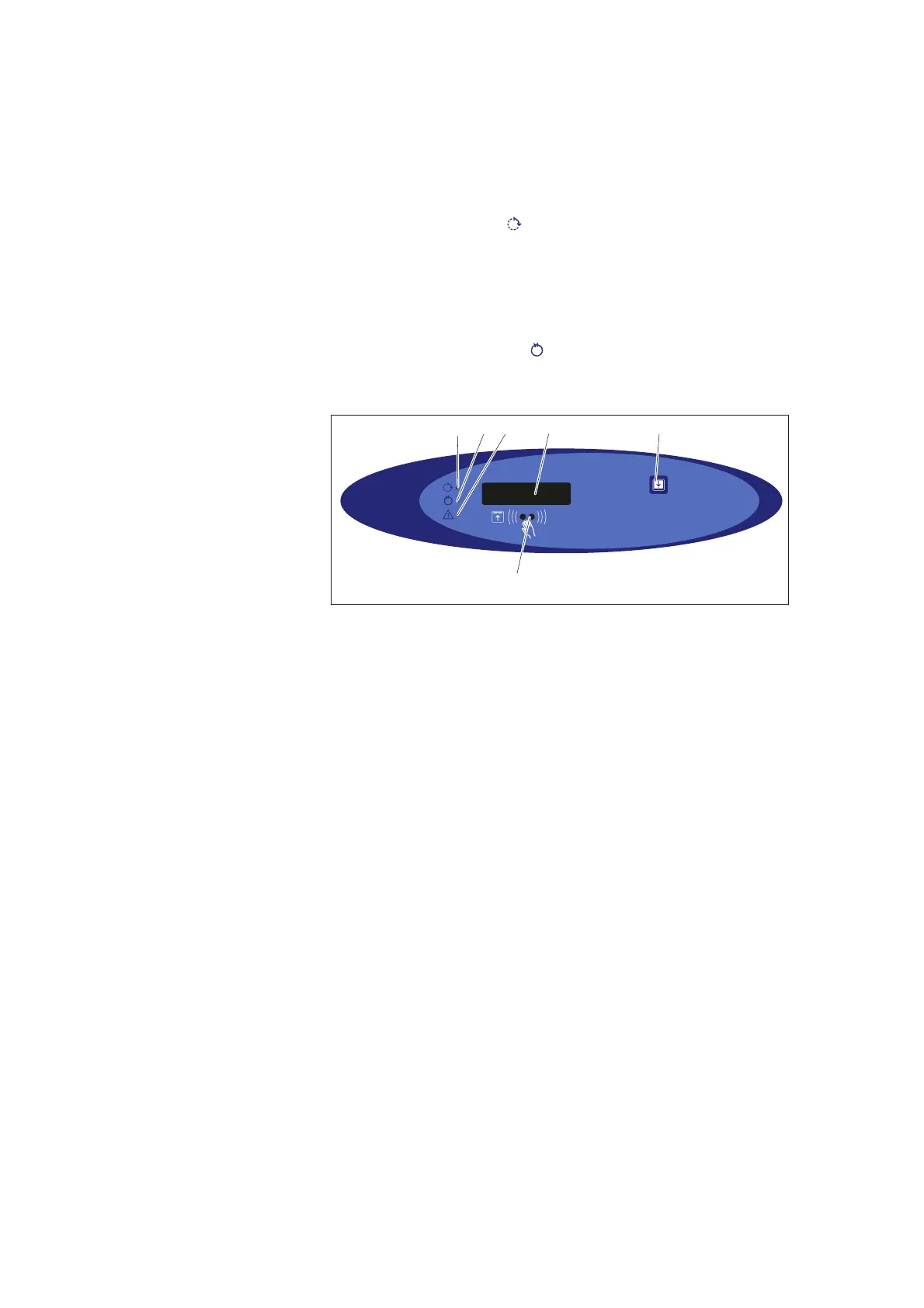
Figure 10. Control panel
1. Yellow: Process running
2. Green: Process complete
3. Red: Disinfection not achieved or other error code F
4. Display
5. Open/close door.
6. Sensor to open/close door and to start preselected
program
• The machine has a dosing system for descaler and possibly
for processing agent (optional). Start a standard program
and check that the disinfector consumes the correct amount.
For descaler, the amount per program is usually about 1.5 -
4.0 ml (follow the supplier’s recommendations). Check the
service program in the Technical Manual for checking and
adjusting the dosage amount.
Check that the door can be opened and closed with the
sensor.
Check that there are no water leaks. If necessary,
tighten connections and pipe couplings.


 To Next Page