installation &
operating instructions
ips 4000 controller - Integrated pumping
system for variable primary applications
7
delta Indicates how far from the control curve the
pump(s) are operating. The ips regulates the
pump speed to achieve an error of zero
ips status Indicates whether the ips is on or off
alarm A red bell indicates an Alarm in the system
bypass valve Indicates valve position in percentage (100%
means fully open)
minimum flow Indicates the rated minimum chiller/boiler
flow. Updates dynamically based on number
of chillers/boilers enabled
maximum flow Indicates the rated maximum chiller/boiler
flow. Updates dynamically based on number
of chillers/boilers enabled
Buttons
Pump 1 to 6 icon Touching a pump icon brings up the
corresponding pump control screen
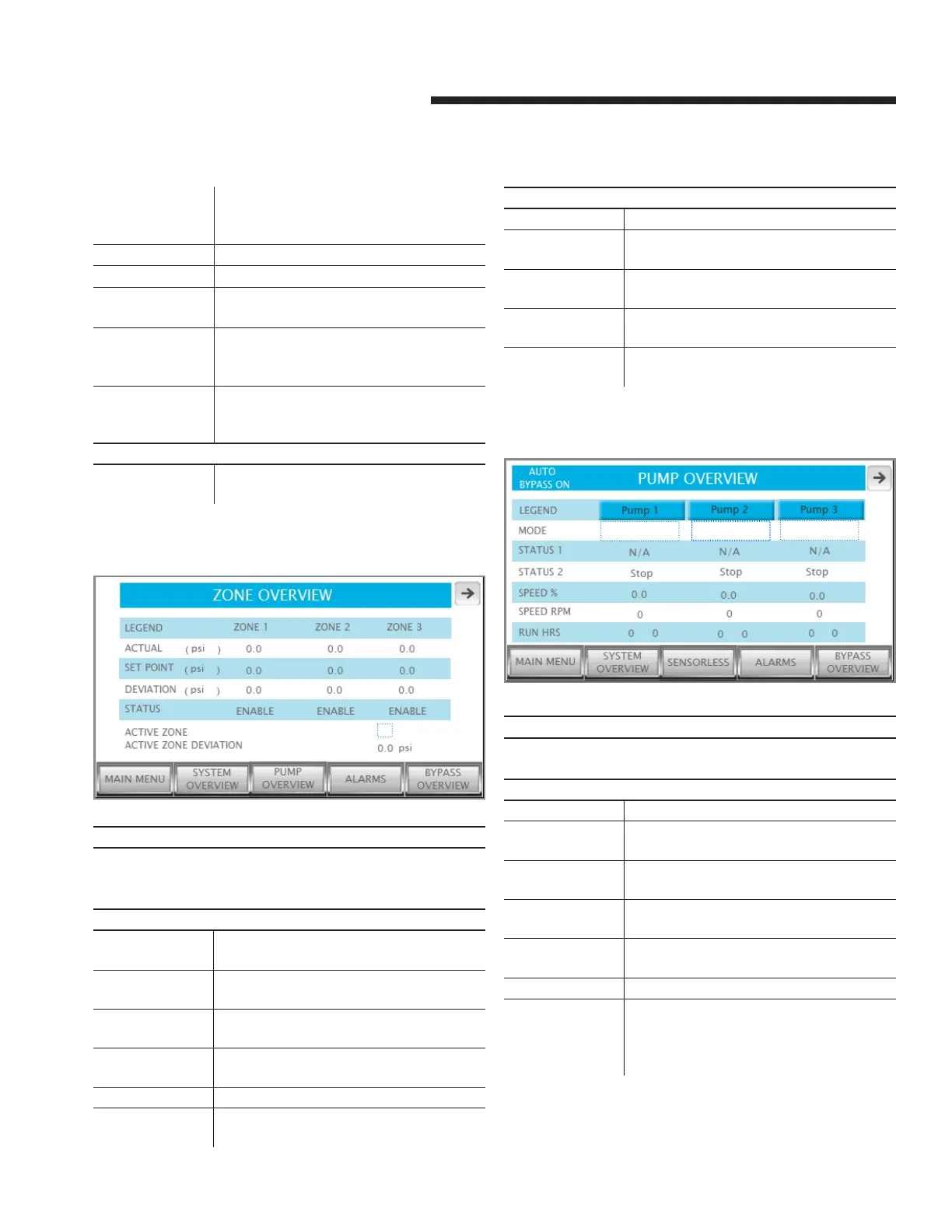
3.1.2 zone overview
Description
Shows an overview of the system zones. If there are more than
3 zones, use the grey arrows to scroll. This screen is not avail-
able if the vfd type is ivs sensorless
Data
actual Indicates the present value of the zone
sensor in the selected units
setpoint Indicates the setpoint of the zone in the
selected units
deviation Indicates the zone deviation in the
selected units
status Indicates whether the zone is enabled
or disabled
active zone Indicates which zone is assigned as active
active zone
deviation
Indicates the active zone deviation in the
selected units
Buttons
main menu Navigates to the main menu
system
overview
Changes the current screen to System
Overview
pump overview Changes the current screen to Pump Over-
view
alarms Shows the alarm screen. If there is an active
alarm, this button turns red
bypass overview Changes the current screen to Bypass
Overview
3.1.3 pump overview
Description
Allows monitoring pump information. If there are more than 3
pumps, scroll using the arrows on the top corners
Data
Pump 1 to 6 mode Shows each pump mode: Hand, O or Auto
Pump 1 to 6
status 1
Shows each pump duty: Duty1, Duty2, Duty3,
Duty4, Duty5, Duty6 or Stand-by
Pump 1 to 6
status 2
Shows if the pump is running or stopped
Pump 1 to 6
speed %
Shows each pump speed in percentage
Pump 1 to 6
speed rpm
Shows each pump speed in rpm
Run hrs Shows the total pump run time in hours
auto bypass on If the pumps are in auto bypass, the auto by-
pass on label appears on the top left corner.
Touching this label brings up the auto bypass
reset screen


 To Next Page