installation &
operating instructions
ips 4000 controller - Integrated pumping
system for variable primary applications
13
4.0 setup displays
The setup displays allow viewing, modifying, saving and
restoring system parameters. There are 3 levels of password
protected access:
Level Actions allowed
Level 0 • View only
Level 1 • Modify all parameters
• Restore previously saved default values (factory
defaults); expect Pump pid and bas parameters
Level 2 • Modify all parameters
• Save changes
• Restore previously saved default values
(factory defaults)
The following sections list and describe each setup screen.
Only Level 2 screens are shown, however each level has the
same screens with their respective level restrictions.
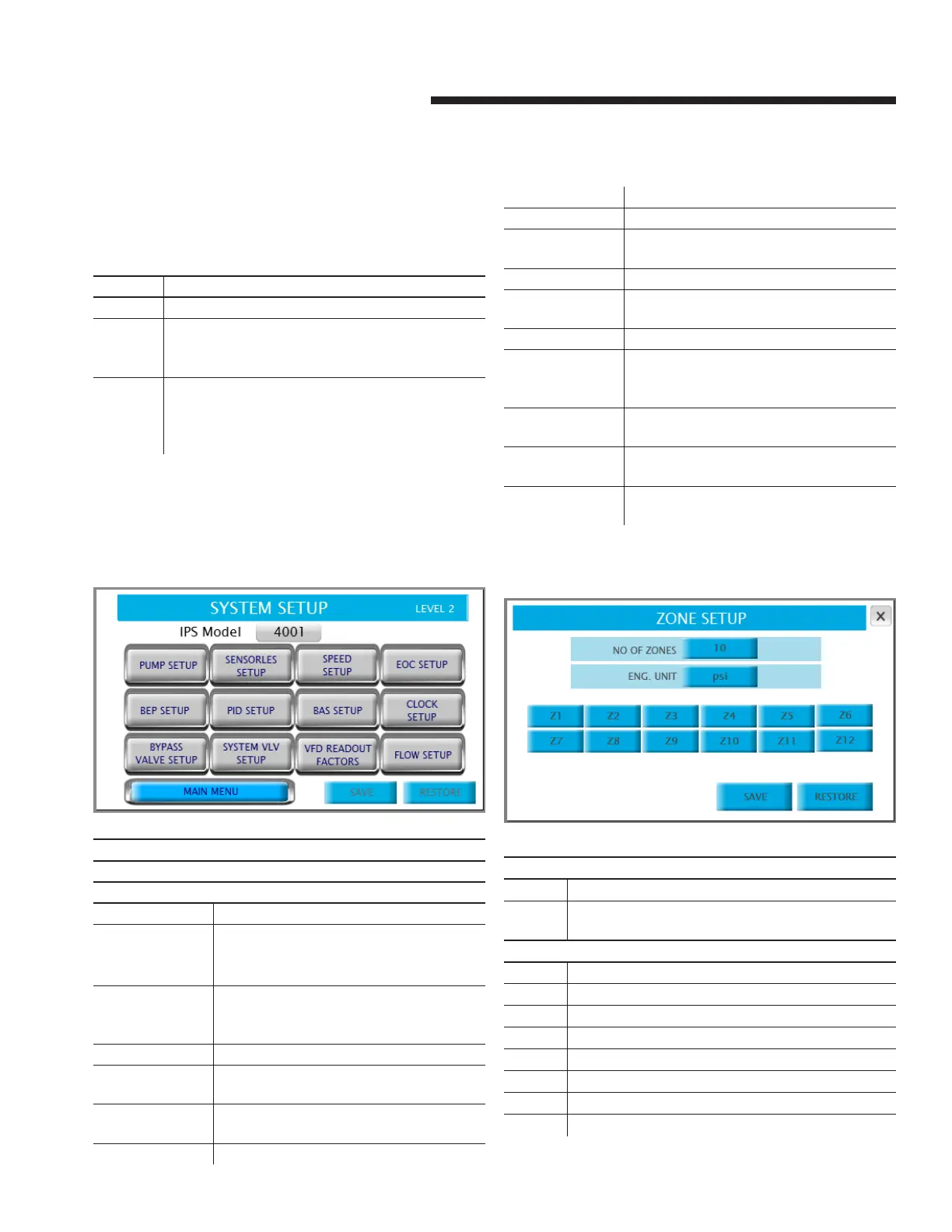
4.1.0 level 2 setup menu
Description
This screen allows navigation to each of the setup screens
Button
pump setup Navigates to the pump setup screen
zone setup Navigates to the zone setup screen. Not
available if the vfd type on pump setup
screen is ivs sensorless
sensorless setup Navigates to the sensorless setup screen.
Not available only if the vfd type on pump
setup screen is ivs sensorless
speed setup Navigates to the pump speed setup screen
eoc setup Navigates to the end of curve (eoc) protec-
tion screen
bep setup Navigates to the duty speed staging setup
screen
pid setup Navigates to the pid setup screen
bas setup Navigates to the bas setup screen
clock setup Navigates to the clock setup screen
bypass valve
setup
Navigates to the bypass valve setup screen
system vlv setup Navigates to the system valves setup screen
vfd readout
factors
Navigates to the vfd readout factors setup
screen
flow setup Navigates to the flow setup screen
main menu Returns to the main menu. User must login
again to return to the level 1 & level 2 setup
menu
save Saves all the current setup parameters as
default. Only available in level 2
restore Restores all the default parameters as de-
fault. Only available in level 1 & 2
ips model Selects the ips model: 4001, 4002 or 4003.
Only available in level 1 & 2
4.1.1 zone setup
Parameter: no of zones
Range: Function:
1-12 Indicates how many zones will be used to control the
system, typically one zone per area of the building
Parameter: eng. unit
Options: Function:
psi dp sensors in psi are used
ft dp sensors in ft are used
kPa dp sensors kPa psi are used
m dp sensors in m are used
bar dp sensors in bar are used
°f Temperature sensors in °f are used
°c Temperature sensors in °c are used


 To Next Page