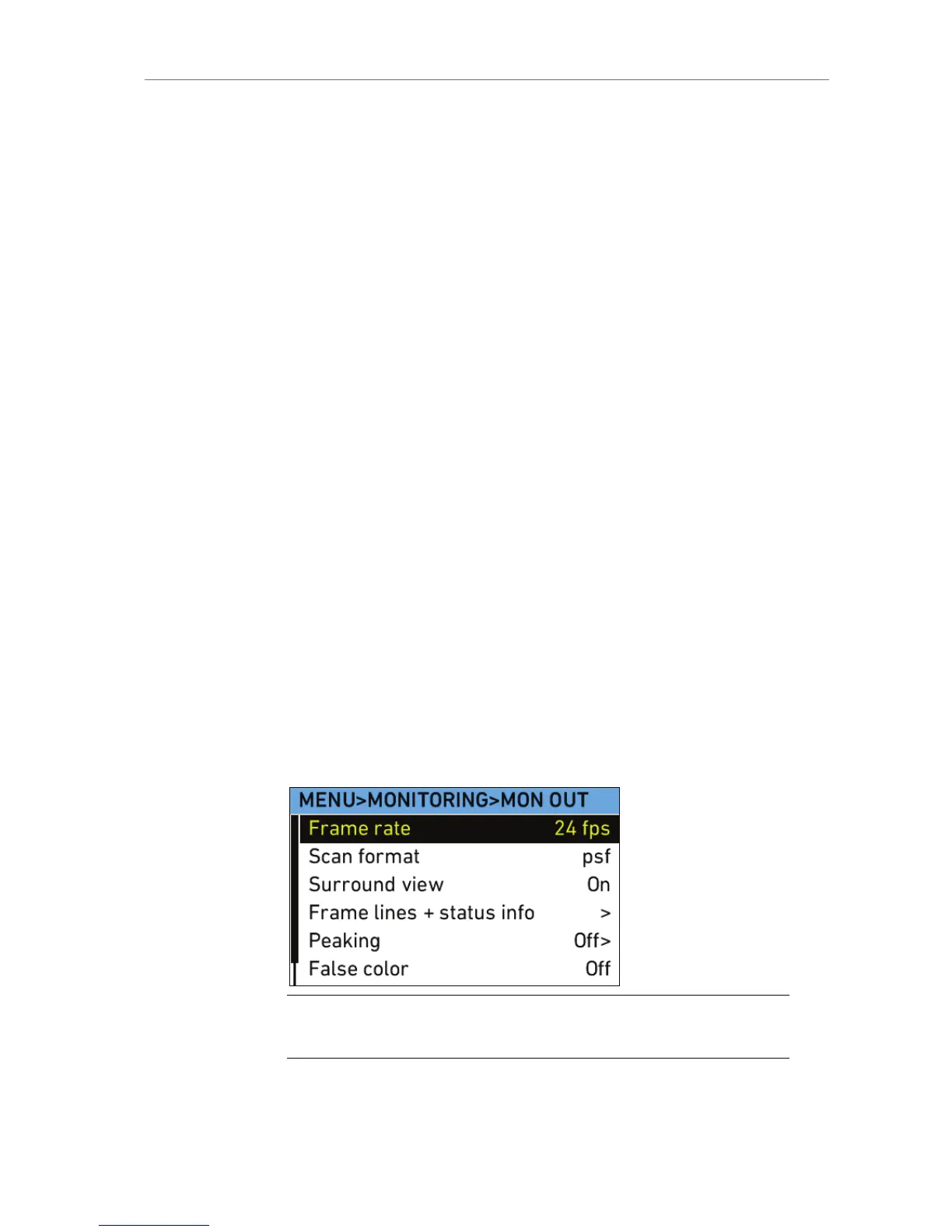
Surround view Select to set Surround view on the MON OUT On
or Off. When set to on, the additional pixels
outside the recorded image area on the ALEXA’s
ALEV III sensor are displayed, allowing the
operator to see outside the recorded image and
keep unwanted objects, such as microphone
booms, out of the shot. To view only the recorded
image, set Surround view to off.
Frame lines +
status info
Select to set frame lines, surround mask, center
mark and status info overlays to On or Off on the
MON OUT.
Peaking Select to set peaking on the MON OUT to On or
Off, and the strength of peaking to low, medium
or high.
False color Select to activate the false color display on the
MON OUT. The false color display is an exposure
tool that overlays the image with color coding to
highlight areas with significant luminance values.
Anamorphic
desqueeze
Select to set Anamorphic desqueeze to 1.3x, 2.0x
and 2.0xmag (only available if a license for
anamorphic desqueeze is active in the camera).
The desqueeze corrects the image for 1.3x and
2.0x anamorphic lenses. With 2.0x lenses, the
user can choose between viewing the full sensor
image (2.0x), or only the relevant image area
(2.0xmag) where left and right sides of the MON
OUT image outside the 2.39 aspect area are
cropped.
Only available if a license for anamorphic desqueeze
is active in the camera.
Note: Only use double shielded HD-SDI cables for monitoring to ensure error
free data transmission!









 To Next Page