The file formats, file naming and directory structure that will be
presented by the VFS are fully configurable through the Codex Platform
software. This makes the VFS a highly flexible tool for providing exactly
the material you require, when you want it, without redundant
processing and storage overhead on your drives.
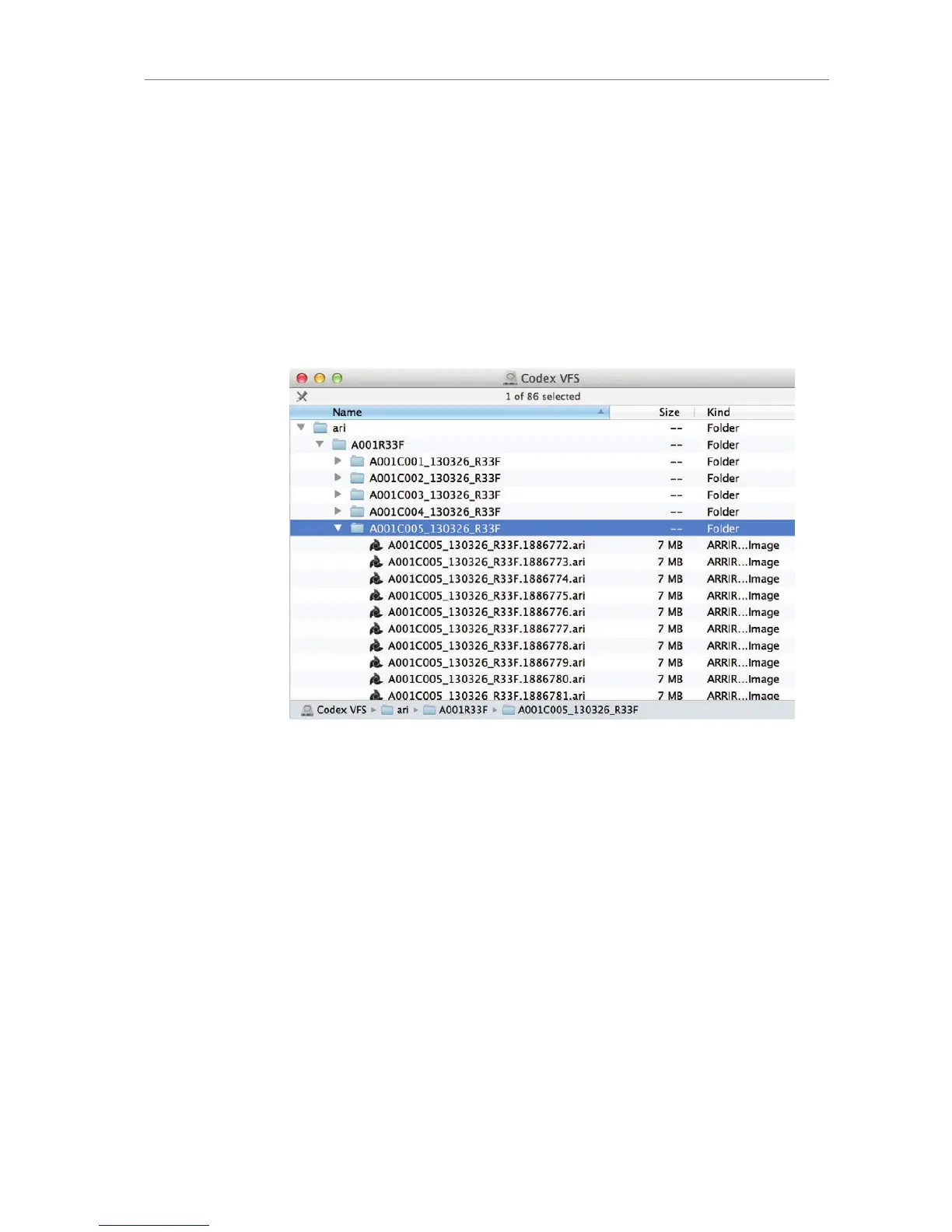
The default VFS configuration for the output of only ARRIRAW files
uses the following file path:
<Extension>/<Roll>/<Shot>/<Shot>.<TC Frames>.<Extension>
For detailed instructions on the Virtual File System configuration,
please visit http://www.codexdigital.com/support/media-stations and
download the Codex VFS Guide.
Figure 76: Example of an XR Capture Drive using the VFS default file
structure in Mac OS X
File naming scheme
ALEXA automatically names files as they are created on the recording
media. While it is possible to change the file names later on a
computer, it is not recommended, as the ALEXA naming scheme has
been developed to minimize the risk of duplicate file names.
The file name consists of 6 parts:
Camera Index: One character, A-Z. User assignable, should
match the camera unit. For example, the camera index A can be
assigned to the A camera, and B to the B camera.
Reel Counter: 3 characters, 001-999. Auto-assigned to each
drive/card, automatically advanced by one for each new
drive/card. The user can change the counter for the next reel.
This should only be done under special circumstances, such as
after changing the camera body in the middle of a shoot.









 To Next Page