CAM LEVEL
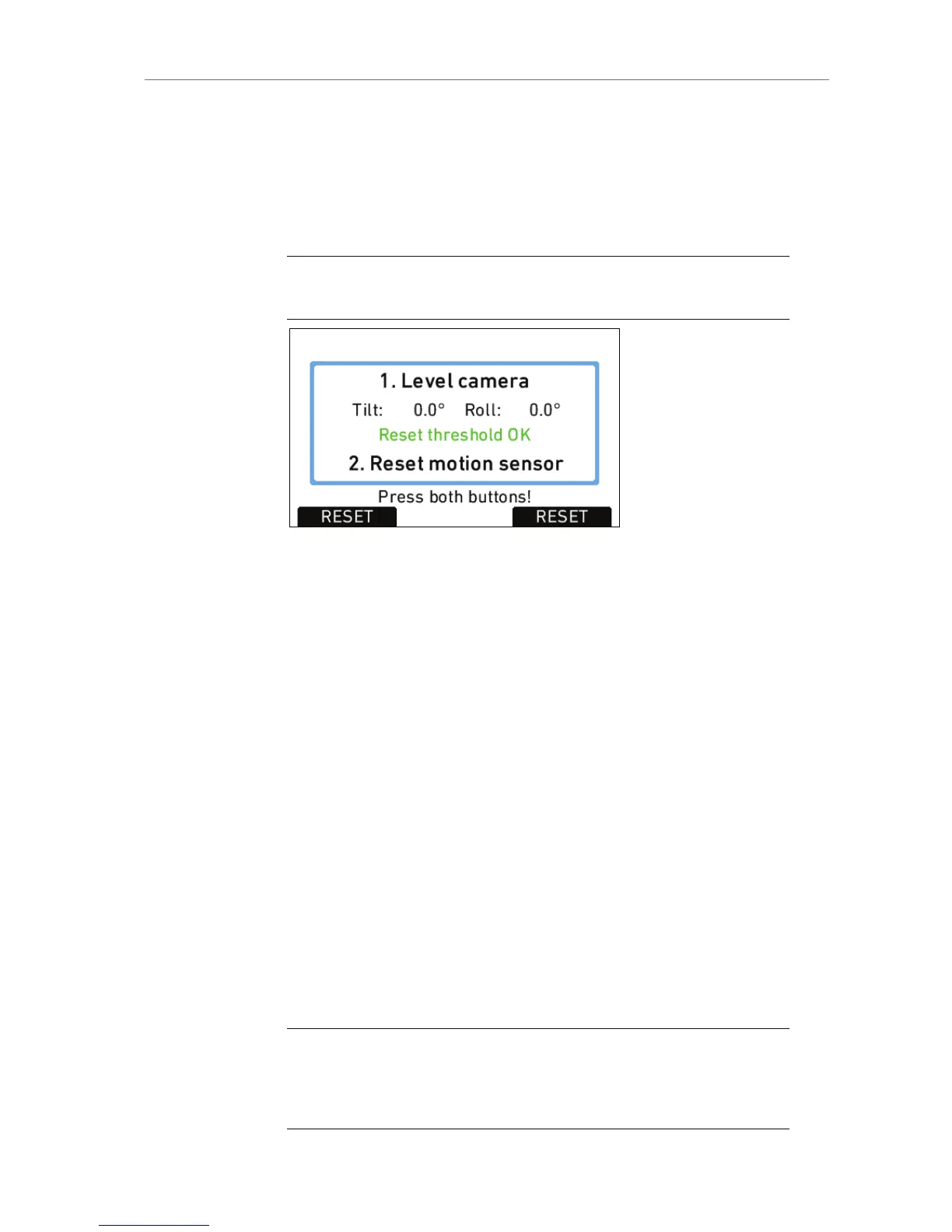
Shows the tilt and roll of the camera in degrees as measured by the
camera's position sensor. This sensor can be reset if it appears to have
an offset. Press the CAM LEVEL screen button to access the reset
screen. By pressing the two lower outer screen buttons simultaneously,
the sensor is reset.
Note: The sensor can only be reset while both axis are within a threshold of +/-
10 degrees around 0.
Figure 82: Motion sensor reset screen
LENS DATA
Shows the type of LDS lens connected and the LDS status. The LENS
DATA screen button leads to the LDS screen, where lens type, current
focal length, iris, focus distance and close and far point of depth of field
are shown.
The OPTIONS screen button opens the LDS options screen, where the
following parameters can be set:
Lens distance unit
Metric
Imperial
Default unit (as provided by the
lens)
Note: When setting LDS mount to Off, it is possible to use a lens table from the
Lens Data Archive (see below) with an LDS lens, and ignore data coming from
the lens itself. To re-enable the LDS mount, set the parameter to On, detach the
lens and re-attach it.









 To Next Page