VAP3400/3402 802.11ac Wireless Video Access Point • User Guide 1
Installation and Overview
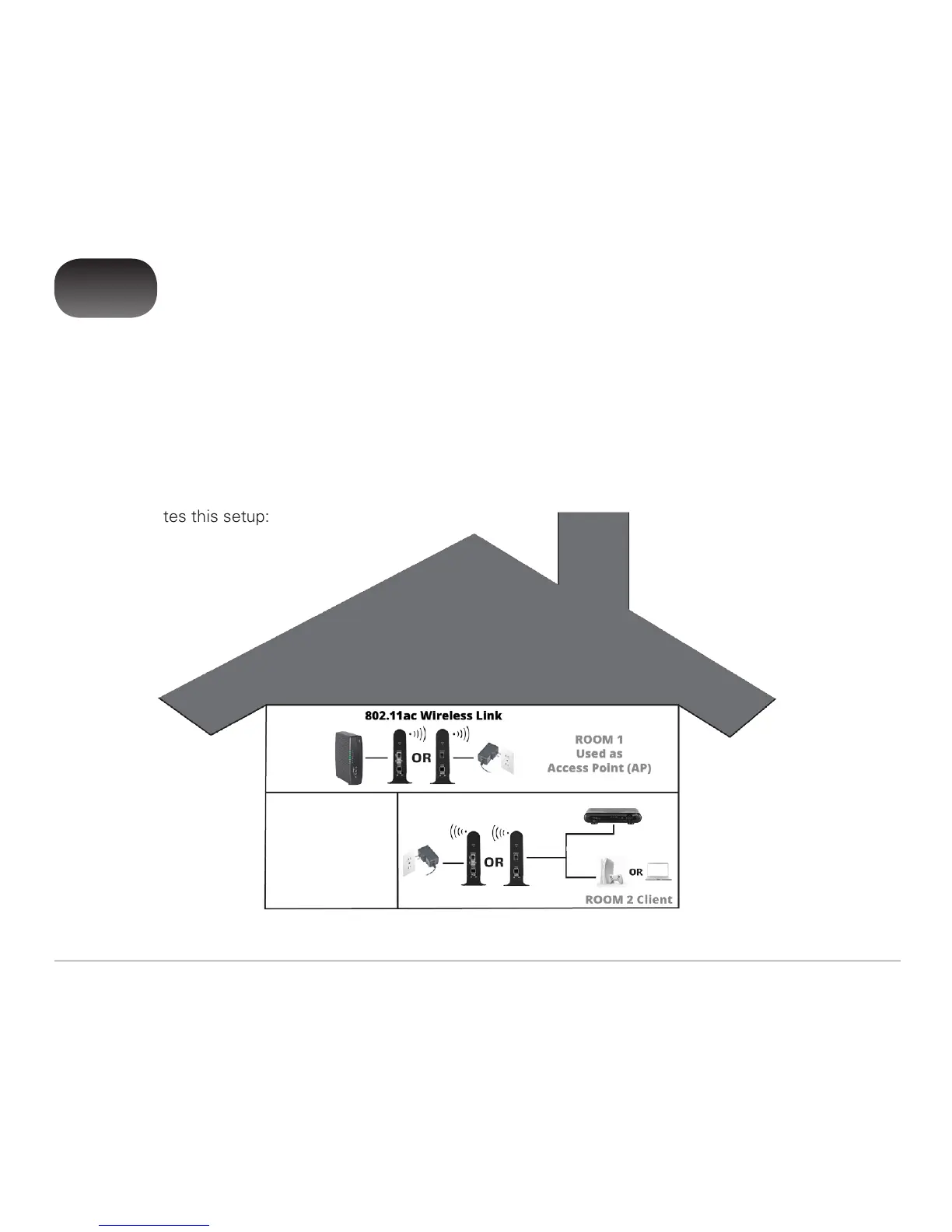
Note for ROOM 2 Client:
Always connects to a Set Top Box (1 and 2 port) and (optionally) one additional device (2 port only).
1
The VAP3400/3402 enables you to transmit multiple standard- and high-definition video streams throughout your
home wirelessly. You can enjoy a full range of video services and applications without having to run wires, lay
cables, or drill holes. The VAP3400/3402 uses one-button, Wi-Fi Protected Setup (WPS) technology to ensure
easy, reliable installation.
The VAP3400/3402 operates via two (or more) integrated units. You’ll dedicate one unit as the Access Point
and the other unit (or units) as its Client. When you connect a VAP to your home gateway, it auto-configures as
an Access Point. The Access Point streams content to the Client, which you’ll connect to a set-top in a different
location in your home. (The Client auto-configures as well when you connect it to the set-top.) The following
graphic illustrates this setup:



 To Next Page