2. Unpacking operation
2.1 Product installation
04
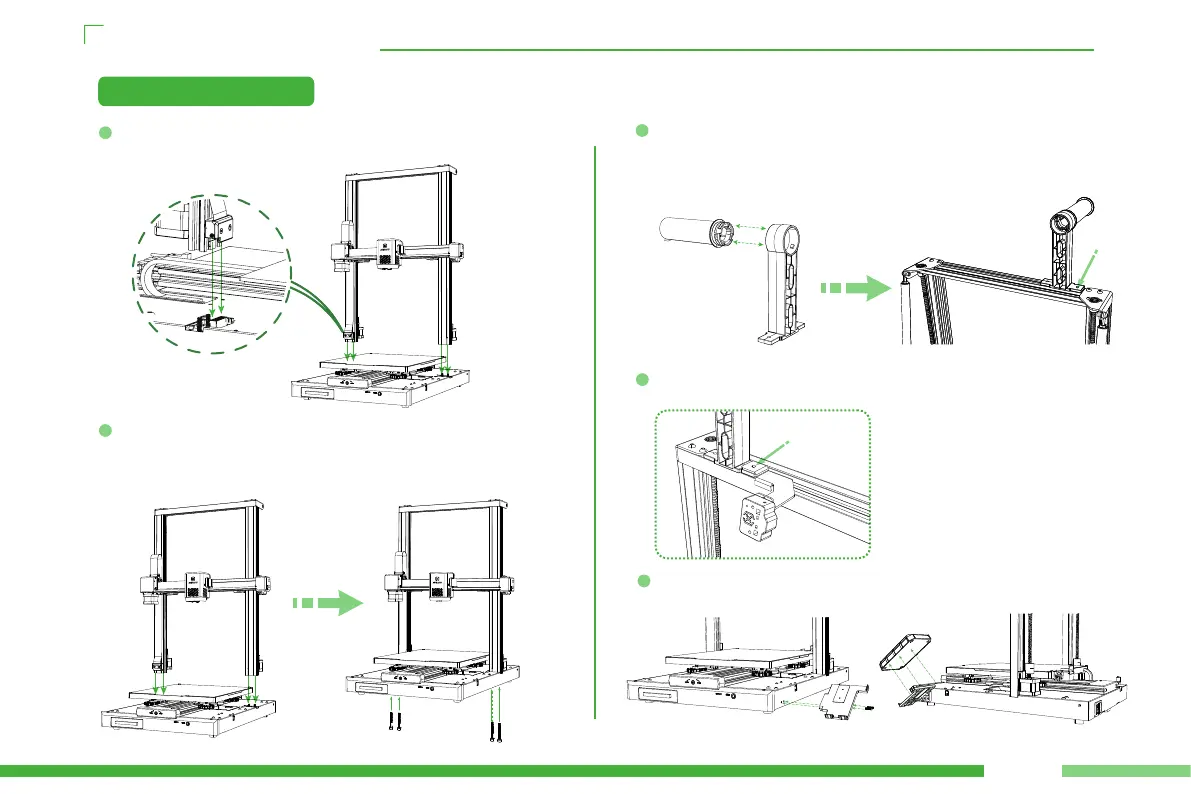
Make the gant align to the slot which on the base, and make sure
the cable pins are correctly aligned with the slots.
1
2
4
Use the 4 pieces M5 screws which pre-embedded in the prole to lock
the gant on the base and lock it, rstly make ensure the section
materials when screwing then tightly lock it, to prevent the appear-
ance of the external character.
Assemble the material rack as shown in the following gure, install the
roller onto the pre installed bearings on the sheet metal of the two
material racks, and then install it onto the top crossbeam. Use an M4 *
18 screw to pre lock the left side of the material rack.
3
Fix the broken material detection kit on the right side of the material
rack with an M4 * 18 screw.
5
Place the screen bracket on the side of the right prole and secure it with
two M3 * 12 screws.Then x the display screen on the screen bracket.



 To Next Page