2. Unboxing Operation
5
6
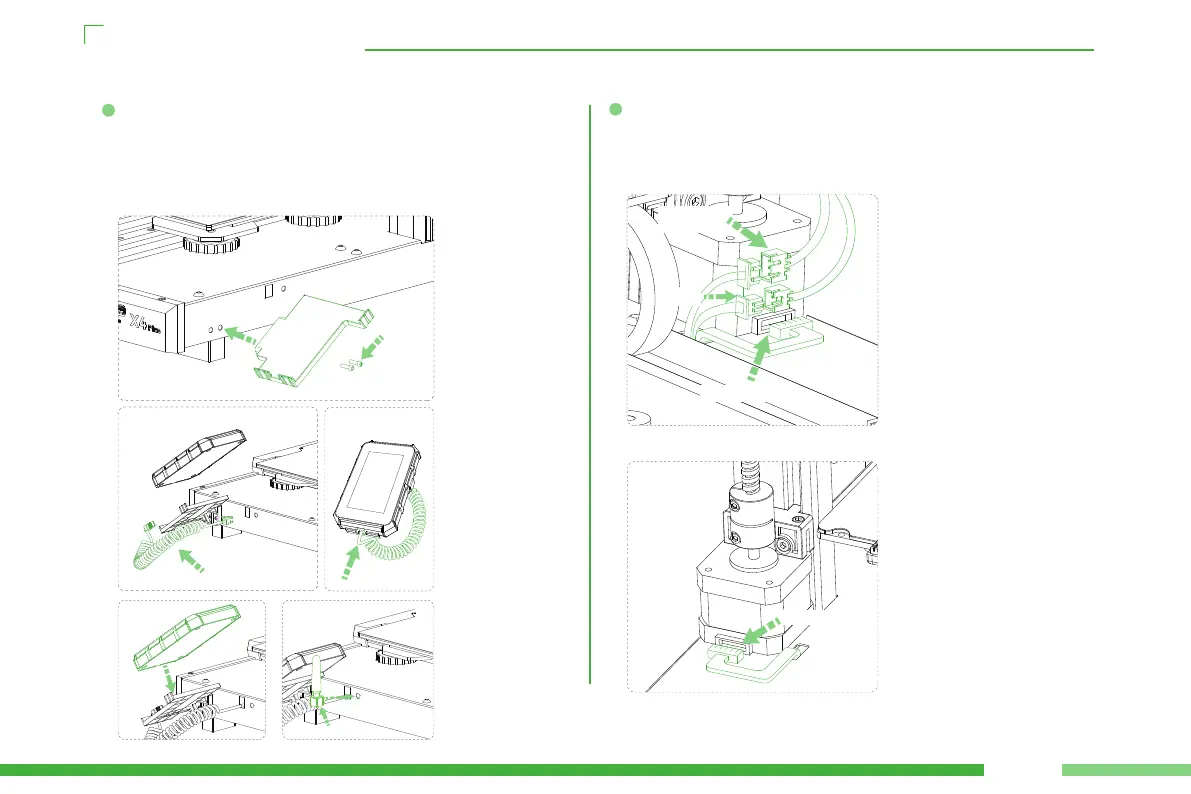
Fix the screen bracket on the right side of the machine with two M3*12
screws (screw bags④) (as shown in Figure a);
Connect both ends of the telephone line to the right side of the
machine and the screen po respectively (as shown in Figures b and c);
Place the display screen on the screen bracket. Connect the WIFI
antenna (as shown in Figures d and e).
Inse the 3pin line of broken material detection into the broken materi-
al detection po; Then inse the 2pin line of the top LED lamp into the
LED lamp po; Finally, inse the 4pin wire of the motor into the motor
pos on both sides of the Z axis.
05
M3*12
WIFI Antenna
Display cable
a
c
d e
b
Material break
detection
LED light
Z-axis machine
Z-axis machine
left Z-axis machine
Right Z-axis machine


 To Next Page