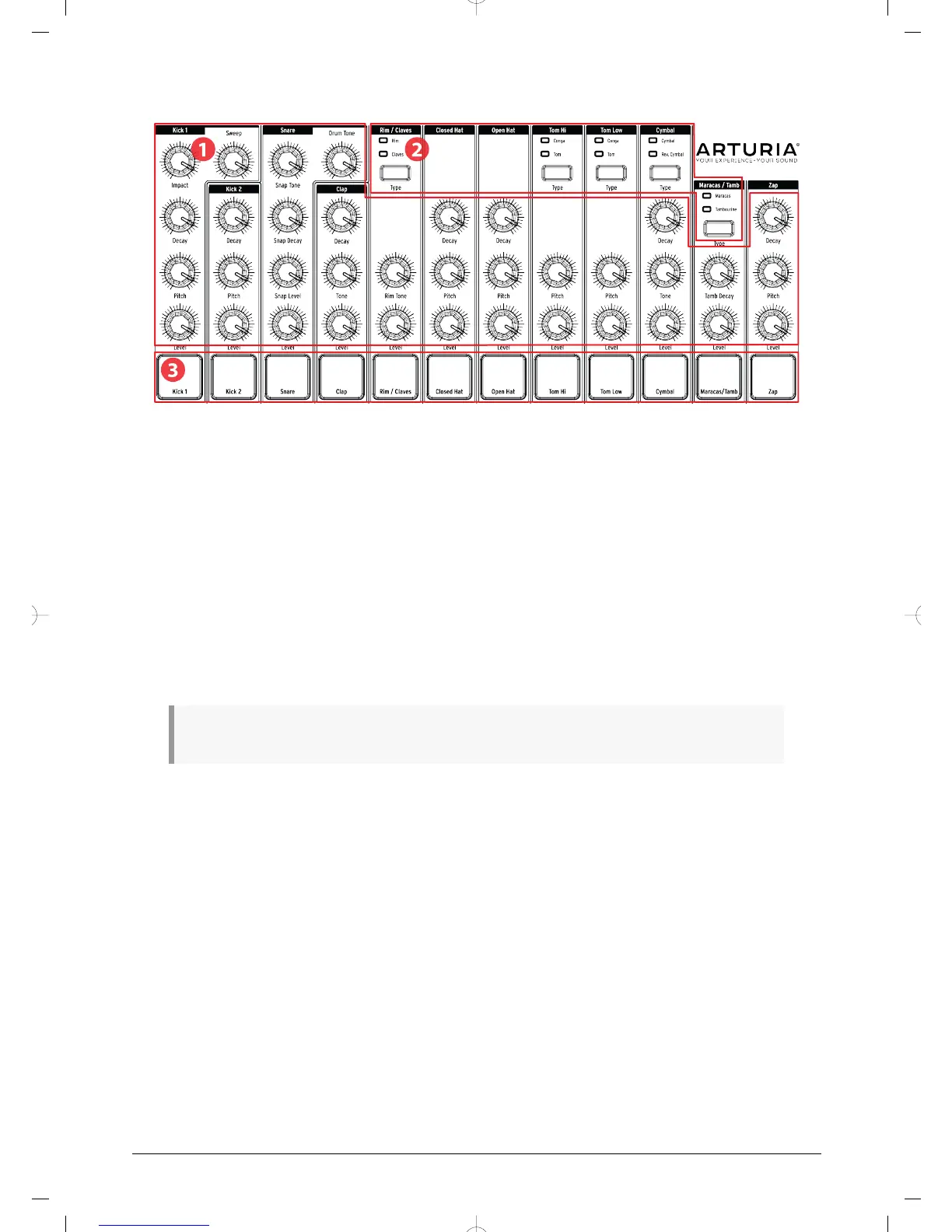
1.4. Instruments + Pads
1. Instrument controls
2. Instrument select buttons
3. Pads
1.4.1. Instrument controls
Each instrument has its own set of sound-sculpting parameters. The lines between the
instruments indicate which knobs belong to which instrument. Each instrument and its
knobs are called an instrument channel.
Some instrument channels are shared by two instruments. For example, the Maracas and
the Tambourine instruments are both found within the Maracas/Tamb channel. This is
known as a shared channel.
The movements of the instrument controls are not recorded as part of a pattern.
1.4.2. Instrument select buttons
These buttons toggle between the instruments in a shared channel. Each instrument in a
shared channel can be recorded independently into a pattern.
However, as a general rule the instruments share the instrument controls. For example, if
you change the tuning on the Tom Hi instrument the tuning will also change for the Hi Conga.
1.4.3. Pads
The 12 velocity-sensitive pads are used to input note data into a pattern. But they will always
trigger their instruments whether DrumBrute is running or not (except if Local Control option
is Off).
Remember that some pads provide access to more than one instrument, each of which
has its own track in the pattern sequencer. Counting all of the shared channels, there are
actually 17 separate instruments available from the 12 pads.
Arturia - User Manual DrumBrute - Overview 14














 To Next Page