4.2.5. Step Repeat
This feature lets you use the Roller/Looper strip to enter quick, glitchy events into your
patterns without having to switch to a different time division and tempo. It works by adding
triggers between existing steps.
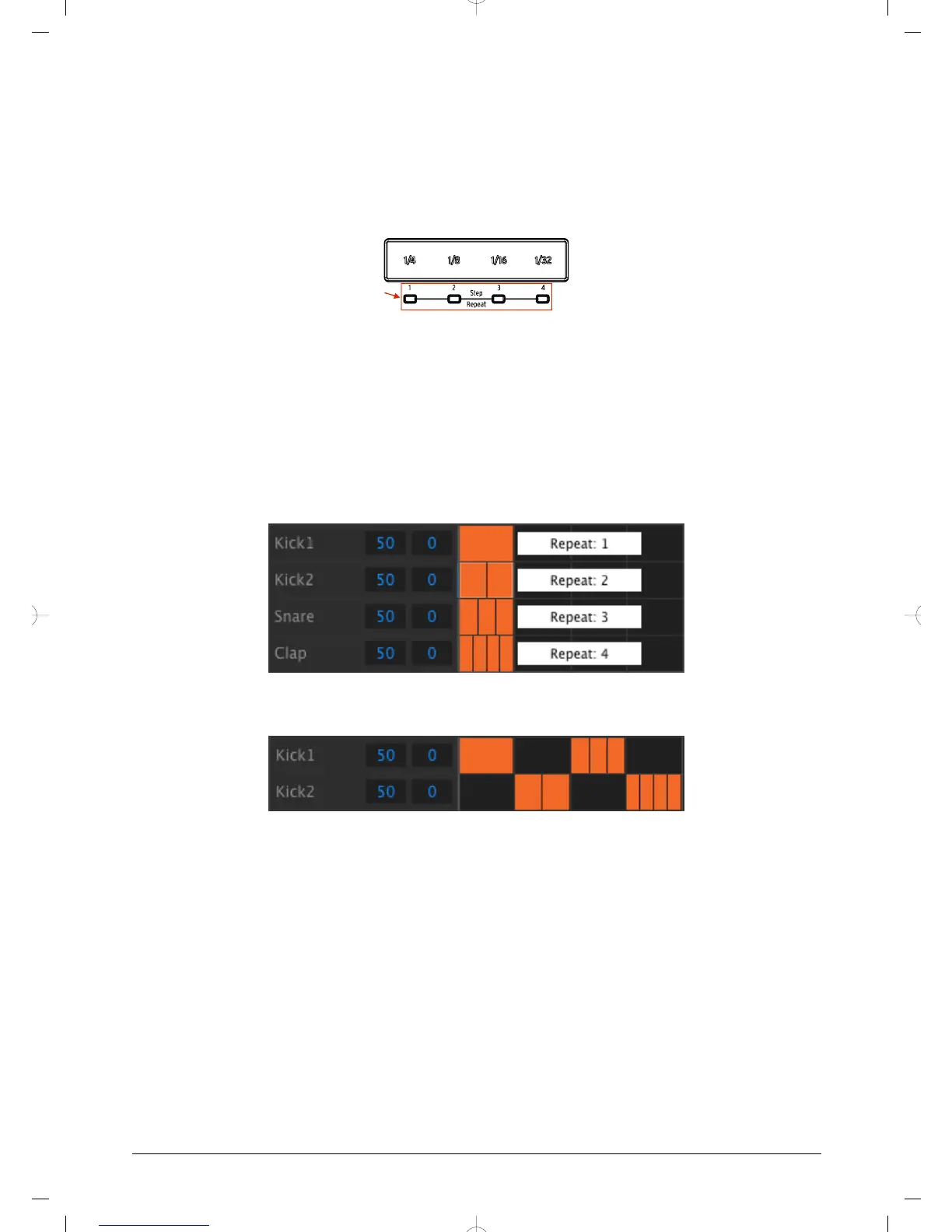
You may have noticed the LEDs and numbers outside of the area of the Roller/Looper strip
where you place your finger:
When you touch the strip one of the LEDs will light, and as you move your finger different
LEDs will activate. While recording or playing back a pattern the position of your finger will
trigger loops or drum rolls and divide the beat by “halves”: cut 1/4 in half and you get 1/8, cut
1/8 in half and you get 1/16, and so on.
But in Step mode there is a triplet trigger option, too! So you can subdivide the step in several
ways without having to change the time division for the entire pattern.
Here are a couple of screen shots from the MIDI Control Center that should help illustrate
the concept:
Step repeat events subdivide a step.
Step repeat used on alternating instruments
Here’s how to use it:
• Create a pattern with a simple Kick 1 pattern on each beat. Let it loop.
• Enter Step mode and select the kick drum (press Shift + Kick 1).
• Press and hold one of the lit Step buttons. A white LED will light beneath the
Roller/Looper strip at the default value of 1.
• While holding the Step button, slide your finger along the strip to select a value of
2. The next time the pattern reaches that point you will hear the kick drum play
twice in the space of a single step.
• Try the same process with Step Repeat values of 3 and 4 on other steps to hear
the difference between them.
You will quickly see how easy it is to create exciting and innovative patterns using the Step
Repeat feature!
37 Arturia - User Manual DrumBrute - Pattern Mode














 To Next Page