English
11
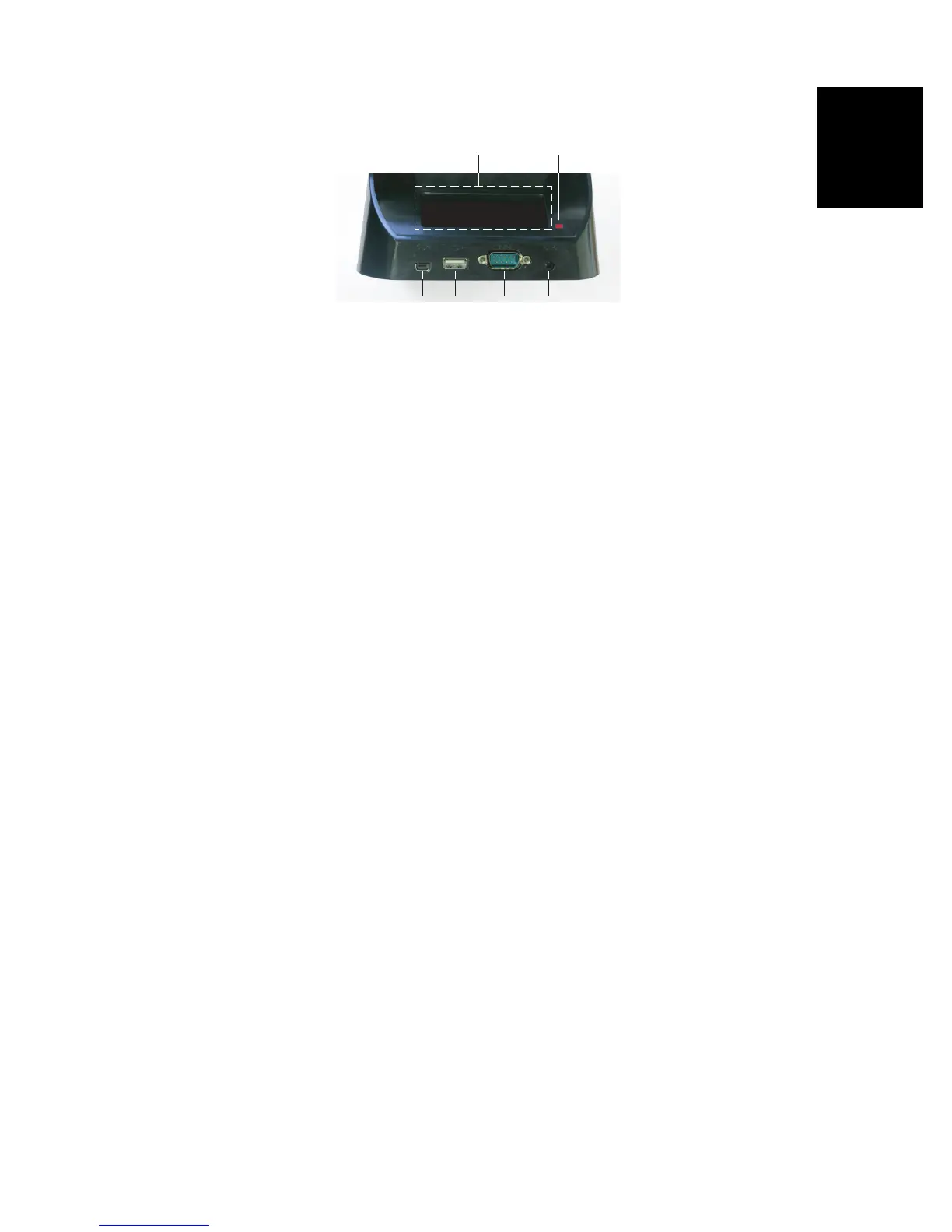
Rear View
The following elements can be found at the rear of the
docking station:
• Back slot [21] for charging a second battery
• Charging indicator [22] for back slot:
– Steady red: Battery charging in progress
– Steady green: Battery fully charged
– Off: No battery connected
– Blinking red, every second: Battery internal
temperature exceeds upper limit. Charging suspended
until temperature is back to normal. If persisting,
remove battery and resume charging later. If this
occurs several times with the same battery, consider
changing the battery. Dispose of the battery according
to regulations.
• Mini USB connector [23]: Use this connector to let the
receiver communicate with your computer through
Microsoft ActiveSync.
• USB connector [24], Use this connector to plug a USB
key.
• RS232 SubD 9-C connector [25]: Use this port to connect
the receiver to an external device.
• Power input [26]. Connect the output of the AC adapter to
this input.
[21] [22]
[23] [24] [25] [26]


 To Next Page