English
15
Inserting a SIM Card
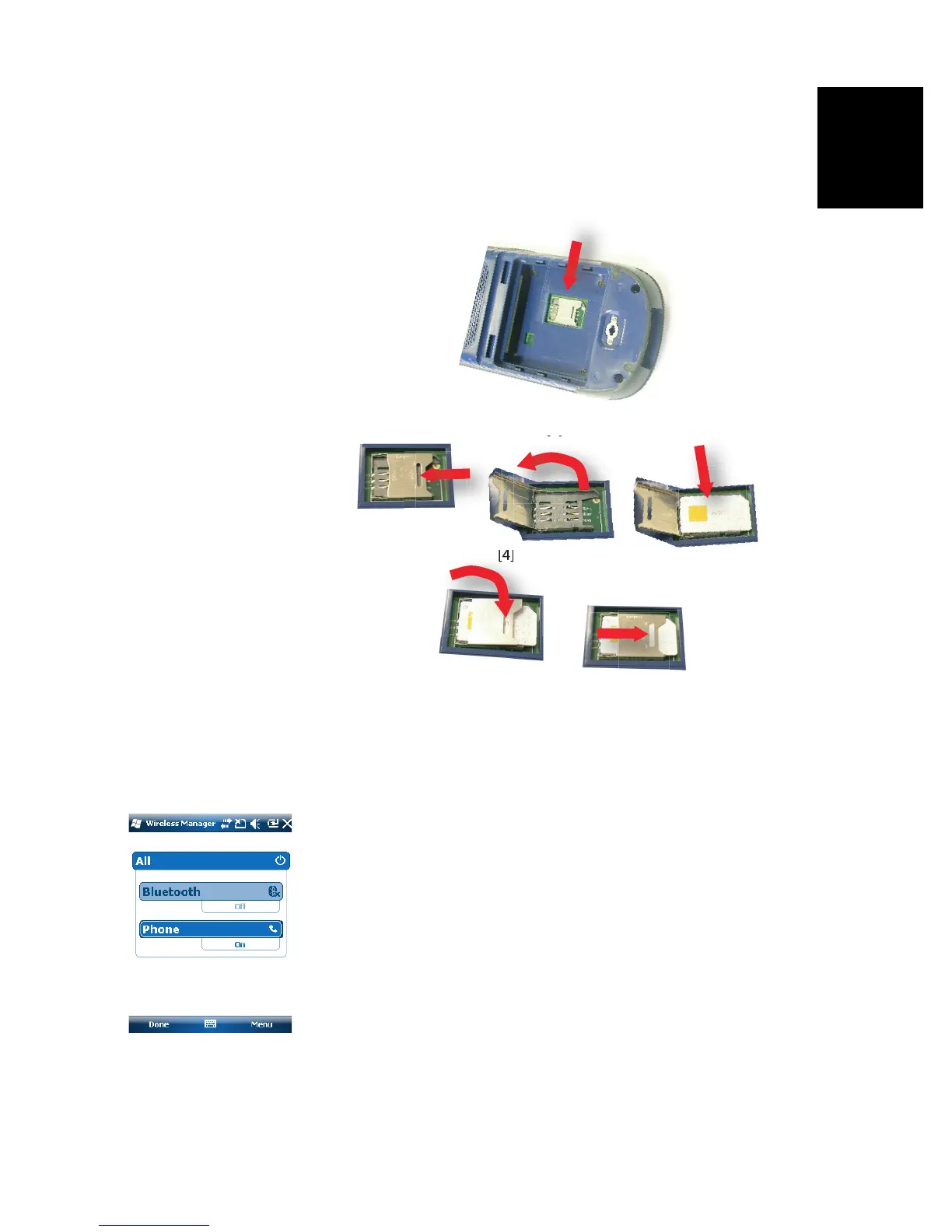
Remove the battery door and the battery to access the SIM
card holder. Refer to the figure below to insert the card. The
holder should be opened before you can place the SIM card.
Make sure you properly lock the SIM card holder before
putting back the battery and locking the battery door.
Enabling the Phone Function
•Tap Start, Settings, Connections, Wireless Manager. This
opens the Wireless Manager window.
• Tap anywhere on the blue Phone bar. This turns on the
Phone function. The color of the Phone bar turns dark
blue with a phone icon showing up on the right.
•Tap Done (at the bottom of the screen) to close the window
and return to the Start screen.
Setting the GPRS Connection
•Tap Start, Settings, Connections and Connections.
• Tap on the hyperlink: Add a new modem connection.
• Name the new modem connection you are creating.
• Select “Cellular Line (GPRS)” from the Select a modem
field.


 To Next Page