English
18
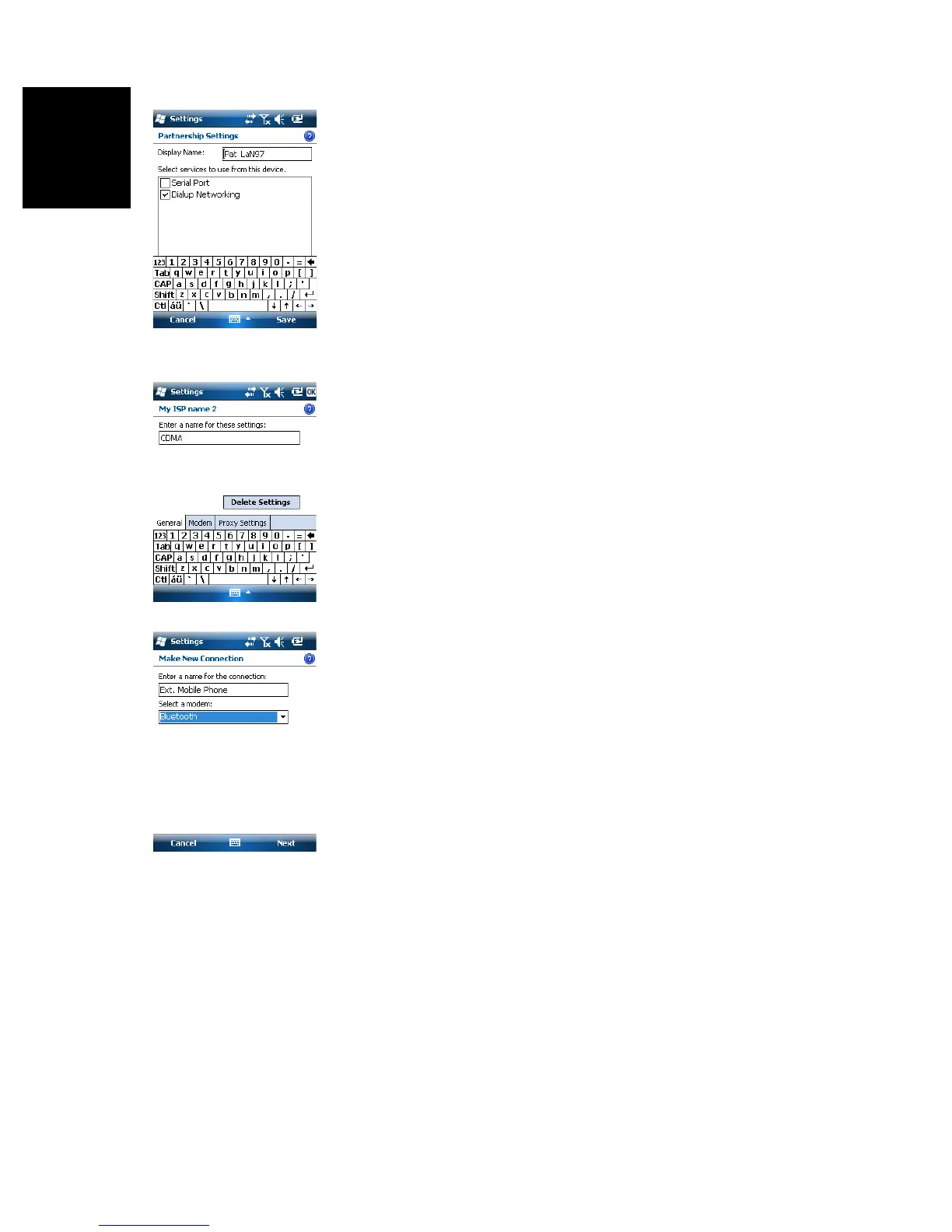
• When the Bluetooth connection is established, the
receiver screen lists the Bluetooth services available from
your mobile phone. Make sure the Dialup Networking option
is enabled.
•Tap Save to complete the connection procedure. This
takes you back to the Bluetooth Settings window on which
you can now see your phone as a properly connected unit.
•Tap OK to close this window.
•Tap Done (at the bottom of the screen) to close the window
and return to the Start screen.
Setting Up the Internet Connection
•Tap Start, Settings, Connections, Connections
• Tap on the Advanced tab
• Tap on the Select Networks button, then on the New button
• Enter a name identifying the network connection (e.g.
“CDMA”)
• Tap on the Modem tab, then on the New button
• Enter a name identifying the connection to this network
(e.g. “Ext. Mobile Phone”)
• In the field underneath, select “Bluetooth” as the modem
used.
•Tap Next
To be complete d..


 To Next Page